
Highlight
iOS 18 在 WidgetKit 框架中新增了 Control 控件类型,支持 Button 和 Toggle 两种形态,可出现在控制中心、锁屏和 iPhone 15 Pro 的 Action 按钮三个系统空间中。
核心内容
iOS 14 引入的 WidgetKit 让 App 能够展示丰富信息,比如天气或日历事件。iOS 18 扩展了这一框架,新增了 Control 控件类型。Control 专注于提供快速操作入口,比如开关手电筒或深链到时钟 App。
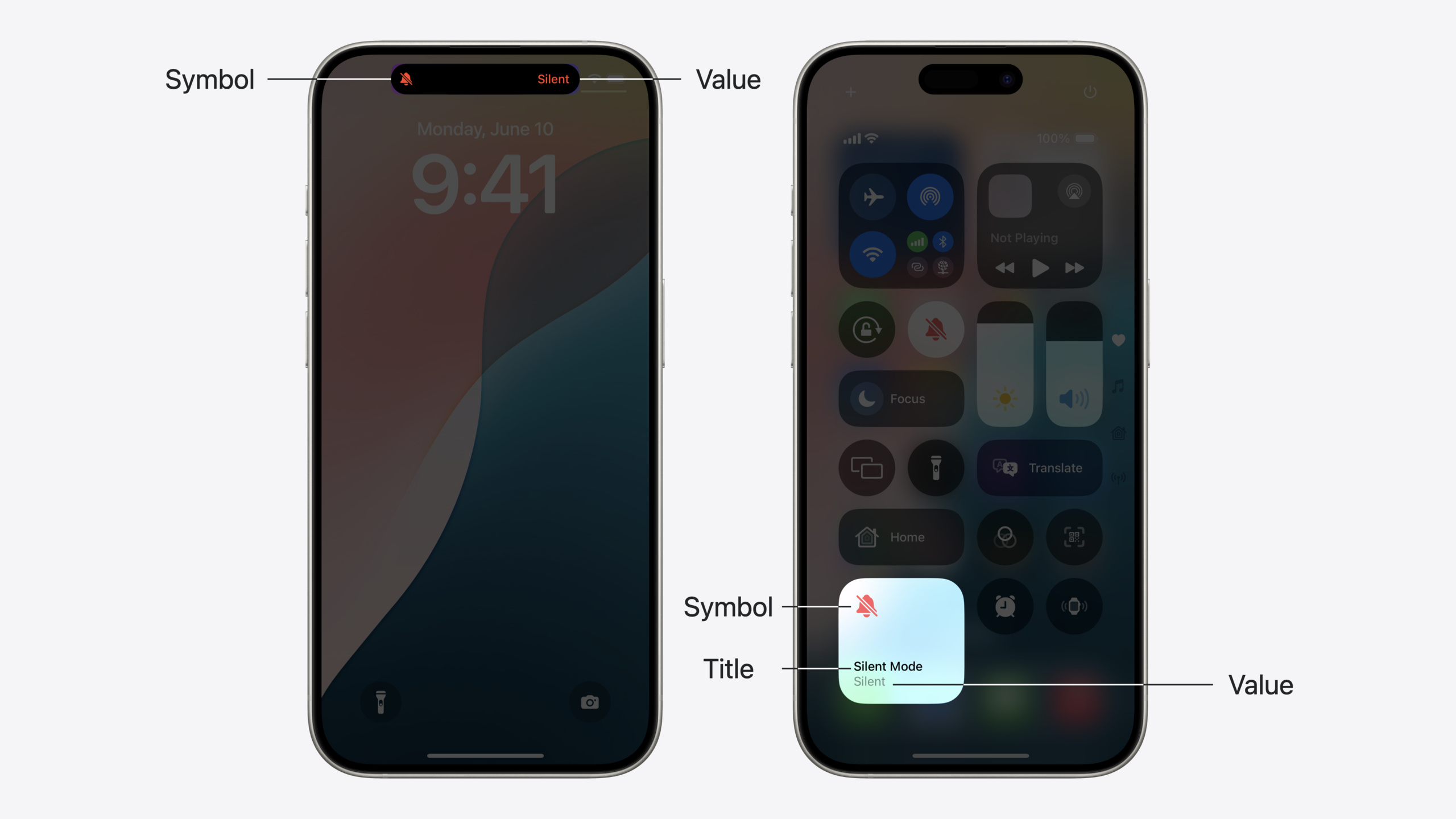
Control 分为两种类型:Button 执行一次性操作(可包括启动 App),Toggle 切换布尔状态(比如开关某项功能)。与 interactive widget 类似,Control 也使用 App Intent 来执行操作。你的 App 提供符号图标、标题、tint 颜色等视觉信息,系统根据放置位置决定最终显示样式。
演讲者 Cliff 以一个”生产力计时器”为例展示 Control 的开发流程。这个计时器可以在锁屏上启动、在控制中心停止、通过 Action 按钮切换运行状态——同一套代码,三个入口。Control 的状态管理机制:系统会在 App Intent 执行完毕后自动触发 reload,App 也可以通过 ControlCenter API 主动请求刷新,还支持通过 push notification 触发 reload 来实现跨设备同步。
详细内容
基础 Control 构建
构建 Control 的第一步是将其添加到现有的 Widget Bundle 中(03:13):
@main
struct ProductivityExtensionBundle: WidgetBundle {

    var body: some Widget {
        ChecklistWidget()
        TaskCounterWidget()
        TimerToggle()
    }

}
关键点:
TimerToggle()是新增的 Control 条目,与现有 Widget 共享同一个 Widget Bundle- WidgetKit 的架构让 Control 可以和 Widget 共存于同一扩展中
接下来定义 Control 本体(03:29):
struct TimerToggle: ControlWidget {
    var body: some ControlWidgetConfiguration {
        StaticControlConfiguration(
            kind: "com.apple.Productivity.TimerToggle"
        ) {
            ControlWidgetToggle(
                "Work Timer",
                isOn: TimerManager.shared.isRunning,
                action: ToggleTimerIntent()
            ) { _ in
                Image(systemName:
                      "hourglass.bottomhalf.filled")
            }
        }
    }
}
关键点:
ControlWidget是 Control 遵循的协议StaticControlConfiguration用于不可配置的 Controlkind参数是 Control 的唯一标识符,反向 DNS 风格ControlWidgetToggle定义这是一个 Toggle 类型的控件isOn绑定到 TimerManager 的运行状态ToggleTimerIntent()是点击时执行的 App Intent- 闭包返回的
Image定义了 Control 显示的符号
状态化视觉设计
Control 可以根据状态显示不同的符号(04:41):
struct TimerToggle: ControlWidget {
    var body: some ControlWidgetConfiguration {
        StaticControlConfiguration(
            kind: "com.apple.Productivity.TimerToggle"
        ) {
            ControlWidgetToggle(
                "Work Timer",
                isOn: TimerManager.shared.isRunning,
                action: ToggleTimerIntent()
            ) { isOn in
                Image(systemName: isOn
                      ? "hourglass"
                      : "hourglass.bottomhalf.filled")
            }
        }
    }
}
关键点:
- 闭包参数
isOn让你可以根据状态返回不同的视觉内容 - 运行时显示流动的沙漏符号,停止时显示半填充沙漏
- 系统会在状态变化时自动重新计算闭包返回值
进一步自定义 value text 和 tint 颜色(05:21):
struct TimerToggle: ControlWidget {
    var body: some ControlWidgetConfiguration {
        StaticControlConfiguration(
            kind: "com.apple.Productivity.TimerToggle"
        ) {
            ControlWidgetToggle(
                "Work Timer",
                isOn: TimerManager.shared.isRunning,
                action: ToggleTimerIntent()
            ) { isOn in
                Label(isOn ? "Running" : "Stopped",
                      systemImage: isOn
                      ? "hourglass"
                      : "hourglass.bottomhalf.filled")
            }
            .tint(.purple)
        }
    }
}
关键点:
Label替代Image可以同时显示文字和符号isOn ? "Running" : "Stopped"自定义了状态文本,替代默认的 “on/off”.tint(.purple)设置开启状态下的颜色,替代默认的 systemBlue- value text 在锁屏和小尺寸控制中心中不可见,只有符号显示
App Intent 实现
Control 的操作通过 App Intent 执行(08:14):
struct ToggleTimerIntent: SetValueIntent, LiveActivityIntent {
    static let title: LocalizedStringResource = "Productivity Timer"

    @Parameter(title: "Running")
    var value: Bool  // The timer's running state

    func perform() throws -> some IntentResult {
        TimerManager.shared.setTimerRunning(value)
        return .result()
    }
}
关键点:
SetValueIntent协议表示这个 Intent 用于设置某个值LiveActivityIntent协议表示它会修改 Live Activity@Parameter标注的value会由系统根据当前状态自动填充perform()方法在返回前必须完成所有状态更新- 系统会在
perform()返回后自动 reload Control
主动刷新 Control
当 App 内部状态变化时,可以主动请求刷新 Control(08:54):
func timerManager(_ manager: TimerManager,
                  timerDidChange timer: ProductivityTimer) {
    ControlCenter.shared.reloadControls(
        ofKind: "com.apple.Productivity.TimerToggle"
    )
}
关键点:
ControlCenter.shared.reloadControls(ofKind:)请求系统刷新指定 Control- 适用于 App 内状态变化需要同步到 Control 的场景
- 开发时可开启 WidgetKit Developer Mode 移除系统刷新策略
异步状态获取
当状态需要从服务器或数据库异步获取时,使用 ControlValueProvider(10:03):
struct TimerValueProvider: ControlValueProvider {

    func currentValue() async throws -> Bool {
        try await TimerManager.shared.fetchRunningState()
    }

    let previewValue: Bool = false
}
关键点:
currentValue()是异步函数,可从数据库或服务器获取状态- 可以抛出错误来表示状态暂时无法计算
previewValue用于控件预览场景(如图库、锁屏自定义),应快速返回且对应关闭状态
使用 ValueProvider 的 Control 初始化(11:00):
struct TimerToggle: ControlWidget {
    var body: some ControlWidgetConfiguration {
        StaticControlConfiguration(
            kind: "com.apple.Productivity.TimerToggle",
            provider: TimerValueProvider()
        ) { isRunning in
            ControlWidgetToggle(
                "Work Timer",
                isOn: isRunning,
                action: ToggleTimerIntent()
            ) { isOn in
                Label(isOn ? "Running" : "Stopped",
                      systemImage: isOn
                      ? "hourglass"
                      : "hourglass.bottomhalf.filled")
            }
            .tint(.purple)
        }
    }
}
关键点:
provider参数传入 ValueProvider 实例- 异步获取的值通过闭包参数
isRunning传递 - 系统会先执行 ValueProvider,再用返回值生成 Control 内容
可配置 Control
让 Control 支持用户配置,使用 AppIntentControlValueProvider(13:06):
struct ConfigurableTimerValueProvider: AppIntentControlValueProvider {
    func currentValue(configuration: SelectTimerIntent) async throws -> TimerState {
        let timer = configuration.timer
        let isRunning = try await TimerManager.shared.fetchTimerRunning(timer: timer)
        return TimerState(timer: timer, isRunning: isRunning)
    }

    func previewValue(configuration: SelectTimerIntent) -> TimerState {
        return TimerState(timer: configuration.timer, isRunning: false)
    }
}
关键点:
AppIntentControlValueProvider让值依赖于 Intent 配置SelectTimerIntent允许用户选择要控制的计时器- 返回的
TimerState是自定义结构体,包含计时器和其运行状态
对应的 Control 配置(13:40):
struct TimerToggle: ControlWidget {
    var body: some ControlWidgetConfiguration {
        AppIntentControlConfiguration(
            kind: "com.apple.Productivity.TimerToggle",
            provider: ConfigurableTimerValueProvider()
        ) { timerState in
            ControlWidgetToggle(
                timerState.timer.name,
                isOn: timerState.isRunning,
                action: ToggleTimerIntent(timer: timerState.timer)
            ) { isOn in
                Label(isOn ? "Running" : "Stopped",
                      systemImage: isOn
                      ? "hourglass"
                      : "hourglass.bottomhalf.filled")
            }
            .tint(.purple)
        }
    }
}
关键点:
AppIntentControlConfiguration用于可配置的 ControltimerState是自定义结构体,包含更丰富的状态信息- Control 标题、操作目标都根据配置动态变化
强制用户配置(14:26):
struct SomeControl: ControlWidget {
    var body: some ControlWidgetConfiguration {
        AppIntentControlConfiguration(
            // ...
        )
        .promptsForUserConfiguration()
    }
}
关键点:
promptsForUserConfiguration()让系统在添加 Control 时自动弹出配置界面- 适用于需要配置才能正常工作的 Control
界面微调
自定义 Action Button 的操作提示(15:42):
struct TimerToggle: ControlWidget {
    var body: some ControlWidgetConfiguration {
        AppIntentControlConfiguration(
            kind: "com.apple.Productivity.TimerToggle",
            provider: ConfigurableTimerValueProvider()
        ) { timerState in
            ControlWidgetToggle(
                timerState.timer.name,
                isOn: timerState.isRunning,
                action: ToggleTimerIntent(timer: timerState.timer)
            ) { isOn in
                Label(isOn ? "Running" : "Stopped",
                      systemImage: isOn
                      ? "hourglass"
                      : "hourglass.bottomhalf.filled")
                .controlWidgetActionHint(isOn ?
                                         "Start" : "Stop")
            }
            .tint(.purple)
        }
    }
}
关键点:
controlWidgetActionHint自定义 Action Button 的提示文本- 提示应以动词开头,系统会自动添加 “Hold to” 前缀
isOn ? "Start" : "Stop"让提示变为 “Hold to Start” 和 “Hold to Stop”
设置显示名称和描述(16:56):
struct TimerToggle: ControlWidget {
    var body: some ControlWidgetConfiguration {
        AppIntentControlConfiguration(
            kind: "com.apple.Productivity.TimerToggle",
            provider: ConfigurableTimerValueProvider()
        ) { timerState in
            ControlWidgetToggle(
                timerState.timer.name,
                isOn: timerState.isRunning,
                action: ToggleTimerIntent(timer: timerState.timer)
            ) { isOn in
                Label(isOn ? "Running" : "Stopped",
                      systemImage: isOn
                      ? "hourglass"
                      : "hourglass.bottomhalf.filled")
                .controlWidgetActionHint(isOn ?
                                         "Start" : "Stop")
            }
            .tint(.purple)
        }
        .displayName("Productivity Timer")
        .description("Start and stop a productivity timer.")
    }
}
关键点:
displayName设置 Control 的显示名称,替代默认的 App 名称description在配置界面显示,帮助用户理解 Control 的功能- 每个 Control 都应设置具体的 displayName
核心启发
-
为高频操作添加 Control 入口:找出用户最常执行的一两个操作(比如开始专注、切换白名单、快速记录),为它们创建 Toggle 或 Button Control。不要试图把整个 App 功能塞进去,Control 应该是单一功能的快速入口。
-
从不可配置的 Toggle 开始:先用
StaticControlConfiguration构建一个最简单的 Toggle Control,验证核心功能。等基础体验跑通后,再考虑AppIntentControlConfiguration支持用户配置多个实例。这样能避免一次性引入太多复杂度。 -
设计适合小尺寸的符号:Control 在锁屏上只显示一个圆形图标,在控制中心小尺寸下也只有符号空间。确保你的 SF Symbol 在极小尺寸下仍能清晰辨识,不要依赖文字来传达信息。tint 颜色在深浅模式下都要有足够对比度。
-
善用 ValueProvider 支持异步状态:如果你的状态需要从网络或数据库获取,使用
ControlValueProvider而不是在body中同步获取。previewValue 应该是一个固定的、快速返回的值,通常对应 Control 的关闭状态。 -
主动刷新保持状态同步:当用户在 App 内部修改了状态时,使用
ControlCenter.shared.reloadControls(ofKind:)主动刷新 Control。对于跨设备场景,可以配置 push notification 在收到状态变更推送时自动 reload。
关联 Session
- Bring expression to your app with Genmoji — discover how to bring genmoji to life in your app. we
- Catch up on accessibility in SwiftUI — swiftui makes it easy to build amazing experiences that are accessible to everyo
- Demystify SwiftUI containers — learn about the capabilities of swiftui container views and build a mental model
- Evolve your document launch experience — make your document-based app stand out, and bring its unique identity into focus
评论
GitHub Issues · utterances