
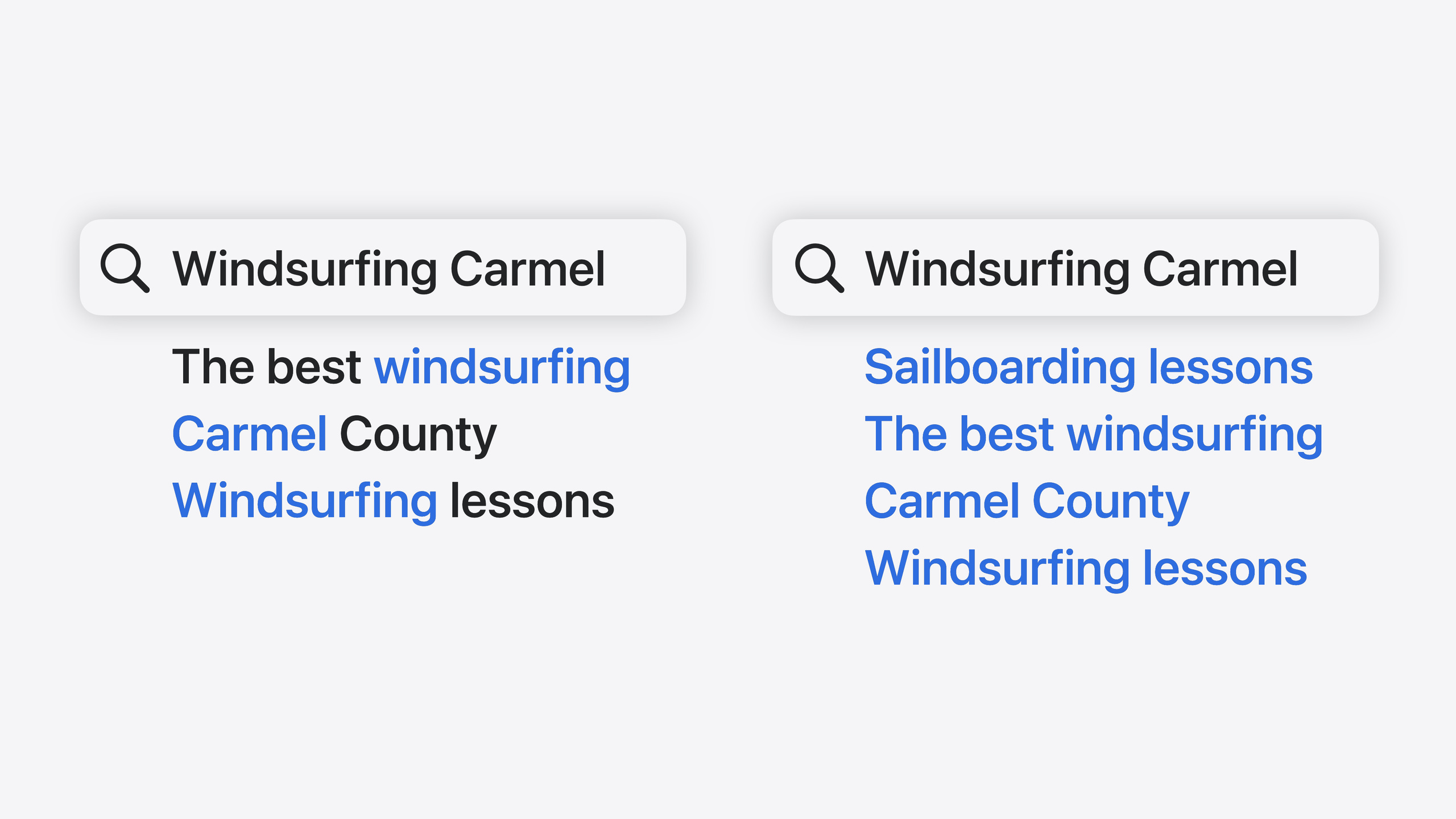
Highlight
iOS 18 的 Core Spotlight 原生支持语义搜索,用户用近义词搜索也能命中目标,无需开发者自建搜索模型。
核心内容
Core Spotlight 一直是 iOS 上让 app 内容被系统 Spotlight 索引的标准方式。但它有一个短板:搜索是精确匹配的。用户搜”旅行”找不到标题写”出游”的笔记,搜”图片”匹配不到”照片”。在 Spotlight 全局搜索里苹果做了不少优化,但 app 内搜索场景下,精确匹配经常让用户抓狂。很多 app 为了解决这个问题,不得不自己做模糊搜索逻辑,或者引入第三方搜索库,开发成本不低。
iOS 18 的 Core Spotlight 原生支持了语义搜索(semantic search)。用户输入的搜索词会被 Spotlight 的 query understanding 模型处理,“意思相近”的搜索词也能命中目标。语义搜索默认就是开启的,不需要写额外的配置代码,不需要自己训练模型,不需要集成 Natural Language 框架,不需要搭后端。你只需要把内容正确地 donate 给 Spotlight,app 内的搜索体验就能直接获得质的飞跃。
Session 还介绍了配套的基础设施改进:batch indexing 配合 client state 让大批量数据的索引更高效,新的 CoreSpotlight Delegate Extension 让 Spotlight 能在设备空闲时触发 re-index,新的 ranked results API 让你能像 Spotlight 一样展示 Top Hits,engagement signal 让搜索排序能随用户行为持续优化。这一切都跑在设备本地,索引数据从不离开设备,其他 app 也无法看到你的索引内容。
详细内容
创建可搜索的 Item
第一步是向 Spotlight donate 可搜索内容。创建 CSSearchableItem 时需要提供唯一标识符、可选的 domain 标识符和属性集(2:14):
// Creating searchable items for donation

let item = CSSearchableItem(uniqueIdentifier: uniqueIdentifier, domainIdentifier: domainIdentifier, attributeSet: attributeSet)uniqueIdentifier应存储在 app 的持久化方案中,以便后续能恢复完整数据domainIdentifier是可选的,用于分组管理可搜索项
接下来创建 CSSearchableAttributeSet,务必设置有效的 contentType(2:28):
// Creating searchable content for donation

let attributeSet = CSSearchableItemAttributeSet(contentType: UTType.text)
attributeSet.contentType = UTType.text.identifiercontentType决定了语义索引如何处理这个 item- 文本类 item 要设置
title和textContent,这两个属性会被语义索引处理 - 图片/视频类 item 要设置
contentURL指向资源文件路径 - 附件或 web 内容应作为独立 item donate,用
relatedUniqueIdentifier维持与源 item 的关系
Batch Indexing 与 Client State
对于大量数据的索引,iOS 18 提供了 batch indexing 配合 client state 的方案(3:31):
// Batch indexing with client state

let index = CSSearchableIndex(name: "SpotlightSearchSample")
index.fetchLastClientState { state, error in
    if state == nil {
        index.beginBatch()
        index.indexSearchableItems(items)
        index.endIndexBatch(expectedClientState: state, newClientState: newState) { error in
        }
    }
}- 创建命名的
CSSearchableIndex,用fetchLastClientState获取上次索引的状态 beginBatch()和endIndexBatch()包裹索引操作,newClientState记录本次索引进度- client state 能防止重复捐赠,避免性能问题
- 配合新的
isUpdate标志,确保只捐赠必要的更新(3:56):
// Make it an update to avoid overwriting existing attributes

item.isUpdate = true
CoreSpotlight Delegate Extension
当 Spotlight 需要迁移索引或从数据损坏中恢复时,会请求 app 重新索引。iOS 18 提供了新的 CoreSpotlight Delegate Extension 模板,让 Spotlight 能在设备空闲时(比如设备休眠或闲置时)调度 re-index 请求,逐步完成数据迁移,对 app 现有搜索功能影响最小。
设置方式:在 Xcode 中 File > New > Target,搜索 “CoreSpotlight Delegate extension” 模板即可创建。调试时可以用 mdutil 命令行工具模拟 re-index 请求到你的 bundle ID。
查询配置与语义搜索
语义搜索默认开启。用 CSUserQueryContext 配置查询(7:19):
// Configure a query

let queryContext = CSUserQueryContext()
queryContext.fetchAttributes = ["title", "contentDescription"]fetchAttributes只设置 UI 展示需要的属性,减少不必要的数据读取
开启 ranked results,展示 Top Hits(7:33):
// Ranked results

queryContext.enableRankedResults = true
queryContext.maxRankedResultCount = 2- ranked results 使用和 Spotlight 相同的机器学习模型排序
- 结果返回后需要用
compareByRank排序器排序
配置搜索建议(7:47):
// Suggestions

queryContext.maxSuggestionCount = 4
用 filter queries 按内容类型过滤(7:55):
// Filter queries

queryContext.filterQueries = ["contentTypeTree=\"public.image\""]- filter queries 使用 metadata 语法,可以限定结果只包含特定类型
- 适合 tab 切换场景(如只看图片)或面包屑导航
执行查询与处理结果
创建 CSUserQuery 执行搜索(8:23):
// Query for searchable items and suggestions

let query = CSUserQuery(userQueryString: "windsurfing carmel", userQueryContext: queryContext)
for try await element in query.responses {
    switch(element) {
        case .item(let item):
            self.items.append(item)
            break
        case .suggestion(let suggestion):
            self.suggestions.append(suggestion)
            break
    }
}CSUserQuery接受用户输入的搜索字符串和 query context- 结果通过 async responses 返回,item 和 suggestion 分开处理
- suggestion 提供
localizedAttributedSuggestion用于展示 - 用户点击 suggestion 时,用 suggestion 的文本替换搜索栏内容,触发新的搜索
语义搜索需要下载 ML 模型到设备,模型在 app 进程内运行。模型可能随时加载或卸载以节省内存。因此每次搜索界面出现前都应调用 CSUserQuery.prepare 确保资源就绪(8:56):
// Preparing for queries

CSUserQuery.prepare
CSUserQuery.prepareWithProtectionClasses
Engagement Signal 提升排序
用户浏览内容或点击搜索结果时,app 可以向 Spotlight 发送 engagement signal 来优化未来的搜索排序(9:50):
// Set the lastUsedDate when the user interacts with the item

item.attributeSet.lastUsedDate = Date.now
item.isUpdate = true当用户与搜索结果或建议交互时,标记交互(10:00):
// Interactions with items and suggestions from a query

query.userEngaged(item, visibleItems: visibleItems, interaction: CSUserQuery.UserInteractionKind.select)

query.userEngaged(suggestion, visibleSuggestions: visibleSuggestions, interaction: CSUserQuery.UserInteractionKind.select)lastUsedDate是 freshness 信号,表示用户最近使用过这个 itemuserEngaged是 engagement 信号,包含用户点击了哪个结果、当时可见的其他结果列表- 两种信号共同帮助 Spotlight 的排序模型学习用户偏好
核心启发
-
做什么:给现有 Core Spotlight 集成加上 ranked results 和搜索建议。为什么值得做:ranked results 使用和 Spotlight 相同的 ML 排序模型,能直接展示 Top Hits 区域,搜索体验从”列表罗列”变成”智能推荐”。怎么开始:在现有
CSUserQueryContext上设置enableRankedResults = true和maxRankedResultCount,返回结果后用compareByRank排序器排序即可。 -
做什么:用 batch indexing + client state 替代逐条索引。为什么值得做:client state 记录了上次索引进度,app 重启或 Spotlight 要求 re-index 时可以断点续传,避免全量重新捐赠导致的性能问题。怎么开始:创建命名的
CSSearchableIndex,用fetchLastClientState检查状态,在beginBatch/endIndexBatch之间批量索引,把游标存入newClientState。 -
做什么:在搜索结果被点击时发送 engagement signal。为什么值得做:Spotlight 的排序模型会根据用户行为持续学习,经常被点击的 item 在未来搜索中排名更高,搜索体验会随使用时间自动优化。怎么开始:用户浏览内容时设置
lastUsedDate并以isUpdate = true回写索引;用户点击搜索结果时调用query.userEngaged(),传入被点击的 item 和当时可见的其他结果列表。 -
做什么:添加 CoreSpotlight Delegate Extension 支持索引恢复。为什么值得做:Spotlight 索引在系统升级或数据损坏时可能需要重建,没有 delegate extension 的 app 在这些场景下搜索会失效,用户只能手动重启 app 触发重新索引。怎么开始:在 Xcode 中用新的 CoreSpotlight Delegate extension 模板创建 target,实现 reindexAllItems 和 reindexItemsWithIdentifiers 方法,用
mdutil工具调试。
关联 Session
- Bring your app to Siri — 用 App Intents 让 app 功能暴露给 Siri 和 Apple Intelligence,包括 Spotlight 索引集成
- What’s new in App Intents — App Intents 框架新特性,包含 Transferable API、文件表示和 Spotlight 索引
- Bring your app’s core features to users with App Intents — App Intents 框架核心概念:intents、entities 和 queries
- Design App Intents for system experiences — 如何设计 App Intents 以支持 Spotlight、Siri、Controls 等系统体验
评论
GitHub Issues · utterances