
Highlight
visionOS 上的桌游开发,手势识别、碰撞检测、多人网络同步这些工程问题每个都能吃掉几周。TabletopKit 把它们全部内建——你描述桌面形状、定义座位、摆放棋子,框架自动处理 pinch-drag 手势、碰撞检测、SharePlay 多人同步。
核心内容
在 Vision Pro 上做桌游,开发者要面对一堆跟”好玩”无关的工程问题:桌面的布局坐标系怎么定义、pinch-drag 手势怎么跟棋子绑定、多人的时候怎么同步游戏状态、骰子扔出去的物理模拟怎么跑。这些问题每一个都能吃掉几周开发时间,而且每款桌游都要重复解决。
TabletopKit 就是 Apple 给出的答案。你只需要做三件事:描述桌子、摆放 Equipment(棋子/卡牌/骰子)、编写交互回调。框架替你处理手势识别、碰撞检测和多人网络同步。它和 RealityKit 深度集成——3D 模型、阴影、光照、空间音频全部走 RealityKit 的渲染管线;多人联网基于 GroupActivities(SharePlay 那套框架),添加一个 TabletopGame activity 类型就能把单机游戏变成多人游戏,不需要自己写网络代码。
Session 通过一个完整示例展示了从零搭建桌游的全流程:定义桌子和座位、创建 Equipment、编写交互逻辑、添加视觉效果和音效、接入多人联网。
详细内容
1. 定义桌子和座位
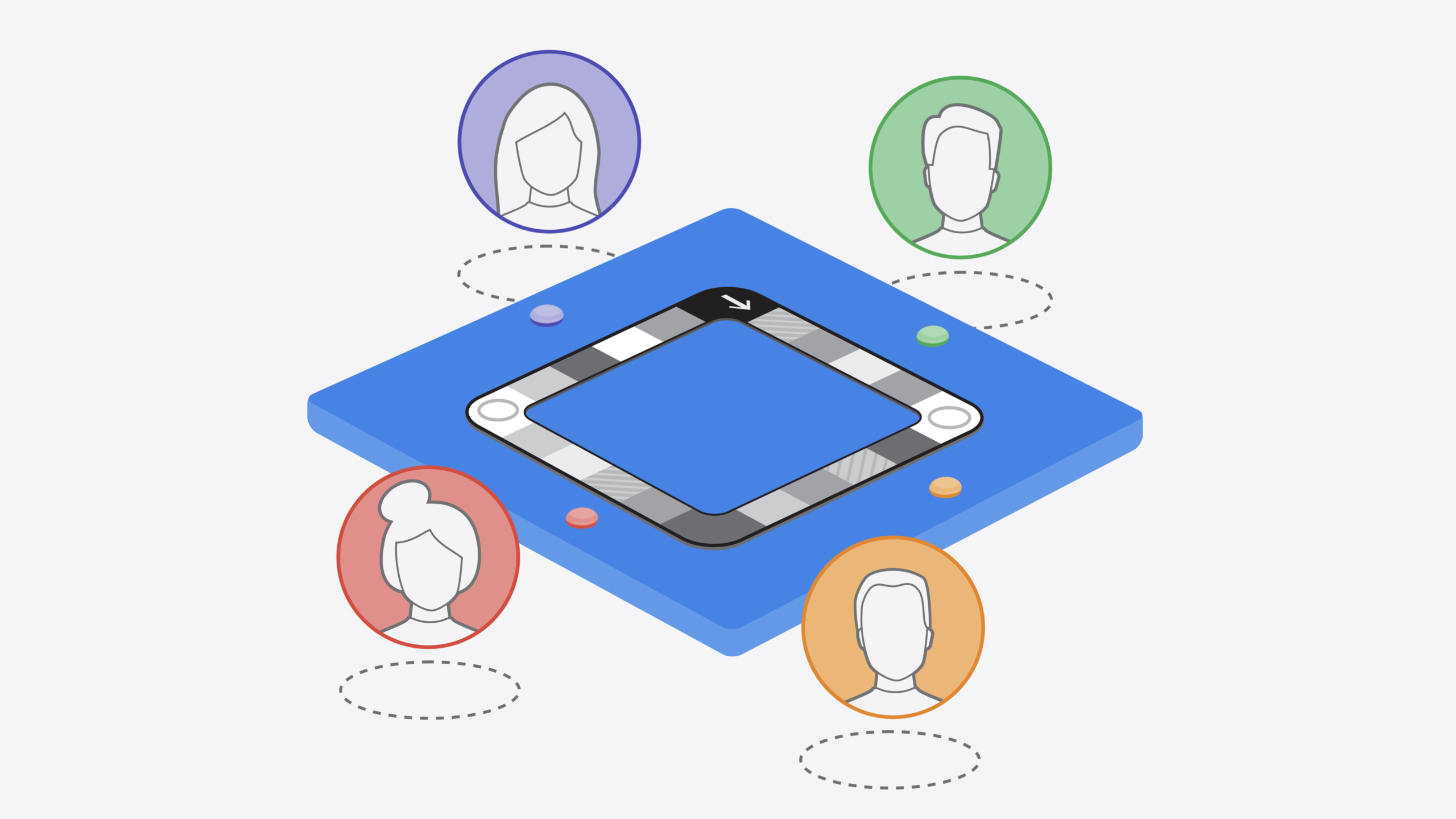
游戏的第一步是描述桌面。TabletopKit 支持两种形状:圆形(给定半径)和矩形(给定宽度和深度)。之后所有的位置和朝向都基于桌面原点的坐标系。(03:07)
// Make a rectangular table.

let entity = try! Entity.load(named: "table", in: table_Top_KitBundle)
let table: Tabletop = .rectangular(entity: entity)Entity.load从 bundle 加载 RealityKit 的 3D 模型.rectangular(entity:)声明一个矩形桌面,框架自动从 entity 计算包围盒- 桌面形状定义的是可玩区域,不一定要跟 3D 模型完全一致
座位围绕桌面放置,每个座位同时只能被一个玩家占据,只有坐下的玩家才能操作桌面上的对象。(04:04)
// Place 3 seats around the table, facing the center.

static let seatPoses: [TableVisualState.Pose2D] = [
  .init(position: .init(x: 0, y: Double(GameMetrics.tableDimensions.z)),
        rotation: .degrees(0)),
  .init(position: .init(x: -Double(GameMetrics.tableDimensions.x), y: 0),
        rotation: .degrees(-90)),
  .init(position: .init(x: Double(GameMetrics.tableDimensions.x), y: 0),
        rotation: .degrees(90))
]- 三个座位均匀分布在桌子周围,朝向桌面中心
rotation控制玩家面向的方向- 多人模式下,未坐下的成员只能旁观,不能操作
2. 定义 Equipment
桌面上所有可交互的对象都是 Equipment。有两种协议:EntityEquipment(有 RealityKit entity,如棋子)和 Equipment(没有 entity,如棋盘格)。
棋子示例——EntityEquipment,有实体模型,只允许对应座位的玩家移动:(05:40)
// Define an object that describes a pawn for each player.

struct PlayerPawn: EntityEquipment {
  let id: ID
  let entity: Entity
  var initialState: BaseEquipmentState

  init(id: ID, seat: PlayerSeat, pose: TableVisualState.Pose2D, entity: Entity) {
    self.id = id
    self.entity = entity
    initialState = .init(seatControl: .restricted([seat.id]),
                pose: pose,
                entity: entity)
  }
}EntityEquipment协议要求提供entity,框架据此计算包围盒seatControl: .restricted([seat.id])限制只有该座位的玩家能操作这个棋子pose设置棋子的初始位置,相对于桌面坐标系
棋盘格示例——Equipment,无实体模型,需要手动指定包围盒:(06:55)
// Define an object that describes a tile on the conveyor belt

struct ConveyorTile: Equipment {
  enum Category: String {
    case red
    case green
    case grey
  }

  let id: ID
  let category: ConveyorTile.Category
  let initialState: BaseEquipmentState

  init(id: ID, boardID: EquipmentIdentifier, position: TableVisualState.Point2D, category: ConveyorTile.Category) {
    self.id = id
    self.category = category
    initialState = .init(parentID: boardID,
              pose: .init(position: position, rotation: .init()),
boundingBox: .init(center: .zero, size: .init(x: 0.06, y: 0, z: 0.06)))Equipment协议没有 entity,所以必须手动提供boundingBoxparentID: boardID表示 tile 是 board 的子对象,位置相对于 board 坐标系- 同一个 tile 可以容纳多个棋子(当两个玩家落在同一格时)
3. 交互逻辑
TabletopKit 监听系统手势(pinch-drag),把手势转换为 TabletopInteraction 回调。你在回调里决定游戏状态怎么变。(09:53)
// The view contains all the content in the game.

RealityView { (content: inout RealityViewContent) in
  content.entities.append(loadedGame.renderer.root)
}.tabletopGame(loadedGame.tabletop, parent: loadedGame.renderer.root) { _ in
  GameInteraction(game: loadedGame)
}


// Define an object that manages player interactions.

struct GameInteraction: TabletopInteraction {
  func update(context: TabletopKit.TabletopInteractionContext,
                value: TabletopKit.TabletopInteractionValue) {
    switch value.phase {
      //...
}.tabletopGame()修饰符把 TabletopKit 游戏挂载到 RealityViewTabletopInteraction协议的update方法在每次手势变化时被调用context有可写属性(哪些 Equipment 参与交互)和方法(取消或结束交互)value提供只读信息:手势阶段、交互阶段、建议的目标位置
手势结束后,通过 addAction 修改游戏状态:(10:48)
// Respond to interaction updates.

func update(context: TabletopKit.TabletopInteractionContext,
              value: TabletopKit.TabletopInteractionValue) {
  switch value.phase {
    //...
    case .ended: {
      guard let dst = value.proposedDestination.equipmentID else {
        return
      }
      context.addAction(.moveEquipment(matching: value.startingEquipmentID, childOf: dst))
    }
}value.proposedDestination.equipmentID是框架建议的放置目标addAction(.moveEquipment(...))把棋子移到目标 Equipment 下- Actions 按入队顺序逐个执行,保证游戏状态的一致性
- 你完全控制哪些操作允许、哪些禁止——比如可以做”教学模式”强制执行规则,或做”自由模式”不限制
4. 音效
RealityKit 的空间音频让音效从 3D 模型的实际位置发出。给骰子加音效只需几行代码:(12:52)
// Respond to interaction updates.

  func update(context: TabletopKit.TabletopInteractionContext,
                value: TabletopKit.TabletopInteractionValue) {
    switch value.gesturePhase {
      //...
      case .ended: {
        if let die = game.tabletop.equipment(of: Die.self,
                                       matching: value.startingEquipmentID) {
          if let audioLibraryComponent = die.entity.components[AudioLibraryComponent.self] {
            if let soundResource = audioLibraryComponent.resources["dieSoundShort.mp3"] {
              die.entity.playAudio(soundResource)
            }
          }
        }
      }
    }
}- 通过
AudioLibraryComponent从 entity 上取出预加载的音频资源 entity.playAudio()播放空间音频,声音从 entity 当前位置发出- 视觉特效同理——你在 entity 上挂载任何 RealityKit 组件,在交互回调里触发即可
5. 多人联网
SharePlay 接入只需两步:激活 GroupActivities session,然后让 TabletopKit 协调。(14:44)
// Set up multiplayer using SharePlay.
// Provide a button to begin SharePlay.

import GroupActivities
func shareplayButton() -> some View {
  Button("SharePlay", systemImage: "shareplay") {
  Task {try! await Activity().activate() }
  }
}


// After joining the SharePlay session, start multiplayer.

    sessionTask = Task.detached { @MainActor in
      for await session in Activity.sessions() {
        tabletopGame.coordinateWithSession(session)
      }
}Activity().activate()启动 SharePlay 会话tabletopGame.coordinateWithSession(session)把网络同步交给 TabletopKit- 框架通过同步 actions 来保证所有玩家游戏状态一致
- 动画和物理模拟在本地运行,保证流畅度
- 默认情况下,TabletopKit 根据座位自动生成 Spatial Persona 模板;如果需要自定义布局,可以用 Custom Spatial Template API 覆盖
核心启发
-
做什么:用 TabletopKit 快速搭建一款卡牌对战游戏。为什么值得做:卡牌游戏规则简单、Equipment 类型少(牌堆 + 手牌 + 弃牌堆),适合作为 TabletopKit 的第一个项目验证框架能力。怎么开始:定义一张圆形桌面和两个座位,卡牌用
Equipment协议定义,交互回调里只处理 draw 和 discard 两种 action,2-3 天就能跑通原型。 -
做什么:给现有 visionOS 桌游项目迁移到 TabletopKit,免费获得手势处理和多人同步。为什么值得做:如果你已经手写了 pinch-drag 手势代码和网络同步逻辑,迁移后可以删掉大量样板代码,减少维护负担。怎么开始:先把桌面和座位用 TabletopKit 的 API 重新定义,然后把现有棋子/卡牌改成
EntityEquipment,最后用TabletopInteraction替换原有的手势处理逻辑。视觉效果部分的 RealityKit entity 不需要改动。 -
做什么:做一个”教学 + 自由”双模式的棋类游戏。为什么值得做:TabletopKit 把规则执行和手势分离——交互回调里你可以选择强制执行规则或放行任何操作,这种架构天然适合双模式。教学模式帮新手学规则,自由模式让老玩家随意摆弄。怎么开始:在
update回调里加一个isRuleEnforced标志位,教学模式下校验每一步是否合法,不合法就context.cancelInteraction();自由模式下所有 move action 直接放行。 -
做什么:利用空间音频和 RealityKit 特效打造沉浸感强的骰子游戏。为什么值得做:物理世界的桌游无法做到”骰子落地时从它所在位置发出 3D 音效”这件事,但 visionOS 可以——这是空间计算独有的体验差异。怎么开始:在骰子的 entity 上挂载
AudioLibraryComponent预加载音效,在gesturePhase == .ended时播放;视觉特效同理,用 RealityKit 的动画组件在特定 category 的 tile 上触发庆祝/沮丧动画。
关联 Session
- Bring your iOS or iPadOS game to visionOS — 将 iOS/iPadOS 游戏移植到 visionOS 的完整指南
- Create custom environments for your immersive apps in visionOS — 为沉浸式应用创建自定义环境
- Create enhanced spatial computing experiences with ARKit — 用 ARKit 构建更强的空间计算体验
- Design interactive experiences for visionOS — 设计 visionOS 交互体验的方法论
评论
GitHub Issues · utterances