
Highlight
Apple Push Notification service 新增了
liveactivity推送类型,让服务器可以直接向 Live Activity 发送更新,无需 app 前台运行,大幅降低了对电池的影响。
核心内容
本地更新 Live Activity 有个局限:app 需要在后台运行才能更新数据。对于需要实时同步多用户状态的场景(比如组队游戏、多人配送),这意味着要么频繁唤醒 app,要么数据不同步。
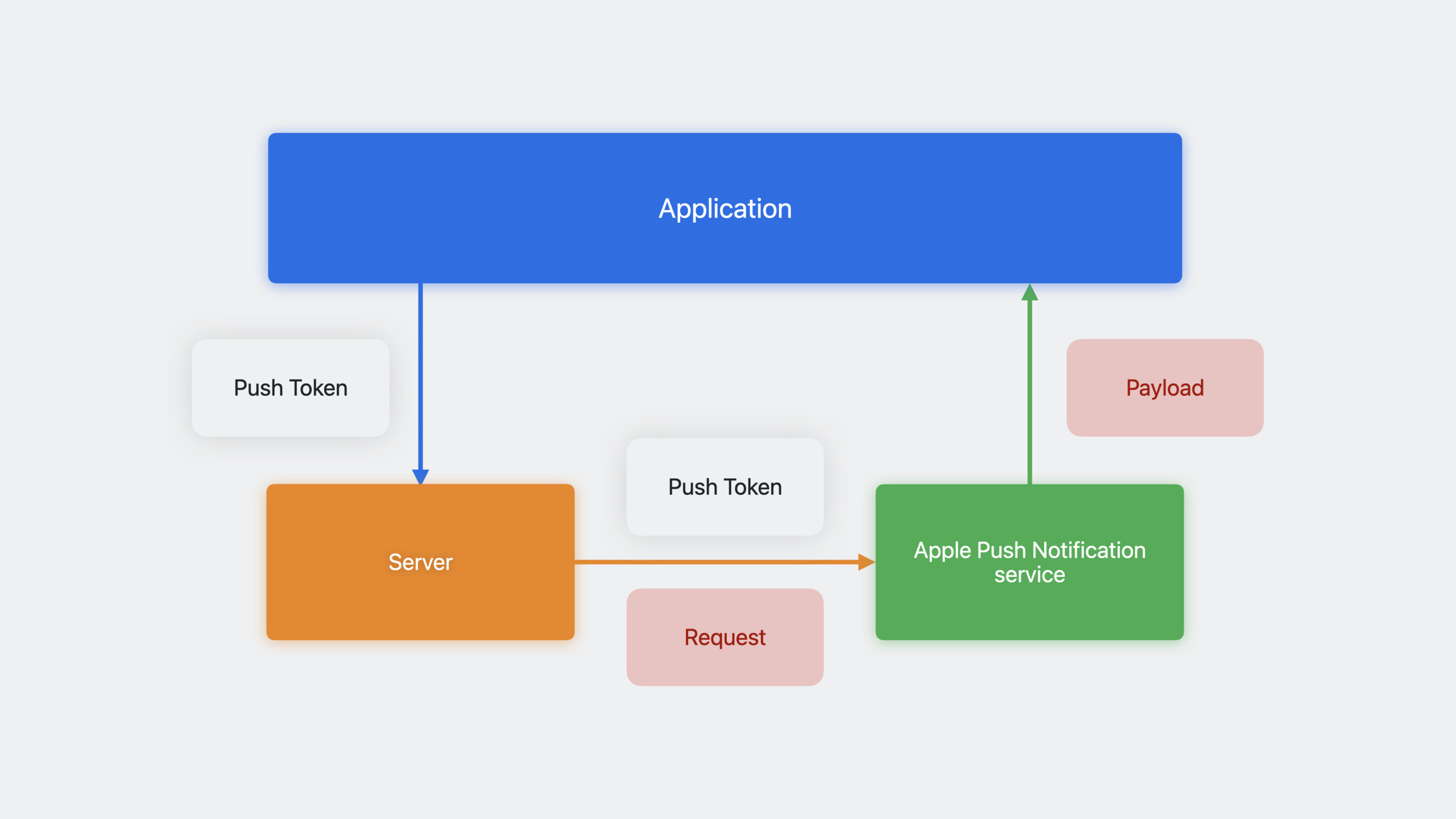
远程推送更新解决了这个问题。服务器通过 APNs 直接向设备的 Live Activity 发送内容更新,widget extension 被唤醒渲染新 UI,整个过程不需要主 app 参与。
实现路径分为三步:app 启动 Live Activity 时获取推送 token 并上报服务器;服务器在状态变化时构造 APNs 请求发送更新;设备收到推送后自动更新 Live Activity UI。
推送更新支持两种优先级:低优先级(5)适合不紧急的更新,无数量限制;高优先级(10)适合需要立即送达的更新,有系统预算限制。还可以添加 alert 对象在 Apple Watch 上触发通知,支持本地化字符串和自定义声音。
详细内容
启用推送更新
(03:53)首先在 Xcode 的 Signing & Capabilities 中添加 Push Notifications 能力,然后在代码中设置 pushType:
func startActivity(hero: EmojiRanger) throws {
    let adventure = AdventureAttributes(hero: hero)
    let initialState = AdventureAttributes.ContentState(
        currentHealthLevel: hero.healthLevel,
        eventDescription: "Adventure has begun!"
    )

    let activity = try Activity.request(
        attributes: adventure,
        content: .init(state: initialState, staleDate: nil),
        pushType: .token  // 启用推送更新
    )

    Task {
        for await pushToken in activity.pushTokenUpdates {
            let pushTokenString = pushToken.reduce("") {
                $0 + String(format: "%02x", $1)
            }
            Logger().log("New push token: \(pushTokenString)")
            try await self.sendPushToken(hero: hero, pushTokenString: pushTokenString)
        }
    }
}
关键点:
pushType: .token告诉 ActivityKit 为这个 Live Activity 申请推送 token- 不要同步访问
activity.pushToken,刚创建时大概率是 nil - 使用
pushTokenUpdatesasync sequence 监听 token 变化 - token 可能在生命周期内更新,新 token 到来时要通知服务器废弃旧 token
- 系统给 app 前台运行时间来处理 token 更新
APNs 推送 payload
(06:54)更新 Live Activity 的推送 payload 格式:
{
    "aps": {
        "timestamp": 1685952000,
        "event": "update",
        "content-state": {
            "currentHealthLevel": 0.941,
            "eventDescription": "Power Panda found a sword!"
        }
    }
}
关键点:
timestamp:Unix 时间戳,系统用它判断最新内容event:update或endcontent-state:JSON 对象,必须能解码为ContentState类型- 使用默认
JSONDecoder解码,不要用自定义 decoding strategy
生成 content-state JSON
(07:37)在 app 中用 JSONEncoder 生成正确的格式:
let contentState = AdventureAttributes.ContentState(
    currentHealthLevel: 0.941,
    eventDescription: "Power Panda found a sword!"
)

let encoder = JSONEncoder()
encoder.outputFormatting = .prettyPrinted

let json = try! encoder.encode(contentState)
Logger().log("\(String(data: json, encoding: .utf8)!)")
关键点:
- 输出是 camelCase 键名
- 服务器发送的 JSON 键名必须与
ContentState的 property 名一致 - 不要用自定义 encoding strategy
用 curl 测试推送
(09:18)开发阶段可以直接从终端发送测试推送:
curl \
  --header "apns-topic: com.example.app.push-type.liveactivity" \
  --header "apns-push-type: liveactivity" \
  --header "apns-priority: 10" \
  --header "authorization: bearer $AUTHENTICATION_TOKEN" \
  --data '{
      "aps": {
          "timestamp": '$(date +%s)',
          "event": "update",
          "content-state": {
              "currentHealthLevel": 0.941,
              "eventDescription": "Power Panda found a sword!"
          }
      }
  }' \
  --http2 https://api.sandbox.push.apple.com/3/device/$ACTIVITY_PUSH_TOKEN
关键点:
apns-topic:app bundle ID +.push-type.liveactivityapns-push-type:必须是liveactivityapns-priority:5(低)或10(高)authorization:JWT bearer token- URL 必须使用 HTTP/2
- 用
date +%s自动生成当前时间戳
带 Alert 的推送
(14:21)重要更新可以触发 alert:
{
    "aps": {
        "timestamp": 1685952000,
        "event": "update",
        "content-state": {
            "currentHealthLevel": 0.0,
            "eventDescription": "Power Panda has been knocked down!"
        },
        "alert": {
            "title": "Power Panda is knocked down!",
            "body": "Use a potion to heal Power Panda!",
            "sound": "default"
        }
    }
}
关键点:
- alert 在 Apple Watch 上显示为通知
- iPhone/iPad 上只播放 sound,不显示弹窗
- title 和 body 只在 Apple Watch 使用
本地化 Alert
(14:56)支持多语言:
{
    "aps": {
        "timestamp": 1685952000,
        "event": "update",
        "content-state": {
            "currentHealthLevel": 0.0,
            "eventDescription": "Power Panda has been knocked down!"
        },
        "alert": {
            "title": {
                "loc-key": "%@ is knocked down!",
                "loc-args": ["Power Panda"]
            },
            "body": {
                "loc-key": "Use a potion to heal %@!",
                "loc-args": ["Power Panda"]
            },
            "sound": "HeroDown.mp4"
        }
    }
}
关键点:
loc-key对应 app 本地化文件中的键loc-args是插入到本地化字符串中的参数- 设备根据用户 locale 自动选择语言
sound可以是自定义音频文件名
结束 Live Activity
(15:52)通过推送结束活动:
{
    "aps": {
        "timestamp": 1685952000,
        "event": "end",
        "dismissal-date": 1685959200,
        "content-state": {
            "currentHealthLevel": 0.23,
            "eventDescription": "Adventure over! Power Panda is taking a nap."
        }
    }
}
关键点:
event: "end"表示结束活动dismissal-date指定何时从锁屏移除(Unix 时间戳)- 省略
dismissal-date让系统决定 - 可以传最终 content-state 给用户一个总结
Stale Date 和过期 UI
(16:44)标记内容何时过期:
{
    "aps": {
        "timestamp": 1685952000,
        "event": "update",
        "stale-date": 1685959200,
        "content-state": {
            "currentHealthLevel": 0.79,
            "eventDescription": "Egghead is in the woods and lost connection."
        }
    }
}
在 SwiftUI 中响应过期状态:
ActivityConfiguration(for: AdventureAttributes.self) { context in
    AdventureLiveActivityView(
        hero: context.attributes.hero,
        isStale: context.isStale,  // 过期时变为 true
        contentState: context.state
    )
    .activityBackgroundTint(Color.gameWidgetBackground)
}
关键点:
stale-date到达后context.isStale变为true- UI 应该给出过期提示(如变灰、添加”可能已过期”标签)
Relevance Score
(17:19)控制多个 Live Activity 的排序:
{
    "aps": {
        "timestamp": 1685952000,
        "event": "update",
        "relevance-score": 100,
        "content-state": {
            "currentHealthLevel": 0.941,
            "eventDescription": "Power Panda found a sword!"
        }
    }
}
关键点:
- 分数越高,在锁屏排序越靠前
- 最高分的活动会占据灵动岛
- 可以在推送中动态调整分数
推送优先级和预算
(11:18)两种优先级:
| 优先级 | 值 | 特点 |
|---|---|---|
| 低 | 5 | opportunistic 投递,省电,无数量限制 |
| 高 | 10 | 立即投递,适合紧急更新,有系统预算限制 |
大部分更新应该用低优先级。高优先级适合英雄被击倒、比赛结束等需要立即关注的事件。
如果 app 频繁需要高优先级更新,可以在 Info.plist 中添加 NSSupportsLiveActivitiesFrequentUpdates 设为 YES,获得更高的更新预算。用户可以在设置中关闭这个功能,通过 ActivityAuthorizationInfo.frequentPushesEnabled 检测状态。
核心启发
1. 多人实时游戏状态同步
- 做什么:组队游戏中,每个队员的 Live Activity 实时显示全队状态和事件
- 为什么值得做:服务器计算状态并推送,不需要每个客户端频繁轮询或保持连接
- 怎么开始:游戏服务器在事件发生时构造 APNs payload,通过
liveactivitypush type 发送到每个队员的 token
2. 外卖/物流实时追踪
- 做什么:配送状态变化时(取餐、出发、到达)自动更新用户锁屏上的 Live Activity
- 为什么值得做:骑手端上报位置后,服务器计算 ETA 并推送给用户,用户全程不需要打开 app
- 怎么开始:骑手 GPS 上报 → 服务器计算 → APNs 推送
content-state更新 ETA 和距离
3. 赛事/比分直播推送
- 做什么:关注的比赛有进球、红黄牌等事件时,Live Activity 立即更新并播放提示音
- 为什么值得做:比传统推送通知更沉浸,用户扫一眼就能看到完整比分和事件时间线
- 怎么开始:赛事数据供应商推送事件 → 服务器构造 alert payload → APNs 高优先级推送
4. 航班/火车动态信息
- 做什么:登机口变更、延误、开始登机等重要信息通过推送实时更新 Live Activity
- 为什么值得做:旅客不需要反复查看机场屏幕或打开 app,锁屏上始终有最新信息
- 怎么开始:与航班数据 API 对接,状态变化时推送更新,延误时提高 relevance-score 让它排在最前
关联 Session
- Meet ActivityKit — Live Activity 基础实现
- Bring widgets to life — WidgetKit 交互性
- Sending notification requests to APNs — APNs 推送通知基础
评论
GitHub Issues · utterances