
Highlight
Apple 在 WWDC23 推出了全新的 CLMonitor API,一个基于 Swift Actor 的位置监听框架。开发者只需创建 Monitor、添加条件、await 事件,就能监听地理区域进入/离开和 Beacon 状态变化,不再需要手动处理线程同步和委托回调。
核心内容
三步上手 CLMonitor
(00:31)CLMonitor 的核心用法极其简洁:
- 创建 Monitor:传入一个字母数字字符串作为名称
- 添加条件:用
add方法添加要监听的区域或 Beacon - await 事件:通过异步序列接收状态变化事件
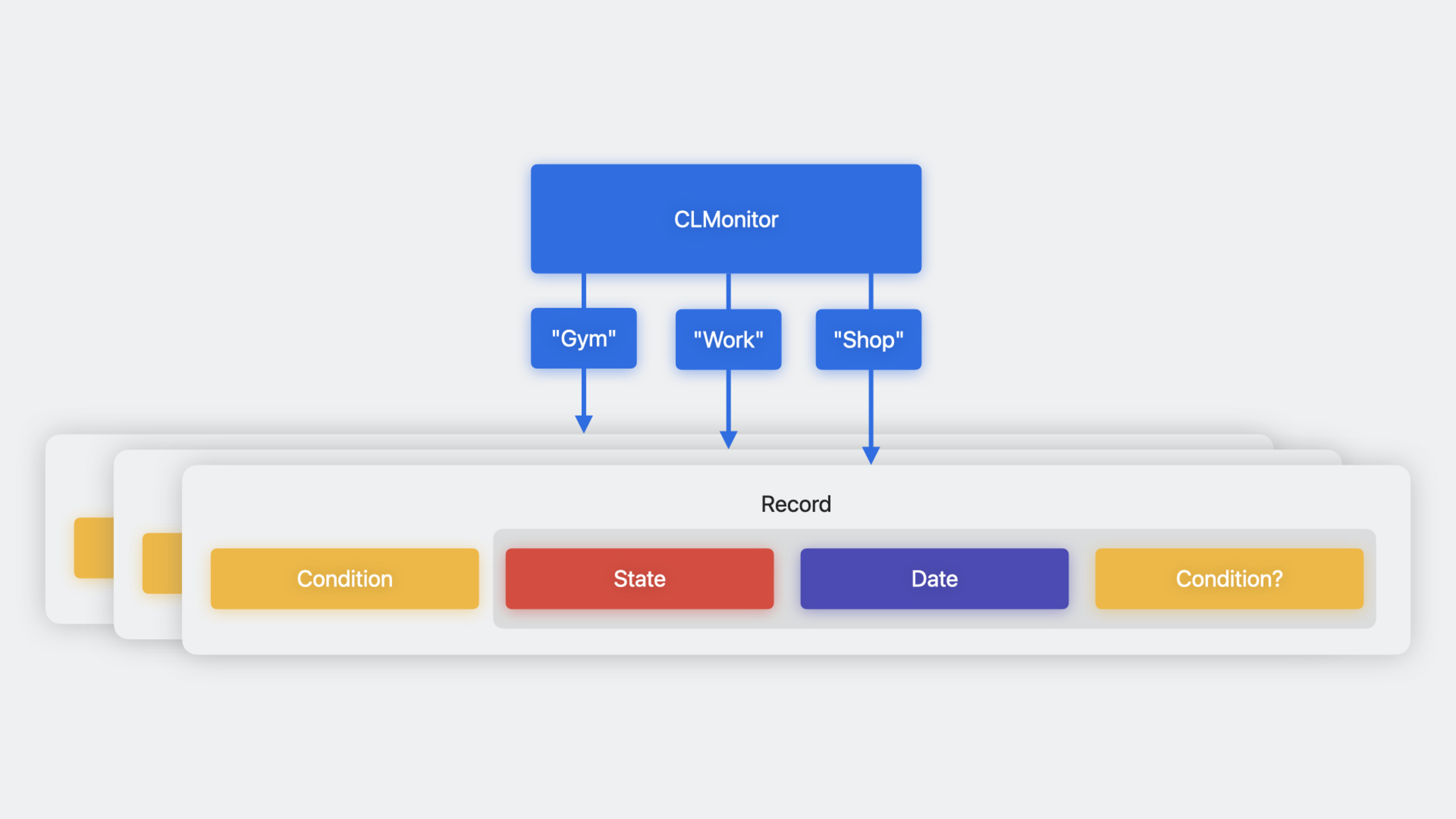
(01:33)CLMonitor 是顶层 Swift Actor。这意味着所有访问都是线程安全的,不需要手动处理锁或队列。创建、添加、移除、查询记录,所有操作都只需要 await。
两种条件类型
(03:07)
CircularGeographicCondition:圆形地理区域,由中心坐标和半径定义。类似于 iOS 16 及之前的 CLCircularRegion。
BeaconIdentityCondition:Beacon 身份条件,由 UUID、Major 和 Minor 定义。类似于 CLBeaconIdentityConstraint。
(04:56)Beacon 条件支持三级匹配策略:
- 仅 UUID:匹配该 UUID 下的所有 Beacon
- UUID + Major:匹配特定组下的所有 Beacon
- UUID + Major + Minor:匹配单个特定 Beacon
这种设计让你可以灵活部署:同一 UUID 覆盖所有站点,不同 Major 区分站点,不同 Minor 区分站点内的具体位置。
事件和记录
(09:14)每个被监听的条件都有一个对应的记录(record),包含:
- condition:被监听的原始条件
- lastEvent:最近一次事件,包含状态(satisfied/unsatisfied/unknown)、时间和 refinement
(10:03)refinement 是 CLMonitor 的一个巧妙设计。当你用通配符监听 Beacon(只指定 UUID)时,条件满足时的事件会包含 refinement,告诉你实际检测到的 Major 和 Minor 值。这让”监听所有站点但知道具体在哪个站点”变得简单。
详细内容
创建 Monitor 和添加条件
(01:53)
import CoreLocation

// 创建 Monitor
let monitor = await CLMonitor("MyLocationMonitor")

// 添加圆形地理区域条件
let workCoordinate = CLLocationCoordinate2D(latitude: 37.3349, longitude: -122.0090)
let workCondition = CLMonitor.CircularGeographicCondition(
    center: workCoordinate,
    radius: 100.0  // 米
)
await monitor.add(workCondition, identifier: "Work")

// 添加 Beacon 条件(仅 UUID,匹配所有站点)
let cafeteriaUUID = UUID(uuidString: "E2C56DB5-DFFB-48D2-B060-D0F5A71096E0")!
let beaconCondition = CLMonitor.BeaconIdentityCondition(uuid: cafeteriaUUID)
await monitor.add(beaconCondition, identifier: "AnyCafeteria")
关键点:
- Monitor 名称是字母数字字符串,用于持久化记录
- 如果同名 Monitor 已存在,会打开它而不是创建新的
- 同一名称同一时刻只能有一个打开的实例
监听事件
(12:12)
// 在 Task 中监听事件
Task {
    for await event in monitor.events {
        switch event.state {
        case .satisfied:
            print("\(event.identifier) - 条件满足")

            // 如果有 refinement,获取具体信息
            if let refinement = event.refinement {
                print("检测到的 Beacon: \(refinement)")
            }

        case .unsatisfied:
            print("\(event.identifier) - 条件不满足")

        case .unknown:
            print("\(event.identifier) - 状态未知")
        }

        // 获取完整记录
        if let record = await monitor.record(for: event.identifier) {
            print("最后事件时间: \(record.lastEvent.date)")
        }
    }
}
关键点:
monitor.events是异步序列,状态变化时自动恢复- 事件包含 identifier、state、date 和 refinement
- 只有状态变化时才会收到新事件
查询记录
(11:09)
// 获取单个记录
if let record = await monitor.record(for: "Work") {
    let condition = record.condition
    let lastEvent = record.lastEvent
    print("状态: \(lastEvent.state), 时间: \(lastEvent.date)")
}

// 遍历所有记录
for identifier in await monitor.identifiers {
    if let record = await monitor.record(for: identifier) {
        print("\(identifier): \(record.lastEvent.state)")
    }
}
关键点:
monitor.identifiers返回所有已添加条件的 identifier 列表- 记录和状态是持久化的,应用重启后仍然存在
- 不需要自己维护 identifier 列表
设置初始状态
(08:33)添加条件时可以指定初始状态:
// 假设应用已经判断用户不在工作区域
await monitor.add(
    workCondition,
    identifier: "Work",
    assuming: .unsatisfied
)
如果假设错误,Core Location 会在确定真实状态后给出正确值。这个参数主要用于减少初始状态确定前的延迟。
移除条件
await monitor.remove("Work")移除条件会同时删除对应的记录。
核心启发
-
替换旧的区域监听代码
- 做什么:将现有使用
CLCircularRegion和CLBeaconRegion的代码迁移到 CLMonitor - 为什么值得做:CLMonitor 基于 Swift Actor 和异步序列,代码更简洁、线程更安全,不再需要处理委托回调和线程同步
- 怎么开始:创建 CLMonitor 实例,将现有的
startMonitoring(for:)调用替换为monitor.add(),将locationManager(_:didEnterRegion:)委托方法替换为for await event in monitor.events
- 做什么:将现有使用
-
构建智能位置触发的工作流
- 做什么:利用 CLMonitor 的 Beacon 三级匹配能力,构建基于位置的自动化工作流
- 为什么值得做:UUID/Major/Minor 的灵活匹配让同一套 Beacon 部署可以支持”进入任意办公室""进入特定办公室""进入办公室特定区域”三种粒度
- 怎么开始:部署统一 UUID 的 Beacon,不同办公室用不同 Major,办公室内不同区域用不同 Minor,在应用中创建对应粒度的 CLMonitor 条件
-
实现持久化的位置状态管理
- 做什么:利用 CLMonitor 的持久化记录特性,在应用重启后恢复位置状态
- 为什么值得做:记录和状态自动持久化,应用被系统终止后重新启动时可以从上次状态继续
- 怎么开始:在
didFinishLaunchingWithOptions中重新初始化同名 Monitor,立即 await events 恢复监听,查询记录获取上次已知状态
-
结合 SwiftUI 构建实时位置 UI
- 做什么:将 CLMonitor 与 SwiftUI 结合,构建实时反映位置状态的界面
- 为什么值得做:异步序列天然适合 SwiftUI 的
.task修饰符,可以简洁地实现位置状态驱动的 UI - 怎么开始:在 ViewModel 中创建 CLMonitor,在视图的
.task中启动事件监听,用@Published属性驱动 UI 更新
关联 Session
- Meet Core Location for spatial computing — Core Location 在 visionOS 上的权限模型和定位行为
- Discover streamlined location updates — CLLocationUpdate 的实时位置更新 API
- What’s new in Swift — Swift 语言新特性,包括 Actor 和并发
- Meet SwiftUI for spatial computing — SwiftUI 在空间计算平台上的适配
评论
GitHub Issues · utterances