
Highlight
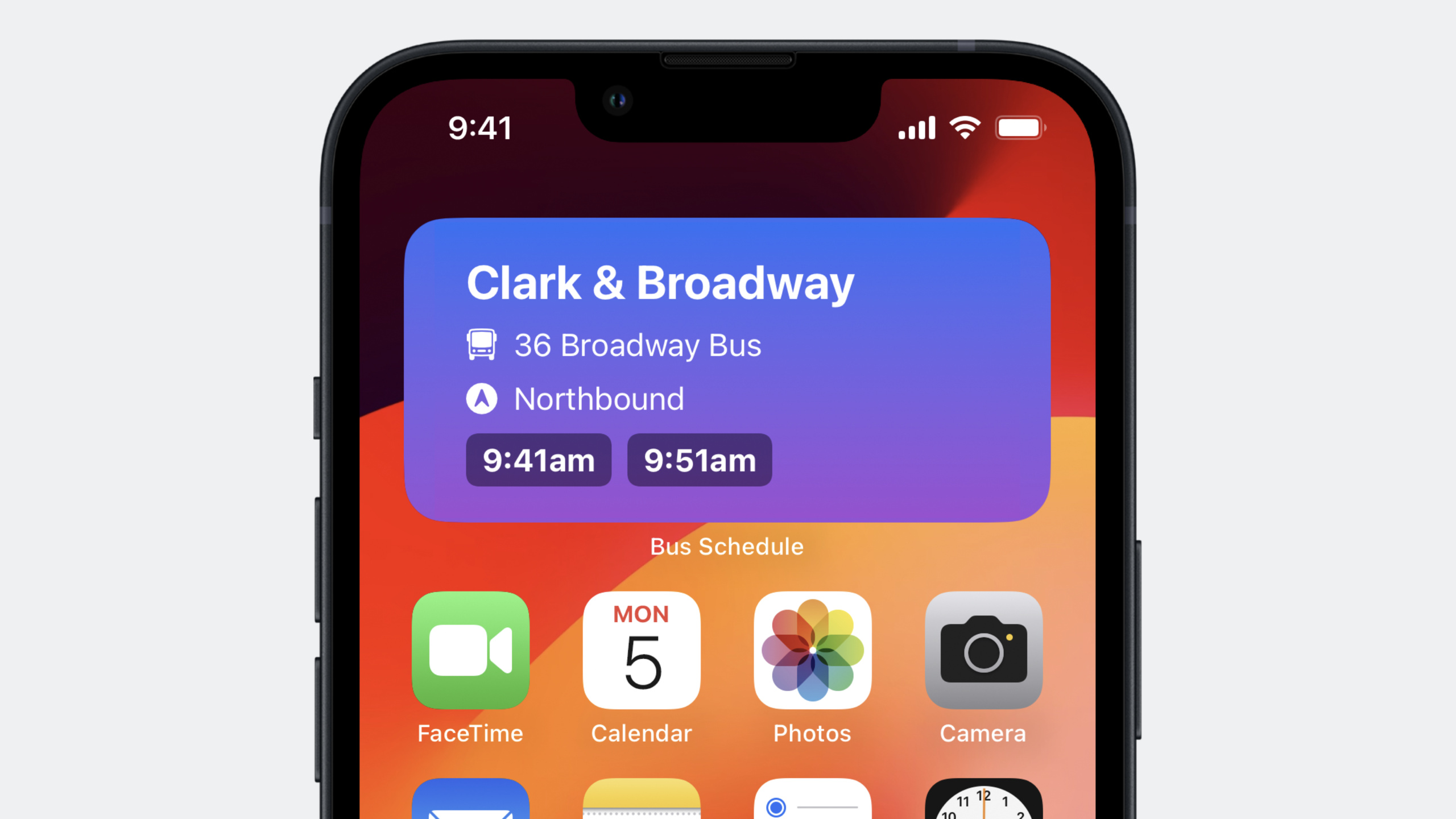
iOS 17 的 App Intents 让 Widget 配置、交互和 Shortcuts 集成统一在同一套代码中,支持 SwiftUI Button/Toggle 直接触发 Intent、参数依赖联动和 Apple Pay 集成,开发者不再需要维护多个 Intent 定义文件。
核心内容
Widget 配置用 App Intents
过去配置 Widget 需要在 Xcode 中维护 Intent Definition File。iOS 17 可以直接在 Widget Extension 代码中定义配置 Intent。
import WidgetKit
import AppIntents
import SwiftUI

// 用 AppIntentConfiguration 替代 IntentConfiguration
struct NextBusWidget: Widget {
    var body: some WidgetConfiguration {
        AppIntentConfiguration(
            kind: "com.example.nextbus",
            intent: ShowNextBusIntent.self,
            provider: Provider()
        ) { entry in
            NextBusWidgetView(entry: entry)
        }
    }
}

// 直接在 Widget Extension 中定义配置 Intent
struct ShowNextBusIntent: WidgetConfigurationIntent {
    static var title: LocalizedStringResource = "Next Bus"

    @Parameter(title: "Bus Stop")
    var busStop: BusStop

    @Parameter(title: "Route")
    var route: BusRoute

    @Parameter(title: "Direction")
    var direction: Direction
}
关键点:
- 用
AppIntentConfiguration替代IntentConfiguration WidgetConfigurationIntent是AppIntent的子协议- 动态选项和查询可以直接在 Widget Extension 中实现,不再需要单独的 Intents Extension
(01:05)
Widget 交互
SwiftUI 的 Button 和 Toggle 现在支持 App Intents,用户点击 Widget 中的按钮就能直接执行应用代码。
import WidgetKit
import SwiftUI
import AppIntents

// 定义交互 Intent
struct SetAlarmIntent: AppIntent {
    static var title: LocalizedStringResource = "Set Bus Alarm"

    @Parameter(title: "Bus Time")
    var busTime: Date

    func perform() async throws -> some IntentResult {
        AlarmManager.shared.setAlarm(for: busTime)
        return .result(dialog: "Alarm set for \(busTime)")
    }
}

struct NextBusWidgetView: View {
    var entry: Provider.Entry

    var body: some View {
        VStack {
            ForEach(entry.upcomingBuses) { bus in
                // 按钮直接关联 App Intent
                Button(intent: SetAlarmIntent(busTime: bus.arrivalTime)) {
                    Text(bus.arrivalTime, style: .time)
                }
            }
        }
    }
}
关键点:
Button(intent:)将 App Intent 与按钮点击关联- 同一个 Intent 可以同时用于 Widget 交互和 Shortcuts 动作
- 不需要打开应用就能完成操作
(05:41)
参数依赖联动
IntentParameterDependency 允许在 DynamicOptionsProvider 中访问其他参数的值,实现级联选择。
import AppIntents

struct BusRouteQuery: EntityQuery {
    // 依赖 ShowNextBusIntent 的 busStop 参数
    @IntentParameterDependency(ShowNextBus.self, \.busStop)
    var showNextBus

    func suggestedEntities() async throws -> [BusRoute] {
        guard let stop = showNextBus?.busStop else {
            return BusRoute.allRoutes
        }
        // 根据已选站点过滤可用路线
        return BusRoute.routes(forStop: stop)
    }
}

// 多参数依赖示例
struct DirectionQuery: EntityQuery {
    @IntentParameterDependency(ShowNextBus.self, \.busStop)
    var showNextBusStop

    @IntentParameterDependency(ShowNextBus.self, \.route)
    var showNextBusRoute

    @IntentParameterDependency(ShowFavoriteRoute.self, \.route)
    var favoriteRoute

    var route: BusRoute? {
        showNextBusRoute?.route ?? favoriteRoute?.route
    }

    func suggestedEntities() async throws -> [Direction] {
        guard let route = route else { return Direction.all }
        return route.availableDirections
    }
}
关键点:
@IntentParameterDependency在 Widget、Shortcuts 和 Focus Filters 中通用- 可以依赖多个参数,也可以依赖多个 Intent
- 返回过滤后的选项,让用户只看到当前上下文相关的选择
(07:59)
数组参数大小限制
Widget 配置中可以为数组参数声明大小限制,还能根据 Widget 尺寸设置不同上限。
struct FavoriteRoutesIntent: WidgetConfigurationIntent {
    static var title: LocalizedStringResource = "Favorite Routes"

    // 限制最多选择 3 条路线
    @Parameter(title: "Routes", size: .init(upperBound: 3))
    var routes: [BusRoute]

    // 根据 Widget family 设置不同上限
    @Parameter(title: "Routes", size: [
        .systemSmall: .init(upperBound: 1),
        .systemMedium: .init(upperBound: 2),
        .systemLarge: .init(upperBound: 5)
    ])
    var dynamicRoutes: [BusRoute]
}
关键点:
- 数组参数可以设置
upperBound限制选择数量 - 支持按 Widget family 映射不同的大小限制
- 大屏幕 Widget 可以容纳更多项目
(10:54)
详细内容
ParameterSummary 与 Widget 配置 UI
ParameterSummary 定义了 App Intent 参数在 Shortcuts 编辑器、Focus Filters 和 Widget 配置中的视觉表现。
struct ShowNextBusIntent: WidgetConfigurationIntent {
    @Parameter(title: "Routes")
    var routes: [BusRoute]

    @Parameter(title: "Include Weather")
    var includeWeatherInfo: Bool

    static var parameterSummary: some ParameterSummary {
        Summary("Show schedules for \(routes)") {
            \$includeWeatherInfo
        }
    }
}
iOS 17 新增 When 语句支持按 Widget family 条件显示参数:
static var parameterSummary: some ParameterSummary {
    Summary("Show schedules for \(routes)") {
        When(.widgetFamily, .equalTo, .systemLarge) {
            \$includeWeatherInfo
        }
    }
}
关键点:
- 句子中的参数先显示,closure 中的参数随后显示
When语句让大 Widget 显示更多配置选项- 小 Widget 可以隐藏不重要的参数
(11:35)
Widget 点击跳转
用户点击 Widget 时,可以通过 widgetConfigurationIntent 获取配置 Intent,用于导航到应用内的特定页面。
import SwiftUI

struct BusScheduleApp: App {
    var body: some Scene {
        WindowGroup {
            ContentView()
                .onContinueUserActivity(NSUserActivityTypeBrowsingWeb) { userActivity in
                    // 从 Widget 点击获取配置 Intent
                    if let intent = userActivity.widgetConfigurationIntent as? ShowNextBusIntent {
                        NavigationManager.shared.showBusStop(
                            stop: intent.busStop,
                            route: intent.route
                        )
                    }
                }
        }
    }
}
关键点:
userActivity.widgetConfigurationIntent返回关联的 App Intent- 用 Intent 的内容导航到对应界面
- 让用户点击 Widget 后直接看到相关内容
(12:52)
框架支持扩展
iOS 17 允许框架直接暴露 App Intents,不再需要把同一份代码编译到多个 target。
// BusScheduleIntents 框架
public struct ShowScheduleIntent: AppIntent {
    public static var title: LocalizedStringResource = "Show Schedule"
    // ...
}

// 让框架支持 re-export
extension BusScheduleIntents: AppIntentsPackage {}

// BusScheduleUI 框架依赖并 re-export BusScheduleIntents
extension BusScheduleUI: AppIntentsPackage {}

// 主应用只导入 BusScheduleUI
import BusScheduleUI

@main
struct BusScheduleApp: App, AppIntentsPackage {
    var body: some Scene {
        WindowGroup {
            ContentView()
        }
    }
}
关键点:
AppIntentsPackage协议让框架可以递归导入依赖- 应用只需提及直接依赖的框架
- 减少二进制体积,避免代码重复
(14:47)
前台继续执行
两个新协议让 Intent 可以在前台继续执行:
// 方式一:完全停止后台执行,要求用户在前台继续
struct FetchBusScheduleIntent: AppIntent, ForegroundContinuableIntent {
    func perform() async throws -> some IntentResult {
        do {
            let schedule = try await BusAPI.fetchSchedule()
            return .result(value: schedule)
        } catch {
            // 抛出错误,系统会提示用户在前台继续
            throw needsToContinueInForegroundError {
                // 应用进入前台后执行的 closure
                NavigationManager.shared.showErrorScreen()
            }
        }
    }
}

// 方式二:暂停后台执行,获取用户输入后继续
struct ChooseAlternateRouteIntent: AppIntent {
    func perform() async throws -> some IntentResult {
        let currentRoute = try await BusAPI.fetchCurrentRoute()

        if currentRoute.hasMaintenanceIssue {
            // 请求用户在前台选择替代路线
            let alternateRoute = try await requestToContinueInForeground(
                returnValue: BusRoute.self
            ) {
                // 显示路线选择界面
                RouteSelectionView.preselectRoute(currentRoute)
            }

            return .result(value: alternateRoute)
        }

        return .result(value: currentRoute)
    }
}
关键点:
ForegroundContinuableIntent用于需要完全停止并在前台重新开始的场景requestToContinueInForeground用于需要获取用户输入后继续执行的场景- continuation closure 在主线程执行
(19:11)
Apple Pay 集成
import AppIntents
import PassKit

struct BuyTicketIntent: AppIntent {
    static var title: LocalizedStringResource = "Buy Bus Ticket"

    func perform() async throws -> some IntentResult {
        let paymentRequest = PKPaymentRequest()
        paymentRequest.merchantIdentifier = "merchant.com.example.bus"
        paymentRequest.countryCode = "US"
        paymentRequest.currencyCode = "USD"
        paymentRequest.paymentSummaryItems = [
            PKPaymentSummaryItem(label: "Bus Ticket", amount: 2.50)
        ]

        let controller = PKPaymentAuthorizationController(paymentRequest: paymentRequest)

        guard await controller.present() else {
            return .result(dialog: "Unable to process payment")
        }

        // 处理支付结果
        return .result(dialog: "Payment successful")
    }
}
关键点:
- 在
perform()中直接创建PKPaymentRequest - 用
PKPaymentAuthorizationController展示支付 sheet - 支持在 Shortcuts 自动化中完成支付流程
(21:50)
进度报告
struct DownloadScheduleIntent: AppIntent, ProgressReportingIntent {
    static var title: LocalizedStringResource = "Download Schedule"

    func perform() async throws -> some IntentResult {
        let routes = await BusAPI.fetchAllRoutes()
        progress.totalUnitCount = Int64(routes.count)

        for route in routes {
            try await BusAPI.downloadSchedule(for: route)
            progress.completedUnitCount += 1
        }

        return .result(dialog: "Downloaded all schedules")
    }
}
关键点:
- 实现
ProgressReportingIntent协议 - 在
perform()中访问progress对象 - Shortcuts 应用会自动显示进度条
(25:00)
核心启发
-
做什么:用一套 App Intents 代码同时支持 Widget 配置、交互和 Shortcuts
- 为什么值得做:减少代码重复,确保三种场景的行为一致,维护成本大幅降低
- 怎么开始:定义
WidgetConfigurationIntent用于配置,AppIntent用于交互,同一个 Query 服务两种场景
-
做什么:为 Widget 添加按钮和切换交互
- 为什么值得做:用户无需打开应用就能完成常用操作,提升使用频率
- 怎么开始:在 Widget 视图中使用
Button(intent:)和Toggle(intent:),定义对应的AppIntent实现具体逻辑
-
做什么:实现级联参数选择
- 为什么值得做:当参数之间有依赖关系时,过滤后的选项让用户选择更快、错误更少
- 怎么开始:在 Query 中使用
@IntentParameterDependency读取其他参数值,在suggestedEntities()中返回过滤后的列表
-
做什么:将 App Intents 代码移入 Framework
- 为什么值得做:避免在主应用和 Widget Extension 中重复编译同一份代码,减少二进制体积
- 怎么开始:创建包含 App Intents 的 Framework,让 Framework 和主应用都遵循
AppIntentsPackage协议
-
做什么:为耗时操作添加前台继续能力
- 为什么值得做:网络请求可能失败,需要用户确认或选择时,前台界面比语音交互更友好
- 怎么开始:对需要用户决策的 Intent 实现
ForegroundContinuableIntent,或用requestToContinueInForeground获取用户输入后继续执行
关联 Session
- Spotlight your app with App Shortcuts — 通过 App Shortcuts 让应用功能在 Spotlight 和 Siri 中可用
- Bring your widget to life — 为 Widget 添加交互性
- Build widgets for the Smart Stack on Apple Watch — 为 Apple Watch Smart Stack 构建 Widget
评论
GitHub Issues · utterances