
Highlight
iOS 17 的 UIKit Trait System 支持自定义 trait 定义、trait 覆写 API、闭包式 trait 变化监听,以及与 SwiftUI environment key 的双向桥接,让数据在 UIKit 和 SwiftUI 组件间无缝流动。
核心内容
Trait 基础回顾
Trait 是系统自动向应用中每个视图控制器和视图传播的独立数据片段。UIKit 内置了很多系统 trait:user interface style、horizontal size class、preferred content size category 等。
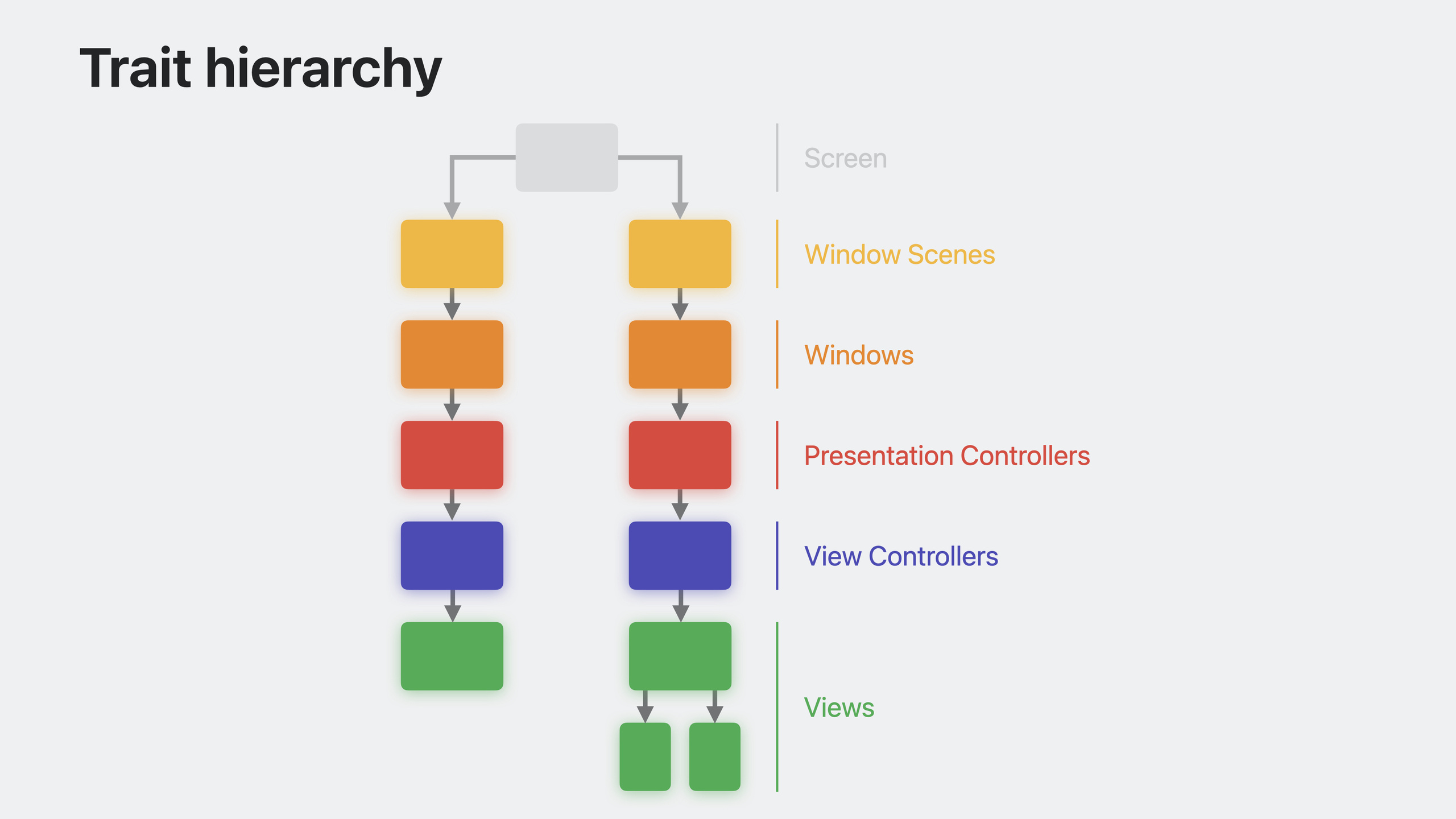
iOS 17 统一了视图控制器和视图的 trait 层级。以前视图控制器的 trait 直接继承自父控制器,视图继承自所属控制器,导致视图层级中的 trait 传递在控制器视图处”截断”。现在改为线性传递:视图控制器从视图的 superview 继承 trait,trait 沿视图层级自然流动。
这个改变带来一个重要后果:在 viewWillAppear 中访问 trait collection 可能拿到过时的值,因为此时视图还没加入层级。viewIsAppearing 是更好的替代,它向后兼容到 iOS 13。
自定义 Trait
iOS 17 允许定义自己的 trait,通过 UITraitDefinition 协议实现。这打开了一种全新的数据传递模式——不需要代理、不需要闭包、不需要单例,数据就能自动传播到嵌套很深的组件。
定义 trait 时,关联数据类型最好是值类型。Bool、Int、Double 或 Int raw value 的 enum 效率最高。自定义 struct 要有高效的 Equatable 实现,因为系统会频繁比较 trait 值来判断是否变化。
如果 trait 会影响颜色解析,设置 affectsColorAppearance = true,系统会在 trait 变化时自动重绘视图。但这个开销较大,只用于变化不频繁的 trait。
Trait 覆写
iOS 17 在每个 trait environment(window scene、window、view controller、view、presentation controller)上新增了 traitOverrides 属性。覆写会修改该对象及其所有后代的 trait 值。
traitOverrides 支持检查覆写是否存在(contains)和移除覆写(remove)。读取 trait 值时始终用 traitCollection,直接读 traitOverrides 在未设置时会抛出异常。
性能方面:每个覆写有少量开销,只在需要的地方设置。变化时系统要更新所有后代的 trait collection,所以尽量减少修改次数。如果 trait 只影响少数深层视图,把覆写应用到最近的公共祖先,而不是根节点。
Trait 变化监听
traitCollectionDidChange 在 iOS 17 已废弃。它的问题是系统不知道你关心哪些 trait,所以任何 trait 变化都要调用,不 scalable。
新的 registerForTraitChanges API 支持闭包和 target-action 两种回调方式。注册时指定关心的 trait,只有这些 trait 变化时才回调。不需要子类化,从任何地方都能监听。
还提供了语义化的系统 trait 集合:systemTraitsAffectingColorAppearance、systemTraitsAffectingImageLookup,可以直接传给注册方法。
注册会自动清理,高级场景可以用返回的 token 手动注销。
UIKit 与 SwiftUI 桥接
自定义 UIKit trait 和自定义 SwiftUI environment key 可以桥接。让 environment key 遵循 UITraitBridgedEnvironmentKey 协议,实现 read 和 write 两个方法。之后 UIKit 的 trait 覆写会自动同步到 SwiftUI 的 environment,SwiftUI 的 environment modifier 也会同步到 UIKit 的 trait。
这解决了混合 UI 架构中数据传递的痛点。无论 SwiftUI 嵌在 UIKit 里,还是 UIKit 嵌在 SwiftUI 里,数据都能双向流动。
详细内容
创建和修改 Trait Collection
(01:51)
// Build a new trait collection instance from scratch
let myTraits = UITraitCollection { mutableTraits in
    mutableTraits.userInterfaceIdiom = .phone
    mutableTraits.horizontalSizeClass = .regular
}

// Get a new instance by modifying traits of an existing one
let otherTraits = myTraits.modifyingTraits { mutableTraits in
    mutableTraits.horizontalSizeClass = .compact
    mutableTraits.userInterfaceStyle = .dark
}
关键点:
UITraitCollection新增闭包初始化器modifyingTraits基于现有 trait collection 创建修改后的副本UIMutableTraits是新的可变容器协议
定义简单自定义 Trait
(09:06)
struct ContainedInSettingsTrait: UITraitDefinition {
    static let defaultValue = false
}

let traitCollection = UITraitCollection { mutableTraits in
    mutableTraits[ContainedInSettingsTrait.self] = true
}

let value = traitCollection[ContainedInSettingsTrait.self]
// true
关键点:
- 遵循
UITraitDefinition协议 - 必须提供
defaultValue - 值类型从 defaultValue 推断(这里是 Bool)
为自定义 Trait 添加属性语法
(10:23)
struct ContainedInSettingsTrait: UITraitDefinition {
    static let defaultValue = false
}

extension UITraitCollection {
    var isContainedInSettings: Bool { self[ContainedInSettingsTrait.self] }
}

extension UIMutableTraits {
    var isContainedInSettings: Bool {
        get { self[ContainedInSettingsTrait.self] }
        set { self[ContainedInSettingsTrait.self] = newValue }
    }
}

let traitCollection = UITraitCollection { mutableTraits in
    mutableTraits.isContainedInSettings = true
}

let value = traitCollection.isContainedInSettings
// true
关键点:
- 给
UITraitCollection加只读属性 - 给
UIMutableTraits加读写属性 - 定义自定义 trait 时始终写这两个扩展
定义影响颜色外观的主题 Trait
(11:00)
enum MyAppTheme: Int {
    case standard, pastel, bold, monochrome
}

struct MyAppThemeTrait: UITraitDefinition {
    static let defaultValue = MyAppTheme.standard
    static let affectsColorAppearance = true
    static let name = "Theme"
    static let identifier = "com.myapp.theme"
}

extension UITraitCollection {
    var myAppTheme: MyAppTheme { self[MyAppThemeTrait.self] }
}

extension UIMutableTraits {
    var myAppTheme: MyAppTheme {
        get { self[MyAppThemeTrait.self] }
        set { self[MyAppThemeTrait.self] = newValue }
    }
}
关键点:
affectsColorAppearance = true让系统在该 trait 变化时自动重绘name用于调试输出identifier用 reverse-DNS 格式,支持编码等额外功能- enum 用 Int raw value 效率最高
使用自定义主题 Trait
(12:33)
let customBackgroundColor = UIColor { traitCollection in
    switch traitCollection.myAppTheme {
    case .standard:    return UIColor(named: "StandardBackground")!
    case .pastel:      return UIColor(named: "PastelBackground")!
    case .bold:        return UIColor(named: "BoldBackground")!
    case .monochrome:  return UIColor(named: "MonochromeBackground")!
    }
}

let view = UIView()
view.backgroundColor = customBackgroundColor
关键点:
- 在 dynamic color 的 provider closure 中读取自定义 trait
- 因为
affectsColorAppearance = true,主题变化时视图自动更新 - 不需要手动监听变化、手动刷新
管理 Trait 覆写
(18:05)
func toggleThemeOverride(_ overrideTheme: MyAppTheme) {
    if view.traitOverrides.contains(MyAppThemeTrait.self) {
        // There's an existing theme override; remove it
        view.traitOverrides.remove(MyAppThemeTrait.self)
    } else {
        // There's no existing theme override; apply one
        view.traitOverrides.myAppTheme = overrideTheme
    }
}
关键点:
contains检查是否已覆写remove移除覆写,恢复继承值- 直接赋值设置覆写
用闭包注册 Trait 变化
(21:28)
// Register for horizontal size class changes on self
registerForTraitChanges(
    [UITraitHorizontalSizeClass.self]
) { (self: Self, previousTraitCollection: UITraitCollection) in
    self.updateViews(sizeClass: self.traitCollection.horizontalSizeClass)
}

// Register for changes to multiple traits on another view
let anotherView: MyView
anotherView.registerForTraitChanges(
    [UITraitHorizontalSizeClass.self, ContainedInSettingsTrait.self]
) { (view: MyView, previousTraitCollection: UITraitCollection) in
    // Handle the trait change for this view...
}
关键点:
- 只注册实际依赖的 trait,避免无关回调
- 闭包第一个参数是被监听的对象,不需要 weak self
- 监听 self 时写
(self: Self, ...)
用 Target-Action 注册 Trait 变化
(22:48)
// Register for horizontal size class changes on self
registerForTraitChanges(
    [UITraitHorizontalSizeClass.self],
    action: #selector(UIView.setNeedsLayout)
)

// Register for changes to multiple traits on another view
let anotherView: MyView
anotherView.registerForTraitChanges(
    [UITraitHorizontalSizeClass.self, ContainedInSettingsTrait.self],
    target: self,
    action: #selector(handleTraitChange(view:previousTraitCollection:))
)

@objc func handleTraitChange(view: MyView, previousTraitCollection: UITraitCollection) {
    // Handle the trait change for this view...
}
关键点:
- action 方法可以有 0、1 或 2 个参数
- 第一个参数是变化的对象,第二个是变化前的 trait collection
- target 省略时默认是注册调用者
桥接 UIKit Trait 和 SwiftUI Environment Key
(26:19)
enum MyAppTheme: Int {
    case standard, pastel, bold, monochrome
}

// Custom UIKit trait
struct MyAppThemeTrait: UITraitDefinition {
    static let defaultValue = MyAppTheme.standard
    static let affectsColorAppearance = true
}

extension UITraitCollection {
    var myAppTheme: MyAppTheme { self[MyAppThemeTrait.self] }
}

extension UIMutableTraits {
    var myAppTheme: MyAppTheme {
        get { self[MyAppThemeTrait.self] }
        set { self[MyAppThemeTrait.self] = newValue }
    }
}

// Custom SwiftUI environment key
struct MyAppThemeKey: EnvironmentKey {
    static let defaultValue = MyAppTheme.standard
}

extension EnvironmentValues {
    var myAppTheme: MyAppTheme {
        get { self[MyAppThemeKey.self] }
        set { self[MyAppThemeKey.self] = newValue }
    }
}

// Bridge SwiftUI environment key with UIKit trait
extension MyAppThemeKey: UITraitBridgedEnvironmentKey {
    static func read(from traitCollection: UITraitCollection) -> MyAppTheme {
        traitCollection.myAppTheme
    }

    static func write(to mutableTraits: inout UIMutableTraits, value: MyAppTheme) {
        mutableTraits.myAppTheme = value
    }
}
关键点:
- 让
EnvironmentKey遵循UITraitBridgedEnvironmentKey read从 UIKit trait 读值返回给 SwiftUIwrite把 SwiftUI environment 值写入 UIKit trait- 两边访问的是同一份数据
从 UIKit 设置 Trait,在 SwiftUI 中读取
(27:01)
// UIKit trait override applied to the window scene
let windowScene: UIWindowScene
windowScene.traitOverrides.myAppTheme = .monochrome

// Cell in a UICollectionView configured to display a SwiftUI view
let cell: UICollectionViewCell
cell.contentConfiguration = UIHostingConfiguration {
    CellView()
}

// SwiftUI view displayed in the cell, which reads the bridged value from the environment
struct CellView: View {
    @Environment(\.myAppTheme) var theme: MyAppTheme

    var body: some View {
        Text("Settings")
            .foregroundStyle(theme == .monochrome ? .gray : .blue)
    }
}
关键点:
- window scene 的 trait 覆写自动传播到 SwiftUI environment
- SwiftUI 用
@Environment读取桥接值 - SwiftUI 自动追踪依赖,trait 变化时视图自动更新
从 SwiftUI 设置 Environment,在 UIKit 中读取
(28:16)
// SwiftUI environment value applied to a UIViewControllerRepresentable
struct SettingsView: View {
    var body: some View {
        SettingsControllerRepresentable()
            .environment(\.myAppTheme, .standard)
    }
}

final class SettingsControllerRepresentable: UIViewControllerRepresentable {
    func makeUIViewController(context: Context) -> SettingsViewController {
        SettingsViewController()
    }

    func updateUIViewController(_ uiViewController: SettingsViewController, context: Context) {
        // Update the view controller...
    }
}

// UIKit view controller contained in the SettingsControllerRepresentable
class SettingsViewController: UIViewController {
    override func viewWillLayoutSubviews() {
        super.viewWillLayoutSubviews()
        title = settingsTitle(for: traitCollection.myAppTheme)
    }

    func settingsTitle(for theme: MyAppTheme) -> String {
        switch theme {
        case .standard:   return "Standard"
        case .pastel:     return "Pastel"
        case .bold:       return "Bold"
        case .monochrome: return "Monochrome"
        }
    }
}
关键点:
- SwiftUI 的
.environmentmodifier 等价于 UIKit 的 trait 覆写 - UIKit 代码用
traitCollection.myAppTheme读取桥接值 - 双向桥接,数据在两个框架间无缝流动
核心启发
-
用自定义 trait 替代深层数据传递
- 做什么:把通过代理、闭包、NotificationCenter 传递的上下文信息改成自定义 trait
- 为什么值得做:trait 自动沿层级传播,嵌套多层的组件也能直接读取,代码更简洁
- 怎么开始:定义一个
UITraitDefinition,在公共祖先上设置traitOverrides,在需要的视图里读取traitCollection
-
给应用加上多主题支持
- 做什么:用自定义 theme trait 实现应用内的主题切换(标准、柔和、 bold、单色等)
- 为什么值得做:trait 变化时动态颜色自动重绘,不需要手动刷新每个视图
- 怎么开始:定义
MyAppThemeTrait,设置affectsColorAppearance = true,用UIColor { traitCollection in ... }创建动态颜色
-
把 traitCollectionDidChange 迁移到 registerForTraitChanges
- 做什么:把重写
traitCollectionDidChange的代码改成registerForTraitChanges - 为什么值得做:只监听关心的 trait,减少不必要的回调,提升性能
- 怎么开始:找到
traitCollectionDidChange实现,用registerForTraitChanges([关心的trait]) { ... }替代
- 做什么:把重写
-
在混合 UIKit/SwiftUI 项目中桥接数据
- 做什么:把需要在两个框架间共享的数据做成桥接 trait/environment key
- 为什么值得做:不需要额外的同步逻辑,一边设置另一边自动感知
- 怎么开始:定义 UIKit trait 和 SwiftUI EnvironmentKey,让 key 遵循
UITraitBridgedEnvironmentKey
-
用 traitOverrides 实现局部 UI 调整
- 做什么:在特定视图控制器或视图上覆写 trait,实现局部的 size class、主题、样式调整
- 为什么值得做:比手动传递状态更声明式,后代视图自动继承
- 怎么开始:在需要调整的视图上加
view.traitOverrides.xxx = value
关联 Session
- What’s new in UIKit — UIKit 新特性概览,包含 viewIsAppearing 和 trait 系统介绍
- Animate symbols in your app — SF Symbols 动画效果
- Build better document-based apps — 文档应用构建,涉及 trait 在复杂 UI 中的应用
评论
GitHub Issues · utterances