
Highlight
PyTorch 2.0 MPS 后端进入 Beta 阶段,支持 Top 60 常用算子和自动混合精度;TensorFlow Metal 插件发布 1.0 稳定版;JAX 首次获得 Metal GPU 加速,在 M2 Max 上平均比 CPU 快 10 倍;MPSGraph 新增序列化格式 MPSGraphPackage 和 Int8 量化支持。
核心内容
PyTorch 2.0 MPS 后端:从实验到可用
以前用 PyTorch 在 Mac 上训练模型,MPS 后端支持的算子有限,很多模型跑不起来或频繁回退到 CPU。PyTorch 2.0 的 MPS 后端进入 Beta 阶段,覆盖了最常用的 60 个 Torch 算子,包括 grid sampler、triangular solve、topk 等。测试覆盖率也大幅提升,包括梯度测试和 ModuleInfo 测试。
多个知名模型已正式采用 MPS 作为 macOS 后端:WhisperAI(语音转文字)、YOLO(目标检测)、Stable Diffusion(图像生成)。Demo 里 YOLOv5 在 M2 Max 上用 MPS 后端跑实时目标检测,帧率明显高于 CPU 版本。
用 Metal System Trace 定位性能瓶颈
PyTorch nightly 版本新增了 MPS 算子分析支持。通过 OS signpost 把算子执行时间、CPU-GPU 数据拷贝、CPU 回退操作记录到 Metal System Trace 中。
Demo 展示了一个 7 层 Sequential 模型,Softshrink 激活函数因为不支持 MPS 而回退到 CPU。在 trace 里可以清楚看到 GPU 时间轴上的大片空白——GPU 在等待 CPU 执行完 Softshrink。解决办法是写一个自定义 Metal 算子替代它。
自定义 GPU 算子四步法
(06:34)
第一步,用 Objective-C 和 Metal 实现算子。用 get_command_buffer 获取 MPSStream 的命令缓冲区,用 get_dispatch_queue 获取串行分发队列,在队列里编码自定义 kernel。
第二步,用 pybind11 创建 Python 绑定。
第三步,用 torch.utils.cpp_extension.load() 编译扩展。
第四步,在训练脚本中导入并使用。
替换自定义 Softshrink 算子后,模型运行效率大幅提升,CPU 回退和数据拷贝全部消失。
自动混合精度训练
MPSGraph 新增 bfloat16 支持。bfloat16 有 1 个符号位、8 个指数位、7 个尾数位,比标准 IEEE float16 更适合深度学习。PyTorch MPS 后端支持 float16 和 bfloat16 两种混合精度模式。
启用方式很简单:用 autocast 作为上下文管理器包裹训练区域,MPS 会自动为每层选择合适的精度。卷积层和线性层可以用低精度,归约层保持高精度。PyTorch 2.0 + macOS Sonoma 上,MPS 后端比上一代快达 5 倍。
TensorFlow Metal 1.0 稳定版
TensorFlow Metal 插件发布 1.0 版本。新增了 grappler remapping optimizer,自动识别并融合常见计算模式:卷积+加法、矩阵乘法、优化器操作、RNN cell。这些优化在计算图创建时自动发生,不需要手动干预。
混合精度支持全局设置,一行代码 tf.keras.mixed_precision.set_global_policy('mixed_float16') 即可启用。安装流程也简化了,通过 pip 安装 TensorFlow 和 tensorflow-metal 插件即可自动启用加速。
JAX 首次登陆 Metal
JAX 是基于 NumPy 的高性能数值计算库,支持自动微分(grad)、向量化(vmap)和 JIT 编译。今年 JAX 获得了 Metal GPU 加速后端。
在 M2 Max MacBook Pro 上,JAX Metal 加速比 CPU 平均快 10 倍。安装和环境配置详情参考 Metal Developer Resources 网页。
MPSGraphPackage:解决启动慢问题
复杂 MPSGraph 在首次编译时可能耗时很长,拖慢应用启动。MPSGraphPackage 是一种新的序列化格式,允许你在构建时预编译 MPSGraphExecutable,运行时直接从文件加载。
创建方式:用 MPSGraphExecutable.serializationDescriptor 创建描述符,调用 serialize 方法写入文件。加载时:用编译描述符和文件路径初始化 MPSGraphExecutable。
MPSGraphTool 命令行工具可以把 Core ML 的 ML Program 或 ONNX 模型直接转换成 MPSGraphPackage,不需要手动重写推理代码。
Int8 量化减少内存占用
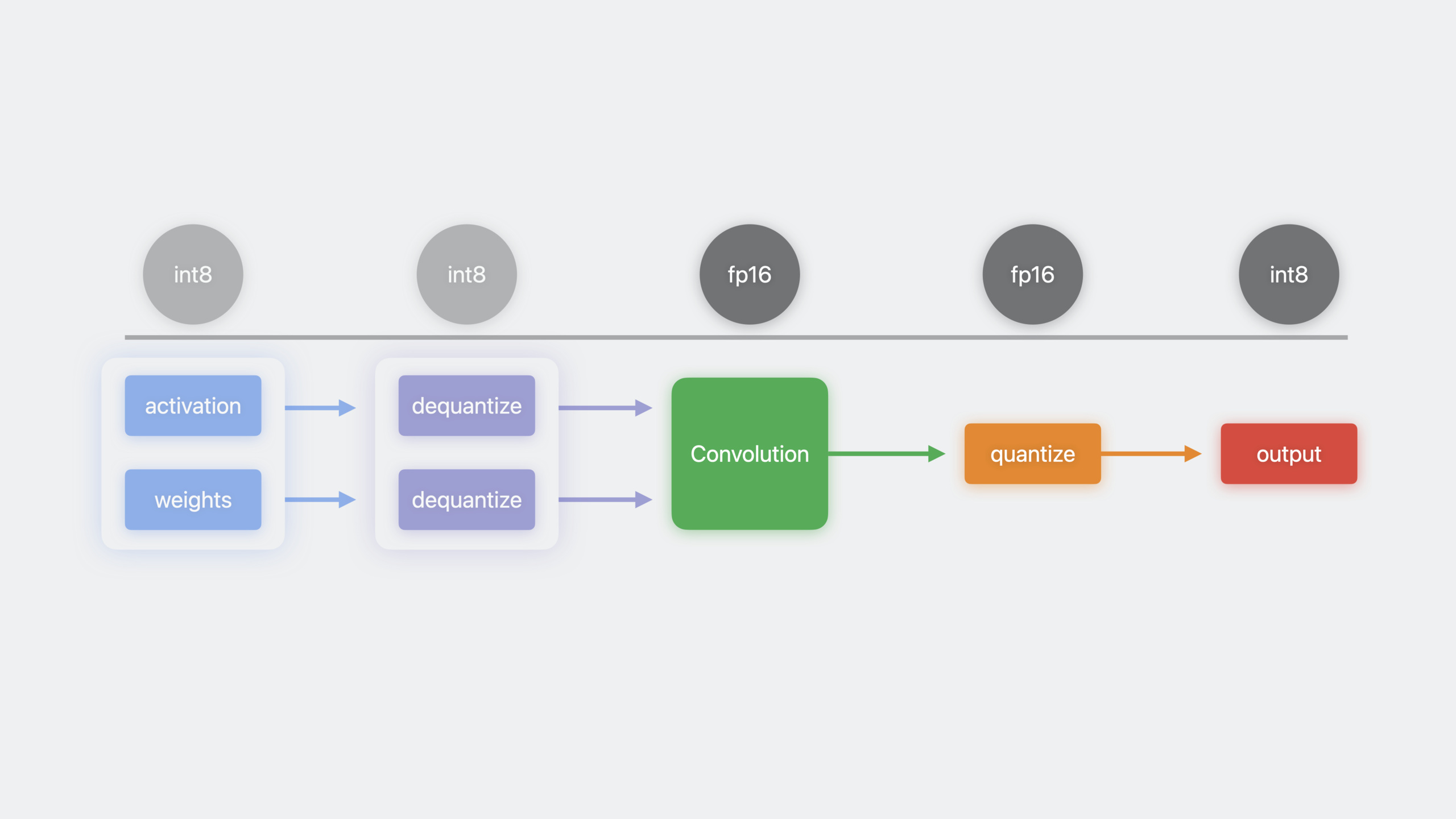
MPSGraph 新增对称和非对称 Int8 量化 API。推理时用 8 位整数代替浮点数,可以节省内存带宽、降低模型内存占用。
流程:Int8 的激活和权重输入,先用 dequantizeTensor 反量化为浮点数,送入卷积等操作,输出再用 quantizeTensor 量化回 Int8。MPSGraph 会自动把这些操作融合成单个 kernel,减少内存搬运。
详细内容
启用 PyTorch MPS 性能分析
(04:31)
import torch
import torch_mps

# 启动 MPS 分析器
torch.mps.profiler.start(mode="interval", wait_until_completed=False)

# 你的训练代码
model = MyModel().to("mps")
for batch in dataloader:
    output = model(batch.to("mps"))
    loss = criterion(output, target)
    loss.backward()
    optimizer.step()

# 停止分析器
torch.mps.profiler.stop()
关键点:
torch.mps.profiler.start()启用 OS signpost 记录- 在 Instruments 的 Metal System Trace 中查看 os_signpost 时间线
- 时间线显示每个算子的执行时间、数据类型、拷贝长度
- 找 GPU 时间轴上的空白区域,通常对应 CPU 回退
自定义 Metal 算子实现
(07:00)
// softshrink_metal.mm
#import <ATen/mps/MPSStream.h>
#import <ATen/mps/MPSAllocator.h>

void customSoftshrink(const at::Tensor& input, at::Tensor& output, float lambda) {
    // 获取 MPSStream 的命令缓冲区
    id<MTLCommandBuffer> commandBuffer = at::mps::get_command_buffer();
    id<MTLDevice> device = at::mps::GetMPSDevice();

    // 获取串行分发队列
    dispatch_queue_t queue = at::mps::get_dispatch_queue();

    dispatch_sync(queue, ^{
        id<MTLComputeCommandEncoder> encoder = [commandBuffer computeCommandEncoder];

        // 加载 Metal shader
        id<MTLLibrary> library = [device newDefaultLibrary];
        id<MTLFunction> function = [library newFunctionWithName:@"softshrink_kernel"];
        id<MTLComputePipelineState> pipeline = [device newComputePipelineStateWithFunction:function error:nil];

        [encoder setComputePipelineState:pipeline];
        [encoder setBuffer:input.storage().data() offset:0 atIndex:0];
        [encoder setBuffer:output.storage().data() offset:0 atIndex:1];
        [encoder setBytes:&lambda length:sizeof(float) atIndex:2];

        MTLSize gridSize = MTLSizeMake(input.numel(), 1, 1);
        MTLSize threadGroupSize = MTLSizeMake(256, 1, 1);
        [encoder dispatchThreads:gridSize threadsPerThreadgroup:threadGroupSize];
        [encoder endEncoding];
    });

    // 同步等待(如需序列化)
    at::mps::synchronize();
}
关键点:
get_command_buffer()获取当前 MPSStream 的命令缓冲区get_dispatch_queue()获取串行队列,确保多线程提交被序列化- 在
dispatch_sync中编码 kernel,避免竞态条件 synchronize()等待当前命令缓冲区完成;不需要序列化时用commit()
Python 绑定与编译
(07:58)
# softshrink_binding.cpp
#include <torch/extension.h>
#include <pybind11/pybind11.h>

void customSoftshrink(const at::Tensor& input, at::Tensor& output, float lambda);

PYBIND11_MODULE(TORCH_EXTENSION_NAME, m) {
    m.def("custom_softshrink", &customSoftshrink, "Custom Softshrink kernel");
}

# 编译并加载扩展
from torch.utils.cpp_extension import load

custom_ops = load(
    name="custom_softshrink",
    sources=["softshrink_binding.cpp", "softshrink_metal.mm"],
    extra_compile_args=["-std=c++17"]
)

# 在训练脚本中使用
from custom_ops import custom_softshrink

class CustomSoftshrink(torch.nn.Module):
    def __init__(self, lambd=0.5):
        super().__init__()
        self.lambd = lambd

    def forward(self, input):
        output = torch.empty_like(input)
        custom_softshrink(input, output, self.lambd)
        return output

# 替换原模型中的 Softshrink
model = nn.Sequential(
    nn.Linear(784, 256),
    CustomSoftshrink(),
    nn.Linear(256, 10)
).to("mps")
关键点:
PYBIND11_MODULE把 C++ 函数暴露给 Pythontorch.utils.cpp_extension.load()自动编译并加载共享库extra_compile_args可以传额外的编译器参数- 替换原算子后,模型在 MPS 上全程 GPU 执行,无 CPU 回退
自动混合精度训练
(10:57)
import torch

model = MyModel().to("mps")
optimizer = torch.optim.Adam(model.parameters())
scaler = torch.cuda.amp.GradScaler()  # 也适用于 MPS

for batch, target in dataloader:
    batch = batch.to("mps")
    target = target.to("mps")

    # autocast 自动选择每层合适的精度
    with torch.autocast(device_type="mps", dtype=torch.float16):
        output = model(batch)
        loss = criterion(output, target)

    scaler.scale(loss).backward()
    scaler.step(optimizer)
    scaler.update()
    optimizer.zero_grad()
关键点:
torch.autocast(device_type="mps", dtype=torch.float16)启用混合精度- 支持 float16 和 bfloat16 两种模式
- 卷积层和线性层自动用半精度,归约层保持全精度
GradScaler防止梯度下溢
MPSGraphPackage 序列化
(16:34)
// 创建并保存 MPSGraphPackage
MPSGraphExecutable *executable = [graph compileWithDevice:device
                                               feeds:feeds
                                            targetTensors:targets
                                     targetOperations:nil];

MPSGraphExecutableSerializationDescriptor *descriptor = [[MPSGraphExecutableSerializationDescriptor alloc] init];
[descriptor setMinimumDeploymentTarget:@"16.0"];

NSURL *packageURL = [NSURL fileURLWithPath:@"model.mpsgraphpackage"];
[executable serializeToURL:packageURL descriptor:descriptor error:nil];

// 运行时加载
MPSGraphExecutableCompilationDescriptor *compDescriptor = [[MPSGraphExecutableCompilationDescriptor alloc] init];
MPSGraphExecutable *loadedExecutable = [[MPSGraphExecutable alloc] initWithPackageURL:packageURL
                                                                        compilationDescriptor:compDescriptor];
关键点:
serializeToURL:descriptor:error:把预编译的 executable 写入文件minimumDeploymentTarget指定最低支持的系统版本- 运行时直接用
initWithPackageURL加载,跳过编译阶段 - 可以用 MPSGraphTool 把 Core ML 或 ONNX 模型直接转换
MPSGraphTool 命令行转换
# Core ML 模型转 MPSGraphPackage
mpsgraphtool --convert coreml --input model.mlpackage \
             --output model.mpsgraphpackage \
             --minimum-deployment-target "17.0"

# ONNX 模型转 MPSGraphPackage
mpsgraphtool --convert onnx --input model.onnx \
             --output model.mpsgraphpackage \
             --minimum-deployment-target "17.0"
关键点:
--convert指定源模型格式:coreml 或 onnx--minimum-deployment-target设置最低 OS 版本- 转换后的 package 可以直接在 App 中加载执行
核心启发
1. Mac 上的本地 Stable Diffusion 生成器
- 做什么:在 Mac 上运行 Stable Diffusion 生成图片,完全离线
- 为什么值得做:PyTorch 2.0 MPS 后端已官方支持 Stable Diffusion,M2 系列芯片速度可用
- 怎么开始:用
diffusers库加载 Stable Diffusion 模型,设置device="mps",启用torch.autocast加速
2. 实时视频目标检测 App
- 做什么:摄像头实时画面里检测和标注物体
- 为什么值得做:YOLOv5 已官方支持 MPS 后端,帧率足够实时
- 怎么开始:用
torch.hub.load('ultralytics/yolov5', 'yolov5s')加载模型,.to('mps')送到 GPU,用AVCaptureVideoDataOutput获取帧
3. 自定义算子加速小众模型
- 做什么:你的研究模型里有 MPS 不支持的算子,写自定义 Metal kernel 替代
- 为什么值得做:一个 CPU 回退算子可能拖慢整个模型,自定义 kernel 能恢复 GPU 全速
- 怎么开始:先用
torch.mps.profiler定位回退算子,按四步法写 Objective-C + Metal 实现 + Python 绑定
4. 移动端模型量化部署
- 做什么:把训练好的浮点模型量化为 Int8,减少 App 包体积和运行时内存
- 为什么值得做:MPSGraph 的 Int8 量化 API 自动融合反量化-计算-量化流程,推理更快
- 怎么开始:用 MPSGraphTool 把 ONNX 模型转成 MPSGraphPackage,在 graph 中插入
quantizeTensor和dequantizeTensor节点
关联 Session
- Improve Core ML integration with async prediction — Core ML 异步预测 API 与性能优化
- Accelerate machine learning with Metal — WWDC22 的 Metal ML 加速基础
- Build customized ML models with Metal Performance Shaders Graph — 用 MPSGraph 构建自定义 ML 模型
评论
GitHub Issues · utterances