
Highlight
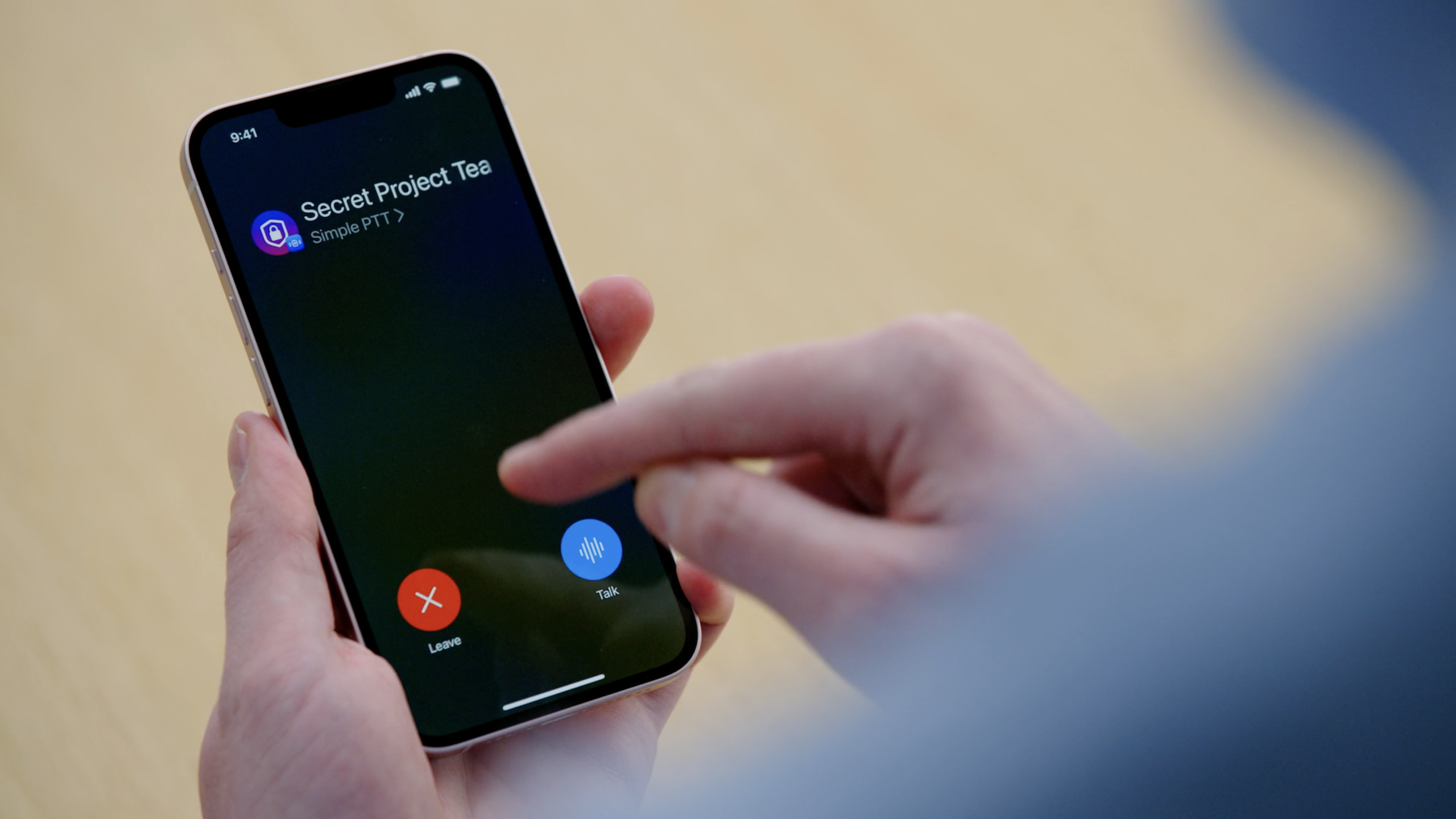
iOS 16 的 PushToTalk framework 提供系统级对讲 UI、后台麦克风激活、Push to Talk 专用 APNS 通知和频道恢复机制,让对讲类 App 可以接入锁屏与系统界面,同时继续使用自己的音频编码、流媒体和后端传输链路。
核心内容
对讲类 App 的难点不在一个按钮。用户可能在锁屏、其他 App、蓝牙配件或网络重连时开始说话;接收端也可能在 App 已经挂起时收到音频。开发者既要让体验像系统通话一样及时,又要避免长时间占用麦克风、网络和后台运行时间。
PushToTalk framework 把这条链路拆成几个明确边界。系统负责频道入口、状态栏蓝色胶囊、锁屏 UI、麦克风激活、音频会话激活和接收通知后的后台唤醒。App 负责自己的业务频道、服务端、音频编码、音频流传输和成员状态。
这场 session 的主线很清楚:先加入一个 channel,让系统知道当前对讲会话;再通过 PTChannelManager 处理开始和结束发言;最后用新的 Push to Talk APNS 通知唤醒接收端,并报告当前说话人。系统只在传输或接收音频时给后台运行时间,空闲时会挂起 App 来节省电量。
详细内容
加入频道:系统 UI 从 channel 开始
(05:33)接入前要在 Xcode 项目里打开 Push To Talk background mode、Push To Talk capability 和 Push Notifications capability。App 还要请求录音权限,并在 Info.plist 中提供麦克风用途说明。
(06:16)Push to Talk 的会话叫 channel。App 必须先加入 channel,系统 UI 才会出现,App 也会收到这个 channel 生命周期内可用的 APNS push token。
func setupChannelManager() async throws {
    channelManager = try await PTChannelManager.channelManager(delegate: self,
                                                               restorationDelegate: self)
}
关键点:
PTChannelManager.channelManager创建 channel manager,这是 App 与 PushToTalk framework 交互的主入口。delegate: self接收加入、离开、发言和音频会话事件。restorationDelegate: self用于系统在 App 重启或设备重启后恢复已有 channel。- 演讲建议在
ApplicationDelegate的didFinishLaunchingWithOptions中尽早初始化,确保后台启动时也能恢复 channel 并接收推送。
(07:33)加入 channel 时,App 提供一个 UUID 和一个描述对象。UUID 后续会贯穿所有 manager 调用;描述对象提供系统 UI 展示的名称和图片。
func joinChannel(channelUUID: UUID) {
    let channelImage = UIImage(named: "ChannelIcon")
    channelDescriptor = PTChannelDescriptor(name: "Awesome Crew", image: channelImage)

    // Ensure that your channel descriptor and UUID are persisted to disk for later use.
    channelManager.requestJoinChannel(channelUUID: channelUUID,
                                      descriptor: channelDescriptor)
}
关键点:
channelUUID是这个 Push to Talk channel 的稳定标识。PTChannelDescriptor提供 channel 名称和图像,系统 UI 会用它帮助用户识别频道。- 注释提醒要把 descriptor 和 UUID 持久化到磁盘,因为恢复 channel 时还会用到。
requestJoinChannel只能在 App 前台运行时请求加入,这是 transcript 明确给出的限制。
(08:11)加入成功后,delegate 会收到加入结果和临时 push token。这个 token 要发给服务端,用于向该设备发送 Push to Talk 通知。
func channelManager(_ channelManager: PTChannelManager,
                    didJoinChannel channelUUID: UUID,
                    reason: PTChannelJoinReason) {
    // Process joining the channel
    print("Joined channel with UUID: \(channelUUID)")
}

func channelManager(_ channelManager: PTChannelManager,
                    receivedEphemeralPushToken pushToken: Data) {
    // Send the variable length push token to the server
    print("Received push token")
}
关键点:
didJoinChannel是 App 已加入 channel 的确认点。receivedEphemeralPushToken返回这个 channel 生命周期内可用的 APNS token。- 代码注释强调 push token 是变长数据,服务端和客户端都不应硬编码长度。
- 服务端后续用这个 token 通知接收端有新音频可播放。
恢复和状态更新:不要让系统 UI 显示过期信息
(09:22)PushToTalk 支持在 App 被终止或设备重启后恢复之前的 channel。恢复时,系统会向 restoration delegate 要 channel descriptor。
func channelDescriptor(restoredChannelUUID channelUUID: UUID) -> PTChannelDescriptor {
    return getCachedChannelDescriptor(channelUUID)
}
关键点:
restoredChannelUUID是系统正在恢复的 channel。getCachedChannelDescriptor表示从本地缓存取 descriptor。- transcript 明确要求这个方法尽快返回,不要在这里做网络请求或其他阻塞任务。
- 这也是前面持久化 UUID 和 descriptor 的原因。
(10:12)channel 名称、图片、网络连接状态变化时,App 要主动告诉系统。系统 UI 会据此更新显示,并在服务连接不可用时阻止用户发言。
func updateChannel(_ channelDescriptor: PTChannelDescriptor) async throws {
    try await channelManager.setChannelDescriptor(channelDescriptor,
                                                  channelUUID: channelUUID)
}
关键点:
setChannelDescriptor用新的 descriptor 更新系统保存的 channel 信息。channelUUID指明要更新哪个 channel。- 适用场景包括频道改名、频道头像变化或本地缓存刷新。
func reportServiceIsReconnecting() async throws {
    try await channelManager.setServiceStatus(.connecting, channelUUID: channelUUID)
}

func reportServiceIsConnected() async throws {
    try await channelManager.setServiceStatus(.ready, channelUUID: channelUUID)
}
关键点:
.connecting告诉系统服务正在重连。- transcript 说明该状态会更新系统 UI,并在 connecting 或 disconnected 时阻止用户发言。
.ready表示连接恢复,用户可以继续传输音频。- PushToTalk 不替代 App 的网络层,服务状态仍由 App 根据自己的后端连接判断。
发言:等系统激活音频会话后再录音
(11:09)用户可以从 App 内开始发言,也可以从系统 UI 开始。App 如果通过 CoreBluetooth 支持硬件按钮,也可以在后台响应外设 characteristic 变化后请求开始传输。
func startTransmitting() {
    channelManager.requestBeginTransmitting(channelUUID: channelUUID)
}

// PTChannelManagerDelegate

func channelManager(_ channelManager: PTChannelManager,
                    failedToBeginTransmittingInChannel channelUUID: UUID,
                    error: Error) {
    let error = error as NSError

    switch error.code {
    case PTChannelError.callIsActive.rawValue:
        print("The system has another ongoing call that is preventing transmission.")
    default:
        break
    }
}
关键点:
requestBeginTransmitting请求在指定 channel 中开始发言。- 这个请求可以来自前台 App,也可以来自受支持的蓝牙外设事件。
failedToBeginTransmittingInChannel处理系统拒绝开始发言的情况。- 示例中的
PTChannelError.callIsActive对应 transcript 里的场景:正在进行的蜂窝通话会阻止 Push to Talk 传输。
(12:41)请求开始发言不等于马上录音。真正的录音时机是 delegate 收到开始传输事件,并且系统激活了 AVAudioSession。
func channelManager(_ channelManager: PTChannelManager,
                    channelUUID: UUID,
                    didBeginTransmittingFrom source: PTChannelTransmitRequestSource) {
    print("Did begin transmission from: \(source)")
}

func channelManager(_ channelManager: PTChannelManager,
                    didActivate audioSession: AVAudioSession) {
    print("Did activate audio session")
    // Configure your audio session and begin recording
}
关键点:
didBeginTransmittingFrom会告诉 App 发言是从系统 UI、程序 API 还是硬件按钮事件开始的。didActivate audioSession是开始录音的信号。- transcript 明确说不要自行 start 或 stop audio session,系统会在合适时机激活。
- App 可以在 audio session 激活后配置录音并把音频流发送到自己的服务器。
(13:19)结束发言同样由 manager 和 delegate 协作完成。系统停用音频会话后,App 再清理录音资源。
func channelManager(_ channelManager: PTChannelManager,
                    channelUUID: UUID,
                    didEndTransmittingFrom source: PTChannelTransmitRequestSource) {
    print("Did end transmission from: \(source)")
}

func channelManager(_ channelManager: PTChannelManager,
                    didDeactivate audioSession: AVAudioSession) {
    print("Did deactivate audio session")
    // Stop recording and clean up resources
}
关键点:
didEndTransmittingFrom记录发言结束以及结束来源。didDeactivate audioSession表示系统已经停用音频会话。- App 在这里停止录音并释放资源。
- 传输期间仍要处理音频中断,例如电话和 FaceTime call。
接收:Push to Talk 专用 APNS 通知唤醒 App
(13:42)接收音频依赖新的 Push to Talk push notification type。服务端有新音频时,用加入 channel 时拿到的 device push token 发通知。APNS header 中 push type 要设为 pushtotalk,topic 要使用 bundle identifier 加 .voip-ptt 后缀,priority 建议为 10,expiration 建议为 0。
(15:29)App 在后台启动后,需要尽快返回 PTPushResult。如果有远端说话人,就返回 active participant;如果服务端要求离开 channel,就返回 leave channel。
func incomingPushResult(channelManager: PTChannelManager,
                        channelUUID: UUID,
                        pushPayload: [String : Any]) -> PTPushResult {

    guard let activeSpeaker = pushPayload["activeSpeaker"] as? String else {
        // If no active speaker is set, the only other valid operation
        // is to leave the channel
        return .leaveChannel
    }

    let activeSpeakerImage = getActiveSpeakerImage(activeSpeaker)
    let participant = PTParticipant(name: activeSpeaker, image: activeSpeakerImage)
    return .activeRemoteParticipant(participant)
}
关键点:
pushPayload可以包含 App 自定义 key,示例用activeSpeaker表示当前说话人。- 没有 active speaker 时,示例返回
.leaveChannel。 PTParticipant包含说话人的名字和可选图片,系统 UI 会用它显示谁正在说话。- 返回
.activeRemoteParticipant后,系统会把 channel 设置为接收模式,激活音频会话,并调用 audio session 激活 delegate。 - transcript 要求这个方法尽快返回;如果头像不在本地,可以先只返回名字,再异步下载图片并更新 active participant。
(17:03)远端说话结束时,App 要清空 active remote participant。系统随后更新 Push to Talk UI,并允许用户再次发言。
func stopReceivingAudio() {
    channelManager.setActiveRemoteParticipant(nil, channelUUID: channelUUID)
}
关键点:
setActiveRemoteParticipant(nil, channelUUID:)表示当前不再接收远端音频。- 系统会停用 App 的音频会话。
- UI 会离开 receive mode,用户可以重新按下 Talk。
- 这一步要和服务端音频流结束事件对齐,否则系统 UI 会误以为仍在接收。
电量和网络:后台运行时间只在需要时出现
(17:37)PushToTalk 使用共享系统资源。同一时间系统只能有一个 active Push To Talk App,蜂窝通话、FaceTime 和 VoIP call 会优先于 Push To Talk。App 要优雅处理失败回调。
(18:18)系统负责激活和停用 audio session,但 App 仍应在启动时把 audio session category 配成 play and record。系统还会提供麦克风激活和停用音效,App 不应再播放自己的提示音。
(19:05)PushToTalk 只在传输和接收音频等必要时给后台 runtime。空闲时,App 会被系统挂起,网络连接也会断开。演讲建议考虑采用 Network.framework 和 QUIC,减少重新建立安全 TLS 连接所需步骤,并改善初始连接速度。
func reportServiceIsReconnecting() async throws {
    try await channelManager.setServiceStatus(.connecting, channelUUID: channelUUID)
}

func reportServiceIsConnected() async throws {
    try await channelManager.setServiceStatus(.ready, channelUUID: channelUUID)
}
关键点:
- 后台挂起后网络连接断开是系统节电策略的一部分。
- 重连期间用
.connecting更新系统 UI,避免用户按下 Talk 后才发现服务不可用。 - 连接恢复后再报告
.ready。 - 如果实时音频链路对恢复速度敏感,可以结合 Network.framework 和 QUIC 优化连接建立。
核心启发
-
做什么:给团队协作 App 增加“频道式语音喊话”。 为什么值得做:PushToTalk 提供系统 UI 和锁屏入口,用户不用打开 App 就能回复。 怎么开始:先用
PTChannelManager.channelManager初始化 manager,再用requestJoinChannel加入一个团队 channel,把receivedEphemeralPushToken发给自己的服务端。 -
做什么:给仓储、医护或现场巡检 App 增加蓝牙按键发言。 为什么值得做:session 明确提到 App 可以继续用 CoreBluetooth 集成无线蓝牙配件,并在外设 characteristic 变化时请求发言。 怎么开始:把外设按钮事件映射到
requestBeginTransmitting(channelUUID:),在didActivate audioSession后开始录音和上传音频流。 -
做什么:做一个接收端“谁在说话”的透明提示。 为什么值得做:系统 UI 会显示 active participant 的名字和图片,用户能知道当前收到的是谁的音频。 怎么开始:服务端在 Push to Talk payload 中放入说话人标识,App 在
incomingPushResult中构造PTParticipant并返回.activeRemoteParticipant。 -
做什么:给对讲服务增加网络状态保护。 为什么值得做:系统 UI 可以根据 service status 阻止用户在服务 connecting 或 disconnected 时发言,减少失败体验。 怎么开始:把后端连接状态同步到
setServiceStatus(.connecting, channelUUID:)和setServiceStatus(.ready, channelUUID:)。 -
做什么:把头像加载从接收推送的关键路径移出去。 为什么值得做:transcript 要求 incoming push delegate 尽快返回,阻塞会影响接收链路。 怎么开始:本地没有头像时先返回只有 name 的
PTParticipant,随后在后台下载图片,再调用setActiveRemoteParticipant更新显示。
关联 Session
- Reduce networking delays for a more responsive app — Push to Talk App 空闲后网络会断开,这场 session 讲 Network.framework、HTTP/3 和 QUIC 如何降低重新连接与请求延迟。
- Power down: Improve battery consumption — PushToTalk 的后台模型以节电为核心,这场 session 系统讲解后台数据处理、长任务和电量消耗。
- Meet Web Push for Safari — 两场都涉及服务端通过 Apple 推送链路触达客户端,可对照理解订阅、发送和调试推送的完整流程。
评论
GitHub Issues · utterances