
Highlight
这场 Session 深入讲解了 Metal 3 中光线追踪相关的性能优化手段。如果你去年已经在用 Metal ray tracing,今年这几项改进可以让你的渲染管线跑得更快、支持更大的场景。
核心内容
光线追踪的成本主要来自两件事:发射大量光线,以及在场景里反复查找光线命中的几何体。Metal 的 ray tracing API 已经把这条路径放进 shader 函数里,开发者通常在 compute 或 fragment function 里生成 ray,再用 intersector 查询 acceleration structure(加速结构)。
(00:57)这套流程能做反射、阴影和全局光照,但每一帧会执行大量相交测试。一个场景越大,intersection function(相交函数)和 acceleration structure build(加速结构构建)越容易成为热路径。
Metal 3 的改动集中在这些热路径上。第一类改动减少 shader 里的内存访问。第二类改动加快 acceleration structure 的 build、refit 和并行调度。第三类改动让 Xcode 14 能检查每个 primitive、每行 shader 代码和 shader 栈溢出。
这场 session 的主线很明确:把每次光线命中时必须读的数据放到更近的位置,把每帧必须构建的数据拆成更适合 GPU 执行的形式,再用工具确认瓶颈是否真的消失。
详细内容
用 per-primitive data 减少相交函数的间接访问
(04:04)演讲从 alpha testing 开始。透明贴图常见于树叶、栅栏、头发等模型。相交函数需要根据纹理 alpha 决定这次 triangle hit 是否成立。
最小逻辑很简单。
float alpha = texture.sample(sampler, UV).w;
return alpha >= 0.5f;
关键点:
texture.sample(sampler, UV)用当前 UV 对贴图采样。.w取 alpha 通道。alpha >= 0.5f决定这次命中是否通过 alpha test。
(05:46)问题出在真实相交函数需要先找到纹理和 UV。旧写法会从 instance data 和 material buffer 里绕几层。
[[intersection(triangle, raytracing::triangle_data, raytracing::instancing)]]
bool alphaTestIntersection(float2               coordinates    [[barycentric_coord]],
                           unsigned int         primitiveIndex [[primitive_id]],
                           unsigned int         instanceIndex  [[instance_id]],
                           device GlobalData   *globalData     [[buffer(1)]],
                           device InstanceData *instanceData   [[buffer(0)]])
{
    device Material *materials = globalData->materials;
    InstanceData instance = instanceData[instanceIndex];
    float2 UV = calculateSamplingCoords(coordinates,
                                        instance.uvs[primitiveIndex * 3 + 0],
                                        instance.uvs[primitiveIndex * 3 + 1],
                                        instance.uvs[primitiveIndex * 3 + 2]);
    int materialIndex = instance.materialIndices[primitiveIndex];
    float alpha = materials[materialIndex].texture.sample(sam, UV).w;
    return alpha >= 0.5f;
}
关键点:
[[intersection(... )]]声明这是 triangle ray tracing 使用的相交函数。coordinates提供 barycentric coordinates,用来插值三角形顶点属性。primitiveIndex和instanceIndex用来定位当前 primitive 与 instance。globalData->materials先拿到全局材质数组。instanceData[instanceIndex]再取当前 instance 的 UV 和材质索引。calculateSamplingCoords用 primitive 的三个 UV 插值得到采样坐标。instance.materialIndices[primitiveIndex]查到材质索引。materials[materialIndex].texture.sample(...)继续跳到材质,再读纹理 alpha。
(06:48)Metal 3 增加了 per-primitive data。开发者可以把相交函数真正需要的数据直接存进 acceleration structure。演讲的例子只保存 texture 和三个顶点的 UV。
struct PrimitiveData
{
    texture2d<float> texture;
    float2 uvs[3];
};
关键点:
PrimitiveData是每个 primitive 关联的一小块数据。texture2d<float> texture把 alpha test 需要的贴图句柄放在 primitive 上。float2 uvs[3]保存三角形三个顶点的 UV。- 演讲提醒,这里可以存任意数据,但保持尺寸较小有助于获得更好性能。
(07:08)相交函数因此变短。它不再接收 global data、instance data、primitive id 和 instance id,只读取一个 primitive data 指针。
// Alpha testing intersection function
[[intersection(triangle, raytracing::triangle_data, raytracing::instancing)]]
bool alphaTestIntersection(float2               coordinates    [[barycentric_coord]],
                     const device PrimitiveData *primitiveData [[primitive_data]])
{
    PrimitiveData ppd = *primitiveData;
    float2 UV = calculateSamplingCoords(coordinates,
                                        ppd.uvs[0],
                                        ppd.uvs[1],
                                        ppd.uvs[2]);
    float alpha = ppd.texture.sample(sam, UV).w;
    return alpha >= 0.5f;
}
关键点:
[[primitive_data]]让相交函数直接接收当前 primitive 的数据指针。PrimitiveData ppd = *primitiveData是这个函数唯一需要的 device memory load。ppd.uvs[0...2]直接提供三角形 UV,避免从 instance data 继续解引用。ppd.texture.sample(sam, UV).w直接使用 primitive 绑定的纹理采样 alpha。- 返回值仍然只表达一件事:这次 hit 是否通过 alpha test。
(08:54)要把这块数据放进 acceleration structure,需要在 geometry descriptor 上设置 buffer、element size、stride 和 offset。
geometryDescriptor.primitiveDataBuffer = primitiveDataBuffer
geometryDescriptor.primitiveDataElementSize = MemoryLayout<PrimitiveData>.size
geometryDescriptor.primitiveDataStride = MemoryLayout<PrimitiveData>.stride
geometryDescriptor.primitiveDataBufferOffset = primitiveDataOffset
关键点:
primitiveDataBuffer指向保存所有 primitive data 的 Metal buffer。primitiveDataElementSize说明每个 primitive 存多少字节。primitiveDataStride处理 buffer 内数据未紧密排列的情况。primitiveDataBufferOffset处理 primitive data 不从 buffer 开头存放的情况。
(09:18)per-primitive data 不只给相交函数用。它也可以从 intersection result 和 intersection query 中取到,用于 shading。
// Intersection function argument:
const device void *primitiveData [[primitive_data]]

// Intersection result:
primitiveData = intersection.primitive_data;

// Intersection query:
primitiveData = query.get_candidate_primitive_data();
primitiveData = query.get_committed_primitive_data();
关键点:
[[primitive_data]]是相交函数参数的入口。intersection.primitive_data从最终 intersection result 读取同一份数据。get_candidate_primitive_data()读取候选命中的 primitive data。get_committed_primitive_data()读取已确认命中的 primitive data。
Apple 在自己的测试应用中看到 per-primitive data 带来 10% 到 16% 的性能提升。这个数字来自减少内存访问和指针间接引用;alpha test 的判定逻辑没有变化。
复用 intersection function table 上的 buffer
(10:18)ray tracing kernel 和 intersection function 经常需要同一批资源。旧流程里,应用会把资源绑定到 intersection function table,同时再把同一份资源绑定给主 ray tracing kernel。
Metal 3 的 Metal Shading Language 允许 shader 从 intersection function table 直接取 buffer 和 visible function table。
device int *buffer = intersectionFunctionTable.get_buffer<device int *>(index);

visible_function_table<uint(uint)> table =
    intersectionFunctionTable.get_visible_function_table<uint(uint)>(index);

uint result = table[0](parameter);
关键点:
get_buffer<device int *>(index)从 intersection function table 上按索引读取已绑定 buffer。get_visible_function_table<uint(uint)>(index)按函数类型读取 visible function table。table[0](parameter)调用 table 中的 visible function。- 这个能力减少重复绑定,适合 intersection function 与主 kernel 共用资源的场景。
从 indirect command buffer 发起光线追踪
(11:15)Indirect command buffer(间接命令缓冲)用于 GPU-driven pipeline。Metal 3 让它支持 ray tracing。开启方式只有一个 descriptor flag。
let icbDescriptor = MTLIndirectCommandBufferDescriptor()

icbDescriptor.supportRayTracing = true
关键点:
MTLIndirectCommandBufferDescriptor()创建 ICB 描述对象。supportRayTracing = true声明这个 ICB 会调度使用 ray tracing 的 graphics 或 compute function。- ray tracing 仍然在这些函数里按常规方式使用。
这个改动对 GPU-driven renderer 有用。应用可以让 GPU 编码后续工作,再在被调度的 shader 中执行 ray tracing 查询。
加快 acceleration structure 的 build、refit 和并行执行
(13:16)游戏加载新关卡时,通常会加载模型和纹理,也会为模型构建 primitive acceleration structures。进入主循环后,动态角色和动画模型常用 refit 更新;场景物体新增、移除或大幅移动时,instance acceleration structure 通常需要完整 rebuild。
(14:39)Metal 3 在 Apple Silicon 上把 acceleration structure build 提升到最高 2.3 倍,refit 提升到最高 38%。对很多小型 primitive acceleration structures,Metal 还会尽量并行执行 build、compact 和 refit,最高可达到 2.8 倍 build 提升。
(15:43)要得到并行收益,多个 build 需要使用同一个 acceleration structure command encoder,并且不能共用同一个 scratch buffer。演讲给出的模式是使用一小组 scratch buffers 轮换。
for (index, accelerationStructure) in accelerationStructures.enumerated() {
    encoder.build(accelerationStructure: accelerationStructure,
                  descriptor: descriptors[index],
                  scratchBuffer: scratchBuffers[index % numScratchBuffers],
                  scratchBufferOffset: 0)
}
关键点:
accelerationStructures.enumerated()遍历一组需要构建的 acceleration structures。encoder.build(...)在同一个 encoder 上连续编码多个 build。descriptors[index]为每个 acceleration structure 提供对应描述。scratchBuffers[index % numScratchBuffers]从 scratch buffer 池中轮换,避免所有 build 抢同一块 scratch buffer。scratchBufferOffset: 0表示每个 scratch buffer 从起始位置使用。
直接使用更紧凑的 vertex format
(16:29)以前 acceleration structure 要求三分量、全精度浮点顶点数据。使用 half precision、normalized integer 或二维平面几何时,应用可能要先解包并复制到临时 buffer,只为了构建 acceleration structure。
Metal 3 允许 acceleration structure build 直接消费更多 vertex formats。设置入口在 triangle geometry descriptor 上。
let geometryDescriptor = MTLAccelerationStructureTriangleGeometryDescriptor()

geometryDescriptor.vertexFormat = .uint1010102Normalized
关键点:
MTLAccelerationStructureTriangleGeometryDescriptor()描述一组三角形几何。vertexFormat声明 vertex buffer 中顶点的实际格式。.uint1010102Normalized是演讲示例中的紧凑 normalized integer 格式。- build 阶段可以直接读取该格式,避免为 acceleration structure 额外准备全精度临时副本。
给 geometry descriptor 设置 transformation matrix
(17:37)新的 transformation matrix 能和紧凑 vertex format 配合使用。举例来说,模型可以把坐标归一化到 0 到 1 范围,用 normalized integer 存储;运行时再提供 scale 和 offset 矩阵,把顶点变回原始位置。
var scaleTransform =
    MTLPackedFloat4x3(columns: (
        MTLPackedFloat3Make( scale.x,      0.0,      0.0),
        MTLPackedFloat3Make(     0.0,  scale.y,      0.0),
        MTLPackedFloat3Make(     0.0,      0.0,  scale.z),
        MTLPackedFloat3Make(offset.x, offset.y, offset.z))

let transformBuffer = device.makeBuffer(length: MemoryLayout<MTLPackedFloat4x3>.size,
                                        options: .storageModeShared)!

transformBuffer.contents().copyMemory(from: &scaleTransform,
                                      byteCount: MemoryLayout<MTLPackedFloat4x3>.size)
关键点:
MTLPackedFloat4x3保存 build acceleration structure 时使用的 4x3 变换矩阵。- 前三列保存
scale.x、scale.y、scale.z。 - 第四列保存
offset.x、offset.y、offset.z。 makeBuffer创建能容纳该矩阵的 Metal buffer。copyMemory把 CPU 侧矩阵复制到 buffer 中。
(18:51)然后把这个 buffer 交给 geometry descriptor。
let geometryDescriptor = MTLAccelerationStructureTriangleGeometryDescriptor()

geometryDescriptor.transformationMatrixBuffer = transformBuffer
geometryDescriptor.transformationMatrixBufferOffset = 0
关键点:
transformationMatrixBuffer指向保存矩阵的 buffer。transformationMatrixBufferOffset指明矩阵在 buffer 内的起始位置。- build acceleration structure 时,Metal 会用该矩阵预变换 vertex data。
(19:05)同一个能力还能减少 instance 数量。对于一组简单且重叠的 boxes 和 sphere,可以给每个 geometry descriptor 设置自己的 transformation matrix,再合并到一个 primitive acceleration structure。演讲说明,这样生成的 primitive acceleration structure build 时间更少,intersect 也更快。
从 heap 分配 acceleration structure
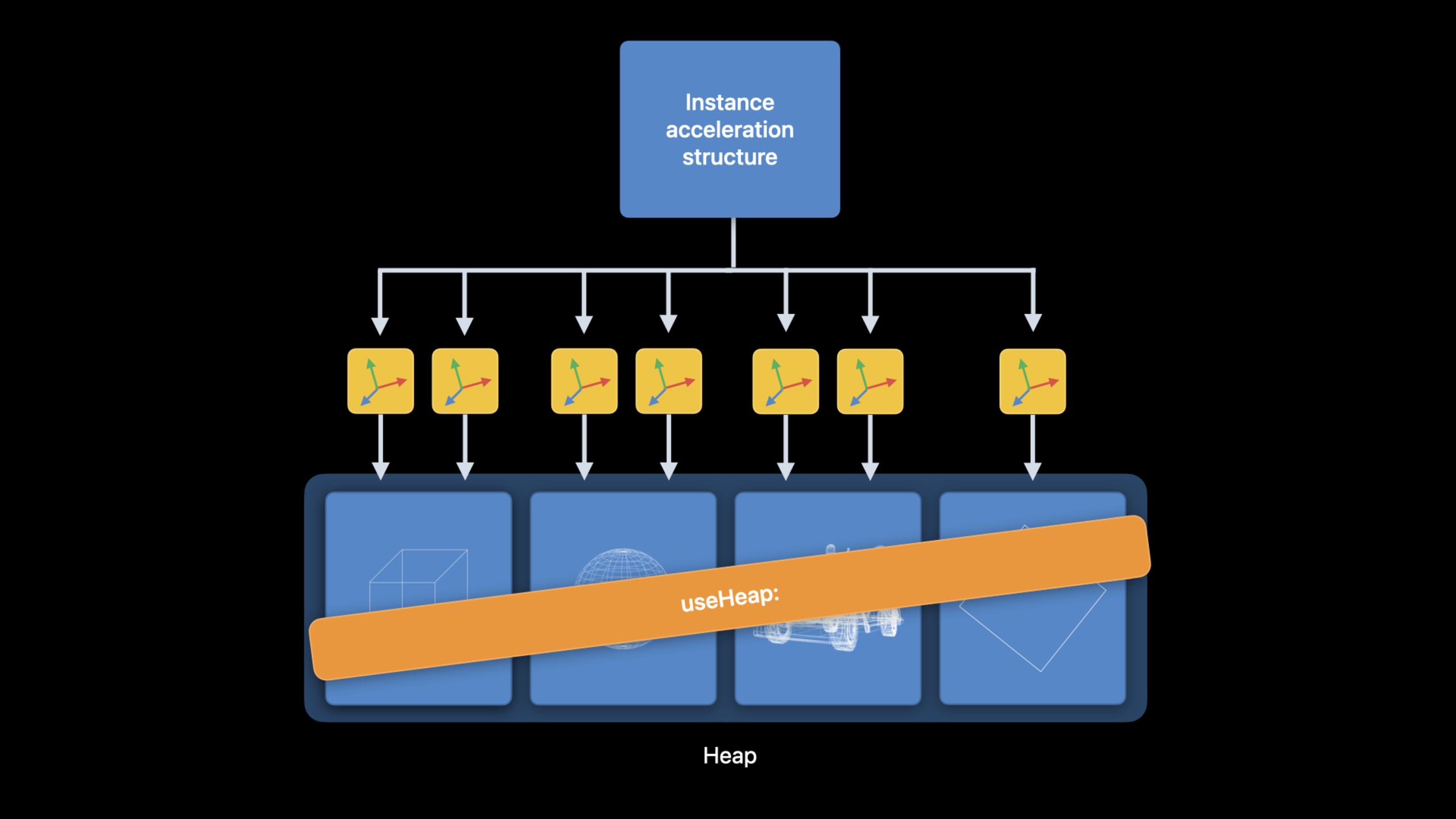
(21:04)Metal 3 支持从 heap 分配 acceleration structure。这样可以复用 heap memory,避免昂贵的 buffer allocations,并减少 useResource: 调用。
在大型场景里,instance acceleration structure 会间接引用很多 primitive acceleration structures。使用 command encoder 时,旧方式需要为每个 primitive acceleration structure 调用 useResource:。如果它们都来自同一个 heap,可以用一次 useHeap: 覆盖这些资源。
(22:33)分配方式有两种。第一种直接让 heap 按 descriptor 创建 acceleration structure。第二种先向 device 查询 size 和 alignment,再按 size 创建。
let heap = device.makeHeap(descriptor: heapDescriptor)!

let accelerationStructure = heap.makeAccelerationStructure(descriptor: descriptor)

let sizeAndAlign = device.heapAccelerationStructureSizeAndAlign(descriptor: descriptor)

let accelerationStructure = heap.makeAccelerationStructure(size: sizeAndAlign.size)
关键点:
makeHeap(descriptor:)创建用于资源分配的 heap。heap.makeAccelerationStructure(descriptor:)用 descriptor 直接在 heap 中创建 acceleration structure。heapAccelerationStructureSizeAndAlign(descriptor:)查询该 descriptor 对应的 size 和 alignment 需求。heap.makeAccelerationStructure(size:)使用最终 size 从 heap 分配 acceleration structure。
使用 heap 时还要处理 residency 和同步。演讲提醒:ray tracing pass 期间要调用 useHeap:;heap 资源默认不由 Metal 跟踪 hazard,可以选择开启 resource hazard tracking,也可以手动用 MTLFences 和 MTLEvents 同步。
用 Xcode 14 工具验证性能和正确性
(24:16)Xcode 14 的 Metal Debugger 为 ray tracing 增加了几项工具支持。
Acceleration Structure Viewer 可以查看 primitive 或 instanced motion。它还增加了 primitive highlight mode,能展开每个 primitive 的数据。这直接对应本场 session 前半段的 per-primitive data。
(25:55)Shader Profiler 支持 intersection functions、visible functions 和 dynamic libraries。开发者可以看到 ray tracing pipeline 中每行代码的执行成本,并按指令类别拆解。
(27:02)Shader Debugger 也能进入 linked functions 和 dynamic libraries。使用 visible function table 或动态库时,调试器可以跟进实际执行的函数。
(28:05)Runtime Shader Validation 能诊断 GPU 运行时错误,例如越界内存访问和空 texture 读取。Metal 3 还增加了 stack overflow detection。如果 shader 里有 intersection function、visible function、dynamic library 或函数指针调用,开发者需要给 pipeline descriptor 设置足够的 maximum call stack depth。设置过低时,Shader Validation 会指出 stack overflow 发生的位置。
核心启发
-
做什么:为使用 alpha-tested geometry 的 renderer 改造相交函数。 为什么值得做:per-primitive data 把 texture 和 UV 放到 acceleration structure 中,演讲中的测试应用获得 10% 到 16% 的性能提升。 怎么开始:定义较小的
PrimitiveData,在MTLAccelerationStructureTriangleGeometryDescriptor上设置primitiveDataBuffer、primitiveDataElementSize、primitiveDataStride和primitiveDataBufferOffset。 -
做什么:把关卡加载阶段的大量 primitive acceleration structure build 合并到同一个 encoder 中。 为什么值得做:Metal 3 会尽量并行执行 build、compact 和 refit,小 build 数量多时能提高 GPU 利用率。 怎么开始:用同一个 acceleration structure command encoder 编码多个
build,并准备一个 scratch buffer 池,避免所有 build 共用同一块 scratch buffer。 -
做什么:让压缩顶点格式直接参与 acceleration structure build。 为什么值得做:新 vertex format 支持减少临时全精度顶点副本,降低内存占用和准备成本。 怎么开始:在
MTLAccelerationStructureTriangleGeometryDescriptor上设置vertexFormat,必要时配合transformationMatrixBuffer还原模型坐标。 -
做什么:把多个简单重叠实例合并成一个 primitive acceleration structure。 为什么值得做:演讲指出减少 instance count 可以减少 ray 命中 instance 时的 transform 和切换开销。 怎么开始:为每个对象创建独立 geometry descriptor,设置各自的 transformation matrix,再把这些 descriptors 放进同一个
MTLPrimitiveAccelerationStructureDescriptor。 -
做什么:把大型场景的 primitive acceleration structures 放进同一个 heap。 为什么值得做:一次
useHeap:可以替代大量useResource:调用,并复用 heap memory。 怎么开始:用device.makeHeap(descriptor:)创建 heap,通过heap.makeAccelerationStructure(...)分配 acceleration structure,在 ray tracing pass 前调用useHeap:。
关联 Session
- Discover Metal 3 — Metal 3 总览,介绍资源加载、离线编译、MetalFX、Mesh Shaders、光线追踪和工具更新。
- Go bindless with Metal 3 — 讲解 bindless 渲染、argument buffers、heap 中的 acceleration structures 与调试改进。
- Target and optimize GPU binaries with Metal 3 — 把 GPU 二进制生成前移到构建阶段,减少启动和运行时编译开销。
- Boost performance with MetalFX Upscaling — 使用 MetalFX Upscaling 提高 Metal 应用的渲染性能。
- Load resources faster with Metal 3 — 使用 Metal 3 fast resource loading 优化大型资源和关卡数据加载。
评论
GitHub Issues · utterances