
Highlight
MetalFX 是 Metal 3 引入的图像放大和抗锯齿框架。它提供两种模式:Spatial Upscaling(空间放大)和 Temporal Anti-Aliasing and Upscaling(时序抗锯齿+放大)。
核心内容
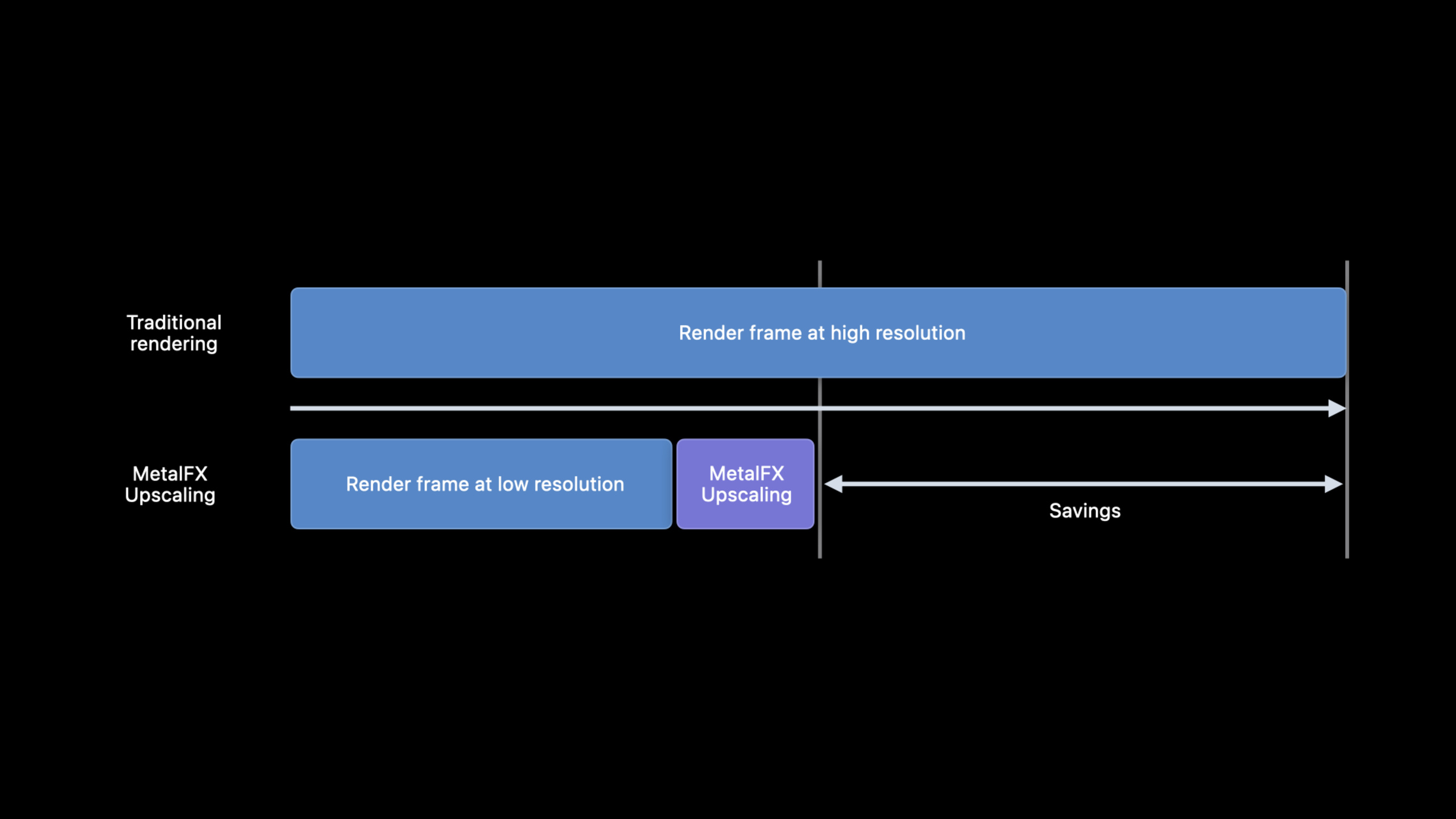
高分辨率渲染的成本很直接:像素越多,GPU 时间越长。游戏为了提帧率,常见做法是降低内部渲染分辨率,再把画面放大到显示分辨率。问题也很直接:低分辨率会丢细节,边缘会发虚。(00:34)
MetalFX Upscaling 解决的是这段管线里的最后一步。App 仍然先以较低分辨率渲染帧,MetalFX 再把结果放大到目标分辨率。Apple 在 session 开头强调,这个 API 针对 Apple 设备做了平台优化,目标是在减少渲染时间的同时保留画面质量。(00:45)
它给了两个入口。Spatial Upscaling(空间放大)只需要当前帧的抗锯齿颜色输入,集成简单,适合已经有一套抗锯齿方案的引擎。Temporal Anti-Aliasing and Upscaling(时序抗锯齿与放大)会使用多帧信息,输入更多,质量上限更高。(01:04)
选择标准也很实用。如果引擎已经能输出 jittered color、motion 和 depth buffer,优先评估 temporal 方案。如果没有这些输入,或者已有成熟的 temporal AA,spatial 方案更容易接进现有渲染管线。(17:55)
详细内容
Spatial Upscaling:在 tone mapping 后放大当前帧
Spatial Upscaling 分析输入图像的空间信息,生成放大后的输出。它只需要抗锯齿后的 color texture。Apple 建议把它放在游戏 tone mapping 完成之后,因为输入已经进入 perceptual color space 时效果最好。(01:36)
初始化时先创建 MTLFXSpatialScalerDescriptor,写入输入输出尺寸、纹理格式和颜色处理模式。scaler 对象创建成本较高,Apple 建议只在 App 启动或显示分辨率变化时创建。(03:17)
// Spatial upscaling (initialization)

let desc = MTLFXSpatialScalerDescriptor()
desc.inputWidth = 1280
desc.inputHeight = 720
desc.outputWidth = 2560
desc.outputHeight = 1440
desc.colorTextureFormat = .bgra8Unorm_srgb
desc.outputTextureFormat = .bgra8Unorm_srgb
desc.colorProcessingMode = .perceptual

spatialScaler = desc.makeSpatialScaler(device: mtlDevice)
关键点:
MTLFXSpatialScalerDescriptor()创建空间放大器的描述对象。inputWidth和inputHeight写入低分辨率渲染结果的尺寸。outputWidth和outputHeight写入最终目标尺寸。colorTextureFormat对应稍后传入的当前帧颜色纹理格式。outputTextureFormat对应 MetalFX 写出的放大结果格式。colorProcessingMode = .perceptual表示输入和输出位于感知颜色空间;session 中建议 spatial 方案为了性能使用 perceptual 模式。makeSpatialScaler(device:)创建可复用的 scaler 对象。
每一帧渲染时,先照常绘制低分辨率画面,再把当前帧颜色纹理和输出纹理交给 scaler,最后把 effect 编码进同一个 command buffer。(04:08)
// Spatial upscaling (per frame)

// Encode Metal commands to draw game frame here...

// Begin setting per frame properties for effect
spatialScaler.colorTexture = currentFrameColor
spatialScaler.outputTexture = currentFrameUpscaledColor

// Encode scaling effect into command buffer
spatialScaler.encode(commandBuffer: cmdBuffer)

// Encode Metal commands for particle/noise effects and game UI drawing for frame here...
关键点:
- 前面的 draw pass 负责生成低分辨率的
currentFrameColor。 colorTexture指向 MetalFX 的输入颜色图。outputTexture指向放大后的目标纹理。encode(commandBuffer:)把 MetalFX 放大工作写入当前 command buffer。- 后续粒子、噪声和 UI 绘制可以基于放大后的结果继续执行。
spatial 方案对输入质量敏感。Apple 的建议是:输入要 anti-aliased、noise free;perceptual 模式下输入应完成 tone mapping,数值位于 0 到 1,并使用 sRGB color space。(12:25)
Temporal AA and Upscaling:用多帧样本提高输出质量
Temporal AA and Upscaling 使用前几帧的数据来生成更高质量的输出。它的核心思路来自 supersampling:每个像素需要多个采样点,单帧内做成本很高,把采样分散到多帧就能降低成本。(04:39)
因为画面内容会移动,temporal 方案需要更多输入:jittered color、motion、depth,以及上一帧的输出。motion 用来回溯上一帧的对应位置,depth 用来判断前景、背景和新露出的区域。MetalFX 会跟踪上一帧的 upscaled output,App 每帧传入当前帧的 color、motion 和 depth。(05:56)
初始化 temporal scaler 时,描述对象需要声明 color、depth、motion 和 output 的纹理格式。随后要设置 motionVectorScale,让 MetalFX 能把引擎里的 motion data 解释成 render resolution pixel space。(09:05)
// Temporal antialiasing and upscaling (initialization)

let desc = MTLFXTemporalScalerDescriptor()
desc.inputWidth = 1280
desc.inputHeight = 720
desc.outputWidth = 2560
desc.outputHeight = 1440
desc.colorTextureFormat = .rgba16Float
desc.depthTextureFormat = .depth32Float
desc.motionTextureFormat = .rg16Float
desc.outputTextureFormat = .rgba16Float

temporalScaler = desc.makeTemporalScaler(device: mtlDevice)
temporalScaler.motionVectorScale = CGPoint(x: 1280, y: 720)
关键点:
MTLFXTemporalScalerDescriptor()创建 temporal 方案的描述对象。inputWidth和inputHeight是内部渲染尺寸。outputWidth和outputHeight是 MetalFX 输出尺寸。colorTextureFormat对应 jittered color 输入。depthTextureFormat对应当前帧深度输入。motionTextureFormat对应当前帧 motion 输入。outputTextureFormat对应 upscaled output。makeTemporalScaler(device:)创建 temporal scaler。motionVectorScale用来缩放 App 的 motion data,使其符合 MetalFX 期望的像素空间。
每一帧的调用比 spatial 方案多几项状态。resetHistory 在第一帧或 scene cut 时设为 true;reversedDepth 声明深度是否使用 reversed-Z;jitterOffset 传入当前帧采样偏移。(10:35)
// Temporal antialiasing and upscaling (per frame)

// Encode Metal commands to draw game frame here...

// Setup per frame effect properties
temporalScaler.resetHistory = firstFrameOrSceneCut
temporalScaler.colorTexture = currentFrameColor
temporalScaler.depthTexture = currentFrameDepth
temporalScaler.motionTexture = currentFrameMotion
temporalScaler.outputTexture = currentFrameUpscaledColor
temporalScaler.reversedDepth = reversedDepth
temporalScaler.jitterOffset = currentFrameJitterOffset

// Encode scaling effect into commandBuffer
temporalScaler.encode(commandBuffer: cmdBuffer)

// Encode Metal commands for post processing/game UI drawing for frame here...
关键点:
resetHistory清掉历史帧累积,适用于第一帧和镜头切换。colorTexture是当前帧的 jittered color 输入。depthTexture提供前景、背景和边缘判断线索。motionTexture提供从当前帧位置到上一帧位置的运动信息。outputTexture接收 MetalFX 写出的高分辨率结果。reversedDepth告诉 MetalFX 深度值是否使用 reversed-Z mapping。jitterOffset传入当前帧 sub-pixel 采样偏移。encode(commandBuffer:)编码 temporal AA and upscaling。
Jitter offset:静态物体不能漂移
Temporal 方案的质量很依赖 jitter offset。session 给出的例子里,一个像素中心位于 (0.5, 0.5),实际采样点位于 (0.625, 0.78),对应的 jitter offset 是 (-0.125, -0.28)。Apple 明确说明 jitter offset 总是在 -0.5 到 0.5 范围内。(11:11)
// Conceptual jitter validation based on the session example.
let pixelCenter = SIMD2<Float>(0.5, 0.5)
let sampleLocation = SIMD2<Float>(0.625, 0.78)
let currentFrameJitterOffset = pixelCenter - sampleLocation

temporalScaler.jitterOffset = CGPoint(
    x: CGFloat(currentFrameJitterOffset.x),
    y: CGFloat(currentFrameJitterOffset.y)
)
关键点:
- 这段是概念示例,用来表达 session 中的 jitter offset 计算关系。
pixelCenter表示像素中心。sampleLocation表示当前帧实际采样点。pixelCenter - sampleLocation得到传给 MetalFX 的 offset。temporalScaler.jitterOffset必须和渲染当前帧时使用的采样偏移一致。
验证方式也很朴素:用一组不同 jitter offset 渲染没有相机和物体运动的静态场景。offset 错了,静态物体会偏移,细线会发糊;offset 对了,物体停在原位,细线会逐步解析出来。(11:40)
Apple 还给了 jitter 序列建议。2x upscaling 时,推荐使用 Halton (2,3) sequence 的 32 个 jitter,约等于每个输出像素 8 个样本。(13:36)
Mip bias:用清晰度换取稳定性
两种 MetalFX 方案都建议设置负 mip bias,让低分辨率渲染时采到更高细节的纹理。spatial 方案的建议公式是 log2(renderResolutionWidth / targetResolutionWidth);每个维度放大 2x 时,mip bias 是 -1。(12:53)
// Conceptual mip-bias calculation from the session guidance.
let spatialMipBias = log2(renderResolutionWidth / targetResolutionWidth)
let temporalMipBias = log2(renderResolutionWidth / targetResolutionWidth) - 1
关键点:
- 这段是概念示例,表达 session 给出的计算规则。
spatialMipBias对应 Spatial Upscaling。temporalMipBias对应 Temporal AA and Upscaling。- 当每个维度放大 2x,spatial 结果为
-1,temporal 结果为-2。 - 对高频纹理要逐项调整,过低 mip level 可能造成 flickering 或 moire。
Temporal 方案的建议公式是在 spatial 公式基础上再减 1。session 展示了电路板纹理:-2 最清晰,但高频细线会出现 flickering 和 moire;-1 会减轻这些问题;0 可以消除它们。结论是把建议值当起点,再按纹理内容调整。(14:15)
False dependency:不要让独立 pass 被资源绑定拖慢
MetalFX 的性能也会受到 false dependency 影响。session 的例子是 shadow pass 和 post processing pass 本来没有依赖,可以跨帧重叠执行;如果两个 pass 读写了同一个 buffer,Metal 会为了避免潜在 hazard 阻止并行。(16:00)
在 MetalFX 场景里,这种跨帧 false dependency 会把 MetalFX Upscaling 的执行时间也纳入等待路径。Apple 给出的修复方向是为 post processing 和 shadow pass 使用分开的 buffer,让独立 pass 恢复并行执行。(17:01)
// Conceptual resource layout for avoiding false dependencies.
let postProcessingBuffer = makePostProcessingBuffer()
let shadowBuffer = makeShadowBuffer()

encodePostProcessingPass(using: postProcessingBuffer)
encodeShadowPass(using: shadowBuffer)
关键点:
- 这段是概念示例,用来表达 session 中的资源拆分思路。
postProcessingBuffer只服务 post processing pass。shadowBuffer只服务 shadow pass。- 两个独立 pass 不再读写同一资源,GPU 更容易重叠执行。
- 检查 false dependency 应成为接入 MetalFX 后的性能验证步骤。
核心启发
-
做一个分辨率滑杆:让玩家在内部渲染分辨率和目标分辨率之间切换。为什么值得做:MetalFX 的基本价值就是低分辨率渲染加高分辨率输出。怎么开始:先接入
MTLFXSpatialScalerDescriptor,把 1280×720 放大到 2560×1440,观察帧时间和画质变化。 -
给已有 temporal AA 的引擎加 spatial 模式:保留现有 AA,把 MetalFX Spatial Upscaling 放到 tone mapping 后。为什么值得做:spatial 方案只需要 anti-aliased color input,接入成本低。怎么开始:复用现有 color texture,设置
colorProcessingMode = .perceptual,每帧调用spatialScaler.encode(commandBuffer:)。 -
做一个 jitter 校验场景:渲染静态细线、棋盘格或三角形,循环一组 jitter offset。为什么值得做:session 明确指出 offset 错误会让静态物体漂移、细线发糊。怎么开始:关闭相机和物体运动,把
temporalScaler.jitterOffset和投影矩阵 jitter 同步记录到调试 HUD。 -
为材质建立 mip bias 例外表:默认按 MetalFX 建议公式设置负 mip bias,再对高频纹理单独回调。为什么值得做:更低 mip level 会增加细节,也可能在电路板这类高频图案上产生 flickering 和 moire。怎么开始:给材质加一个 mip bias override 字段,先检查细线、栅格、布料纹理。
-
加一个跨帧依赖检查 pass:记录相邻帧中独立 pass 的资源读写关系。为什么值得做:false dependency 会阻止 shadow、post processing 和 MetalFX 这类工作重叠执行。怎么开始:从最重的 render/compute pass 开始,找出本该独立却共享 buffer 的路径。
关联 Session
- Discover Metal 3 — Metal 3 总览,解释 MetalFX 在新图形能力中的位置。
- Target and optimize GPU binaries with Metal 3 — 处理 shader 编译和 GPU binary,减少游戏运行时卡顿。
- Load resources faster with Metal 3 — 使用 Fast Resource Loading 改善大型场景和关卡的资产流式加载。
- Maximize your Metal ray tracing performance — 优化光线追踪性能,适合与 MetalFX 一起用于高成本渲染场景。
- Go bindless with Metal 3 — 构建更灵活的 Metal 3 渲染资源绑定模型。
评论
GitHub Issues · utterances