
Highlight
Metal 3 让开发者把 GPU binary 生成前移到项目构建阶段,并提供 optimize for size 编译选项,用来减少运行时卡顿、首次启动时间、新关卡加载时间、着色器体积和编译时间。
核心内容
Metal 应用的卡顿,常常不在 draw call 本身。
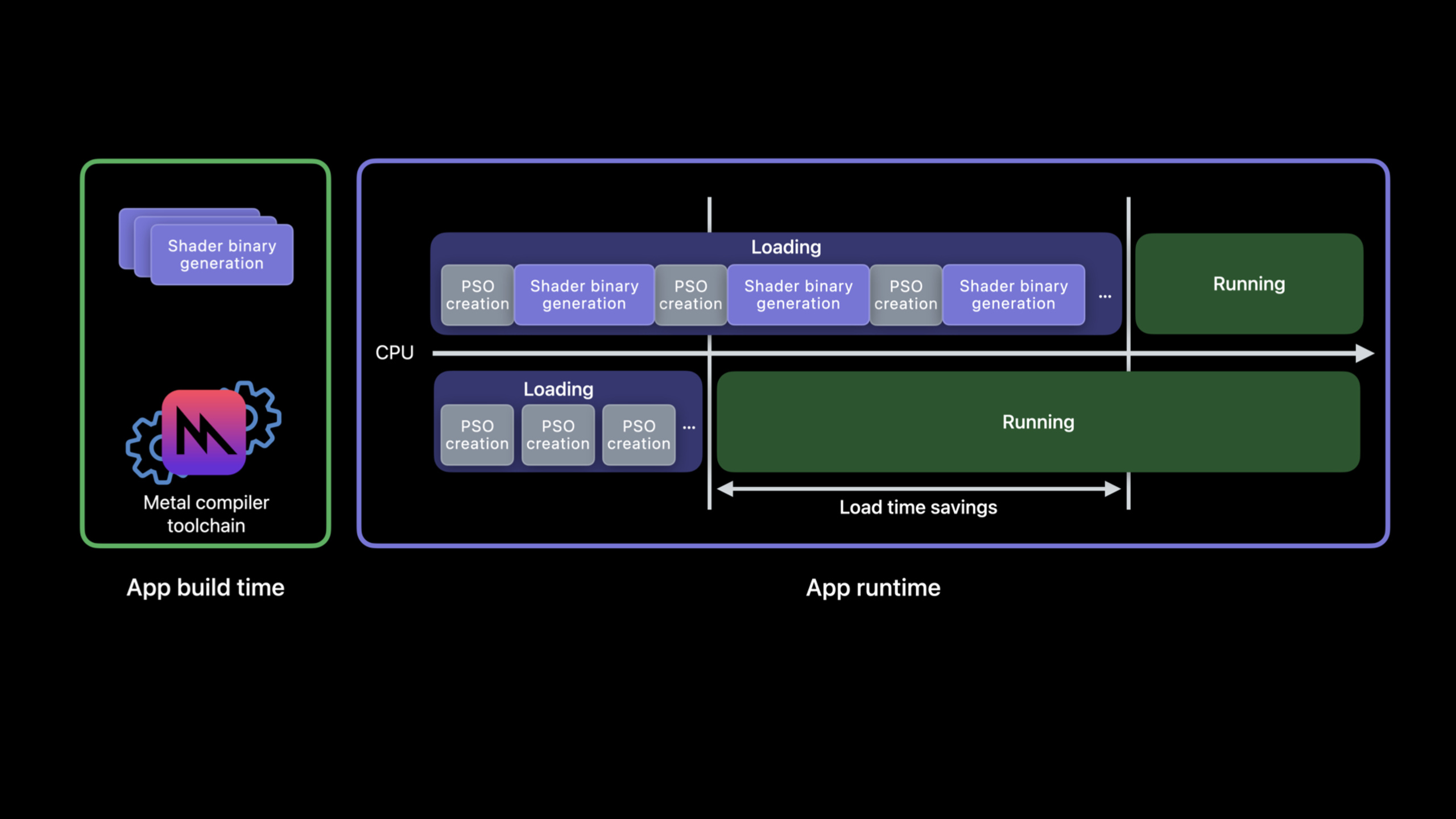
开发者创建 MTLRenderPipelineState 时,Metal 可能需要即时生成 GPU binary。这个步骤吃 CPU。它发生在启动页里,用户会看到更长的等待;它发生在一帧中间,command encoding 会被打断,画面就会掉帧。(01:11)
过去可以把 Metal source 预编译成 .metallib,也可以让 Metal 的文件系统缓存或 MTLBinaryArchive 复用已经生成过的 GPU binary。但这些 archive 仍然要在运行时生成。Metal 3 补上了缺口:把 pipeline descriptor 写成一个 JSON 格式的 Metal pipelines script,再在项目构建阶段和 Metal source 或 Metal library 一起交给工具链,直接产出 binary archive。(02:20)
结果很直接。App 启动时只加载已经生成好的 archive,PSO 创建变成轻量操作;关卡加载时少做 CPU 编译;渲染过程中也不需要用预热帧来换取稳定帧率。(02:48)
这场 session 的第二个主题是编译体积。Metal 编译器默认偏向运行时性能,会做函数内联和循环展开。大型 shader 里,这些变换会把程序膨胀得很大,编译时间也随之变长。Xcode 14 的 Metal 3 新增 optimize for size,用来限制这类会扩大体积的优化。(09:04)
详细内容
用 pipelines script 描述要离线生成的 PSO
(04:47)离线编译需要一个新输入:Metal pipelines script。它是 JSON,表达的内容和 API 里的 pipeline descriptor 对应。
先看原来的 Objective-C 代码。它从 default.metallib 取函数,拼出一个 render pipeline descriptor。
// An existing Obj-C render pipeline descriptor
NSError *error = nil;
id<MTLDevice> device = MTLCreateSystemDefaultDevice();

id<MTLLibrary> library = [device newLibraryWithFile:@"default.metallib" error:&error];

MTLRenderPipelineDescriptor *desc = [MTLRenderPipelineDescriptor new];
desc.vertexFunction = [library newFunctionWithName:@"vert_main"];
desc.fragmentFunction = [library newFunctionWithName:@"frag_main"];
desc.rasterSampleCount = 2;
desc.colorAttachments[0].pixelFormat = MTLPixelFormatBGRA8Unorm;
desc.depthAttachmentPixelFormat = MTLPixelFormatDepth32Float;
关键点:
MTLCreateSystemDefaultDevice()取得当前系统默认 Metal device。newLibraryWithFile:从已有.metallib加载 Metal library。newFunctionWithName:@"vert_main"指定 vertex function。newFunctionWithName:@"frag_main"指定 fragment function。rasterSampleCount = 2把采样数写入 pipeline state。colorAttachments[0].pixelFormat和depthAttachmentPixelFormat记录 render target 的格式。
同一个 descriptor 可以写成 JSON。构建工具链读取这份 JSON,知道要为哪些函数和状态组合生成 GPU binary。
{
  "//comment": "Its equivalent new JSON script",
  "libraries": {
    "paths": [
      {
        "path": "default.metallib"
      }
    ]
  },
  "pipelines": {
    "render_pipelines": [
      {
        "vertex_function": "vert_main",
        "fragment_function": "frag_main",
        "raster_sample_count": 2,
        "color_attachments": [
          {
            "pixel_format": "BGRA8Unorm"
          }
        ],
        "depth_attachment_pixel_format": "Depth32Float"
      }
    ]
  }
}
关键点:
libraries.paths指向提供函数的 Metal library。render_pipelines是要生成的 render pipeline 列表。vertex_function和fragment_function对应 API 里的函数名。raster_sample_count对应rasterSampleCount。color_attachments[0].pixel_format对应第一个颜色附件格式。depth_attachment_pixel_format对应 depth attachment 的格式。
从运行时 archive 反推出 JSON
(05:33)如果项目已经有运行时创建 PSO 的代码,可以先在开发和测试过程中 harvest(采集)descriptor,把 archive 序列化到磁盘。
// Create pipeline descriptor
MTLRenderPipelineDescriptor *pipeline_desc = [MTLRenderPipelineDescriptor new];
pipeline_desc.vertexFunction = [library newFunctionWithName:@"vert_main"];
pipeline_desc.fragmentFunction = [library newFunctionWithName:@"frag_main"];
pipeline_desc.rasterSampleCount = 2;
pipeline_desc.colorAttachments[0].pixelFormat = MTLPixelFormatBGRA8Unorm;
pipeline_desc.depthAttachmentPixelFormat = MTLPixelFormatDepth32Float;

// Add pipeline descriptor to new archive
MTLBinaryArchiveDescriptor* archive_desc = [MTLBinaryArchiveDescriptor new];
id<MTLBinaryArchive> archive = [device newBinaryArchiveWithDescriptor:archive_desc error:&error];
bool success = [archive addRenderPipelineFunctionsWithDescriptor:pipeline_desc error:&error];

// Serialize archive to file system
NSURL *url = [NSURL fileURLWithPath:@"harvested-binaryArchive.metallib"];
success = [archive serializeToURL:url error:&error];
关键点:
- 前半段创建和上一节相同的
MTLRenderPipelineDescriptor。 MTLBinaryArchiveDescriptor用来创建新的 binary archive。newBinaryArchiveWithDescriptor:error:得到MTLBinaryArchive对象。addRenderPipelineFunctionsWithDescriptor:error:把 descriptor 加入 archive,并生成 GPU binary。serializeToURL:error:把 archive 写成文件,后续可以从中提取 pipelines script。
(06:01)提取步骤使用 metal-source。
metal-source -flatbuffers=json harvested-binaryArchive.metallib -o /tmp/descriptors.mtlp-json关键点:
metal-source从已有 archive 中读取内容。-flatbuffers=json要求输出 JSON 格式的 pipelines script。harvested-binaryArchive.metallib是刚才序列化出来的 archive。-o /tmp/descriptors.mtlp-json指定输出文件路径。
在构建阶段生成 GPU binary
(06:24)拿到 pipelines script 后,可以直接从 Metal source 生成 archive。
metal shaders.metal -N descriptors.mtlp-json -o archive.metallib关键点:
metal是 Metal 编译工具。shaders.metal是输入的 Metal source。-N descriptors.mtlp-json把 pipelines script 交给工具链。-o archive.metallib指定带有 GPU binary 的输出 library。
(06:48)如果输入已经是 Metal library,可以使用 Metal translator tool。
metal-tt shaders.metallib descriptors.mtlp-json -o archive.metallib关键点:
metal-tt处理已有的shaders.metallib。descriptors.mtlp-json仍然提供 pipeline descriptor 信息。archive.metallib是最终部署到 app bundle 的输出。- session 明确说明,生成的 Metal library 包含 GPU binary,可部署到工具链支持的设备。
在 App 中加载离线生成的 archive
(07:07)运行时加载 archive 很短。把文件 URL 放进 descriptor,再创建 archive。
MTLBinaryArchiveDescriptor *desc = [MTLBinaryArchiveDescriptor new];
desc.url = [NSURL fileURLWithPath:@"archive.metallib"];
NSError *error = nil;
id<MTLDevice> device = MTLCreateSystemDefaultDevice();
id<MTLBinaryArchive> binaryArchive = [device newBinaryArchiveWithDescriptor:desc error:&error];
关键点:
MTLBinaryArchiveDescriptor描述要加载的 archive。desc.url指向构建阶段生成的archive.metallib。NSError *error接收创建 archive 时的错误。MTLCreateSystemDefaultDevice()取得 Metal device。newBinaryArchiveWithDescriptor:error:从文件创建MTLBinaryArchive。
Metal 会在系统更新或 app 安装时异步、后台地升级这些离线生成的 binary archive,以保证它们能面向未来系统和产品保持兼容。(07:18)
用 optimize for size 控制 shader 体积
(09:04)optimize for size 适合先试在大型 shader 上,特别是有深调用路径和循环、默认优化编译时间异常长的程序。它可能降低运行时性能,所以需要比较编译时间和运行时表现。(09:39)
命令行里用 -Os。
xcrun metal -Os large_shader.metal

# or

xcrun metal -c -Os large_shader.metal
xcrun metal -c     more_shaders.metal
xcrun metal large_shader.air more_shaders.air
关键点:
- 第一条命令在一次 compile-and-link 中启用
-Os。 - 第二组命令先分别编译
.metal文件,再链接.air文件。 -Os可以只加在某一次 compile 命令上,用来只优化部分 shader。- session 指出,
-Os不需要传给 link 命令或后续命令。 - 这个选项可以和前面介绍的 GPU binary 离线生成一起使用。
(12:44)运行时从 source 编译 library 时,用 MTLCompileOptions。
MTLCompileOptions* options = [MTLCompileOptions new];
options.optimizationLevel = MTLLibraryOptimizationLevelSize;

NSString* source = @"...";
NSError* error = nil;
id<MTLLibrary> lib = [device newLibraryWithSource:source
                                          options:options
                                            error:&error];
关键点:
MTLCompileOptions承载 Metal source 编译选项。optimizationLevel设为MTLLibraryOptimizationLevelSize,启用 size 模式。source是运行时提供的 Metal source 字符串。newLibraryWithSource:options:error:按指定优化级别创建MTLLibrary。
核心启发
-
做一个 shader 预编译清单:把启动页和首个关卡一定会用到的 render pipeline descriptor 写成 pipelines script。为什么值得做:这些 PSO 最容易影响首次进入体验。怎么开始:先用现有
MTLRenderPipelineDescriptor对照生成 JSON,再把metal shaders.metal -N descriptors.mtlp-json -o archive.metallib加进构建流程。 -
在测试包里加入 archive harvesting 开关:测试时把实际走到的 pipeline descriptor 加入
MTLBinaryArchive并序列化。为什么值得做:真实流程会暴露手写清单遗漏的 pipeline。怎么开始:在创建 PSO 的路径旁边调用addRenderPipelineFunctionsWithDescriptor:error:,测试结束后保存harvested-binaryArchive.metallib。 -
为大型 shader 做两组编译指标:同一份 shader 分别用默认优化和
-Os编译,记录编译时间、binary 大小和运行时帧耗时。为什么值得做:session 明确说 size 模式可能降低运行时性能,收益必须用项目数据判断。怎么开始:先选编译最慢的 shader,用xcrun metal -Os和默认命令各跑一次。 -
把新关卡加载改成 archive 加载优先:关卡资源包里放入对应的
archive.metallib,进入关卡时先创建MTLBinaryArchive。为什么值得做:session 把 new level load time 列为离线编译的直接收益。怎么开始:为每个关卡维护自己的 pipelines script,构建时生成对应 archive,运行时用MTLBinaryArchiveDescriptor.url加载。
关联 Session
- Discover Metal 3 — 从整体上了解 Metal 3 的性能、工具链和渲染能力更新,适合作为本 session 的入口。
- Go bindless with Metal 3 — 继续深入 Metal 3 中影响大型渲染器资源组织和 CPU/GPU 性能的 bindless 工作流。
- Boost performance with MetalFX Upscaling — 关注 Metal 3 的另一条性能路径:降低渲染分辨率,再用 MetalFX 放大输出。
- Accelerate machine learning with Metal — 同属 Metal 主题,介绍在机器学习训练场景中使用 Metal 和 MPS Graph 获得加速。
评论
GitHub Issues · utterances