
Highlight
SwiftUI 工程师 Julia 以一个”女性计算机科学家名录”App 为案例,介绍了 Transferable 协议的设计和使用。
核心内容
Julia 的示例 App 保存女性计算机科学家的资料。一个资料页里有姓名、简介、趣闻、肖像和视频。用户希望做几件很日常的事:把肖像拖进 App,从剪贴板粘贴趣闻,在 watchOS 上分享人物资料。(00:38)
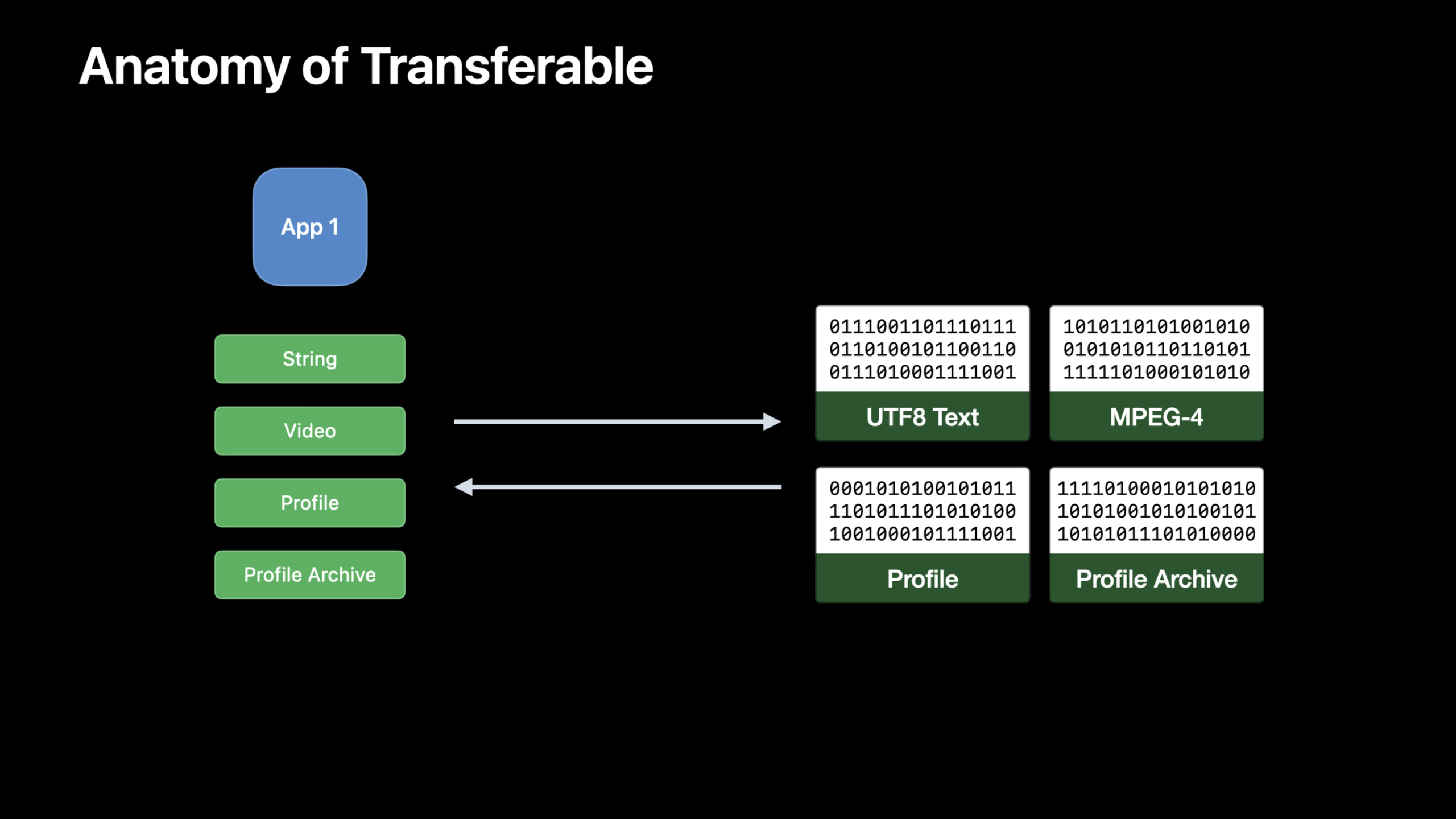
过去这些入口常常分散在不同 API 里。拖放、复制粘贴、Share Sheet 都要把模型变成接收方能理解的数据,还要声明这些数据是什么类型。Transferable 把这件事放回模型层:模型自己声明如何导出、如何导入、对应哪种 UTType。(02:09)
这场演讲的重点不是写一个分享按钮。重点是让 Profile、ProfilesArchive、Video 这些模型一次声明传输规则,然后被 PasteButton、.draggable、.dropDestination、ShareLink 等 SwiftUI 入口复用。(05:10)
详细内容
先声明数据类型
(04:18)跨 App 传输数据时,接收方需要知道二进制数据代表什么。Apple 用 Uniform Type Identifiers(统一类型标识符,简称 UTType)描述数据结构。自定义模型如果有自己的文件格式,需要先声明自定义类型。
import UniformTypeIdentifiers

// also declare the content type in the Info.plist
extension UTType {
    static var profile: UTType = UTType(exportedAs: "com.example.profile")
}关键点:
import UniformTypeIdentifiers引入UTType。extension UTType给系统类型表增加一个业务语义名称。UTType(exportedAs:)表示这个类型由当前 App 定义并导出。- 注释提醒还要在
Info.plist声明;session 建议同时添加文件扩展名,让系统知道 App 能打开这种文件。
标准类型已经能直接传输
(05:01)String、Data、URL、AttributedString、Image 已经遵循 Transferable。如果功能只涉及这些标准类型,SwiftUI 入口可以直接使用。
import SwiftUI

struct Profile {
    private var funFacts: [String] = []
    mutating func addFunFacts(_ newFunFacts: [String]) {
        funFacts.append(newFunFacts)
    }
}

struct PasteButtonView: View {
    @State var profile = Profile()
    var body: some View {
        PasteButton(payloadType: String.self) { funFacts in
            profile.addFunFacts(funFacts)
        }
    }
}关键点:
funFacts用字符串数组保存人物趣闻。addFunFacts接收一组新字符串并追加到模型里。@State var profile让视图持有可变资料模型。PasteButton(payloadType: String.self)声明只接收剪贴板里的字符串内容。- 闭包中的
funFacts来自系统解析后的 payload,直接写回模型。
同一类标准类型也能用于拖放。下面的肖像视图把 Image 同时作为拖拽源和 drop 目标。
import SwiftUI

struct PortraitView: View {
    @State var portrait: Image
    var body: some View {
        portrait
            .cornerRadius(8)
            .draggable(portrait)
            .dropDestination(payloadType: Image.self) { (images: [Image], _) in
                if let image = images.first {
                    portrait = image
                    return true
                }
                return false
            }
    }
}关键点:
@State var portrait保存当前头像图片。.draggable(portrait)让当前Image成为可拖拽内容。.dropDestination(payloadType: Image.self)声明这个视图接收图片 drop。images.first取到第一张被放下的图片。- 成功更新
portrait后返回true,没有可用图片时返回false。
CodableRepresentation 适合普通模型
(06:34)Profile 是本场的中心模型。它有 id、name、bio、funFacts、video 和 portrait,并且已经遵循 Codable。
import Foundation

struct Profile: Codable {
    var id: UUID
    var name: String
    var bio: String
    var funFacts: [String]
    var video: URL?
    var portrait: URL?
}关键点:
Codable让模型具备编码和解码能力。id用UUID标识单个资料。funFacts保存可粘贴的字符串资料。video和portrait用可选URL指向外部资源。
(07:31)因为 Profile 已经能编码和解码,Transferable conformance 只需要提供 transferRepresentation。CodableRepresentation 默认使用 JSON,也允许提供自定义 encoder / decoder。
import CoreTransferable
import UniformTypeIdentifiers

struct Profile: Codable {
    var id: UUID
    var name: String
    var bio: String
    var funFacts: [String]
    var video: URL?
    var portrait: URL?
}

extension Profile: Codable, Transferable {
    static var transferRepresentation: some TransferRepresentation {
        CodableRepresentation(contentType: .profile)
    }
}

// also declare the content type in the Info.plist
extension UTType {
    static var profile: UTType = UTType(exportedAs: "com.example.profile")
}关键点:
import CoreTransferable引入Transferable和表示类型。extension Profile: Codable, Transferable声明Profile可以参与系统传输。transferRepresentation是遵循Transferable时要实现的静态属性。CodableRepresentation(contentType: .profile)使用Codable生成二进制数据,并把内容标记为自定义.profile类型。UTType.profile与CodableRepresentation里的内容类型保持一致。
DataRepresentation 适合内存中的二进制格式
(07:49)ProfilesArchive 已经支持 CSV。它可以从 CSV Data 初始化,也可以导出 CSV Data。这种模型适合 DataRepresentation。
import CoreTransferable
import UniformTypeIdentifiers

struct ProfilesArchive {
    init(csvData: Data) throws { }
    func convertToCSV() throws -> Data { Data() }
}

extension ProfilesArchive: Transferable {
    static var transferRepresentation: some TransferRepresentation {
        DataRepresentation(contentType: .commaSeparatedText) { archive in
            try archive.convertToCSV()
        } importing: { data in
            try ProfilesArchive(csvData: data)
        }
    }
}关键点:
init(csvData:)描述如何从收到的 CSV 数据重建归档。convertToCSV()描述如何把归档导出为 CSV 数据。DataRepresentation(contentType: .commaSeparatedText)声明传输格式是 CSV 文本。- exporting 闭包把
ProfilesArchive转成Data。 - importing 闭包把收到的
Data转回ProfilesArchive。
FileRepresentation 适合大文件
(08:46)视频可能很大。Julia 明确说不希望把视频加载到内存。FileRepresentation 以磁盘文件作为传输载体,接收方用文件 URL 重建模型。
import CoreTransferable

struct Video: Transferable {
    let file: URL
    static var transferRepresentation: some TransferRepresentation {
        FileRepresentation(contentType: .mpeg4Movie) {
            SentTransferredFile($0.file)
        } importing: { received in
            let destination = try Self.copyVideoFile(source: received.file)
            return Self.init(file: destination)
        }
    }

    static func copyVideoFile(source: URL) throws -> URL {
        let moviesDirectory = try FileManager.default.url(
            for: .moviesDirectory, in: .userDomainMask,
            appropriateFor: nil, create: true
        )
        var destination = moviesDirectory.appendingPathComponent(
            source.lastPathComponent, isDirectory: false)
        if FileManager.default.fileExists(atPath: destination.path) {
            let pathExtension = destination.pathExtension
            var fileName = destination.deletingPathExtension().lastPathComponent
            fileName += "_\(UUID().uuidString)"
            destination = destination
                .deletingLastPathComponent()
                .appendingPathComponent(fileName)
                .appendingPathExtension(pathExtension)
        }
        try FileManager.default.copyItem(at: source, to: destination)
        return destination
    }
}关键点:
Video保存一个文件URL,不把视频内容放进模型属性。FileRepresentation(contentType: .mpeg4Movie)声明这是 MPEG-4 电影文件。SentTransferredFile($0.file)把已有文件交给系统传输。- importing 闭包先复制收到的文件,再用复制后的地址创建
Video。 FileManager.default.url(for:in:appropriateFor:create:)找到用户 Movies 目录。- 如果目标文件名已存在,代码追加
UUID避免覆盖。 copyItem(at:to:)完成文件复制,返回 App 自己管理的目标地址。
ProxyRepresentation 提供降级表示
(10:04)有些接收方不认识自定义 .profile 类型,但认识文本。ProxyRepresentation 允许用另一个已经 Transferable 的类型代表当前模型。这里用 name 代表 Profile。
import CoreTransferable
import UniformTypeIdentifiers

struct Profile: Codable {
    var id: UUID
    var name: String
    var bio: String
    var funFacts: [String]
    var video: URL?
    var portrait: URL?
}

extension Profile: Transferable {
    static var transferRepresentation: some TransferRepresentation {
        CodableRepresentation(contentType: .profile)
        ProxyRepresentation(exporting: \.name)
    }
}

// also declare the content type in the Info.plist
extension UTType {
    static var profile: UTType = UTType(exportedAs: "com.example.profile")
}关键点:
CodableRepresentation(contentType: .profile)保留最完整的自定义资料格式。ProxyRepresentation(exporting: \.name)额外导出一个字符串形式的姓名。- 表示的顺序很重要;接收方会使用第一个自己支持的内容类型。
- 自家 App 认识
.profile时拿到完整资料;普通文本框只支持文本时拿到姓名。
(11:20)视频也可以同时有文件表示和 URL 代理。FileRepresentation 给接收方访问磁盘文件内容的能力,并通过临时 sandbox extension 保证访问权限;ProxyRepresentation 把 URL 当作普通可传输值处理。
import CoreTransferable

struct Video: Transferable {
    let file: URL
    static var transferRepresentation: some TransferRepresentation {
        FileRepresentation(contentType: .mpeg4Movie) { SentTransferredFile($0.file) }
           importing: { received in
               let copy = try Self.copyVideoFile(source: received.file)
               return Self.init(file: copy) }
        ProxyRepresentation(exporting: \.file)
  }

    static func copyVideoFile(source: URL) throws -> URL {
        let moviesDirectory = try FileManager.default.url(
            for: .moviesDirectory, in: .userDomainMask,
            appropriateFor: nil, create: true
        )
        var destination = moviesDirectory.appendingPathComponent(
            source.lastPathComponent, isDirectory: false)
        if FileManager.default.fileExists(atPath: destination.path) {
            let pathExtension = destination.pathExtension
            var fileName = destination.deletingPathExtension().lastPathComponent
            fileName += "_\(UUID().uuidString)"
            destination = destination
                .deletingLastPathComponent()
                .appendingPathComponent(fileName)
                .appendingPathExtension(pathExtension)
        }
        try FileManager.default.copyItem(at: source, to: destination)
        return destination
    }
}关键点:
- 第一层
FileRepresentation传输磁盘上的电影文件。 - importing 闭包仍然复制文件,避免依赖临时位置。
ProxyRepresentation(exporting: \.file)提供 URL 形式的降级输出。- 把视频粘到文本字段时,接收方可以使用 URL;接收方需要文件内容时,使用文件表示。
exportingCondition 表达有条件导出
(12:35)有些归档并不支持导出 CSV。exportingCondition 把这个业务条件写到表示上;条件不满足时,这个格式不会被导出。
import CoreTransferable
import UniformTypeIdentifiers

struct ProfilesArchive {
    var supportsCSV: Bool { true }
    init(csvData: Data) throws {  }
    func convertToCSV() throws -> Data { Data() }
}

extension ProfilesArchive: Transferable {
    static var transferRepresentation: some TransferRepresentation {
        DataRepresentation(contentType: .commaSeparatedText) { archive in
            try archive.convertToCSV()
        } importing: { data in
            try Self(csvData: data)
        }
        .exportingCondition { $0.supportsCSV }
    }
}关键点:
supportsCSV把“这个归档能否导出 CSV”变成模型属性。DataRepresentation仍然描述 CSV 的导入和导出方式。.exportingCondition { $0.supportsCSV }在导出前检查当前归档。- 条件为
false时,系统不会把这个归档作为 CSV 提供给接收方。
核心启发
1. 给资料卡增加复制粘贴
- 做什么:让联系人、作品集、课程卡片实现
Transferable,复制到文本框时输出标题或姓名。 - 为什么值得做:
ProxyRepresentation(exporting:)可以给自定义模型提供文本降级,不要求所有接收方理解私有格式。 - 怎么开始:先用
CodableRepresentation(contentType:)声明完整模型,再追加ProxyRepresentation(exporting: \.name)或相似字段。
2. 把图片编辑结果接进拖放
- 做什么:让编辑后的图片可以从预览区拖到 Finder、邮件或另一个窗口。
- 为什么值得做:session 展示了
Image已经遵循Transferable,.draggable和.dropDestination可以直接使用标准类型。 - 怎么开始:在 SwiftUI 视图上加
.draggable(image);接收区用.dropDestination(payloadType: Image.self)更新本地状态。
3. 用 CSV 作为批量导入导出格式
- 做什么:给账本、名册、库存表增加 CSV 导入导出。
- 为什么值得做:
DataRepresentation适合已有内存数据格式的模型,示例中的ProfilesArchive正是 CSV 归档。 - 怎么开始:为归档类型实现
init(csvData:)和convertToCSV(),在DataRepresentation(contentType: .commaSeparatedText)中调用这两个函数。
4. 大视频只走文件传输
- 做什么:视频剪辑、运动记录、课堂录制 App 分享素材时,传文件,不传整块内存数据。
- 为什么值得做:session 明确指出视频可能很大,
FileRepresentation用磁盘文件传输,适合避免一次性加载到内存。 - 怎么开始:模型保存文件
URL,用FileRepresentation(contentType: .mpeg4Movie)返回SentTransferredFile,导入时复制到 App 管理目录。
5. 按模型状态控制可导出格式
- 做什么:只有当文档已完成渲染、归档支持 CSV、或用户拥有权限时,才暴露某种导出格式。
- 为什么值得做:
exportingCondition可以把“是否允许导出”绑定到当前模型实例。 - 怎么开始:给模型增加布尔属性,在表示后追加
.exportingCondition { $0.someFlag }。
关联 Session
- What’s new in SwiftUI — SwiftUI 2022 总览,包含 ShareLink、PhotosPicker、Transferable 和拖放入口。
- What’s new in the Photos picker — PhotosPicker 使用 Transferable 加载选择结果,适合继续看图片和视频选择流程。
- Integrate your custom collaboration app with Messages — 展示协作元数据如何通过 TransferRepresentation 和 ShareLink 进入 Messages。
- Enhance collaboration experiences with Messages — 讲解 Share Sheet 与 Messages 协作流程,补充分享体验的产品层设计。
评论
GitHub Issues · utterances