
Highlight
Apple 在 iOS 15 和 watchOS 中把行走耐力、行走稳定性和跌倒风险暴露给 HealthKit,开发者可以用 Six-Minute Walk 重新校准和 Walking Steadiness 构建远程康复、物理治疗和健康监测功能。
核心内容
Jamie 刚做完膝盖手术。医生知道她术后几乎走不动,但 Apple Watch 的 Six-Minute Walk 估算只出现了小幅下降。问题出在数据窗口:这个估算会使用一段历史活动和运动数据,窗口里还包含术前状态,术后的真实变化被稀释了。
(02:13)iOS 15 提供了 HealthKit estimate recalibration API(估算重新校准 API)。应用知道手术日期后,可以请求从这个日期之后重新建立 Six-Minute Walk 估算。这样,术后几次估算会更快反映耐力下降,护理团队可以更早判断恢复是否顺利。
行走能力还包含另一个问题:患者能走多远,只说明耐力;患者走得稳不稳,关系到跌倒风险。远程物理治疗里,医生很难每周看见患者的真实步态。患者可能按时打卡训练,但稳定性正在下降。
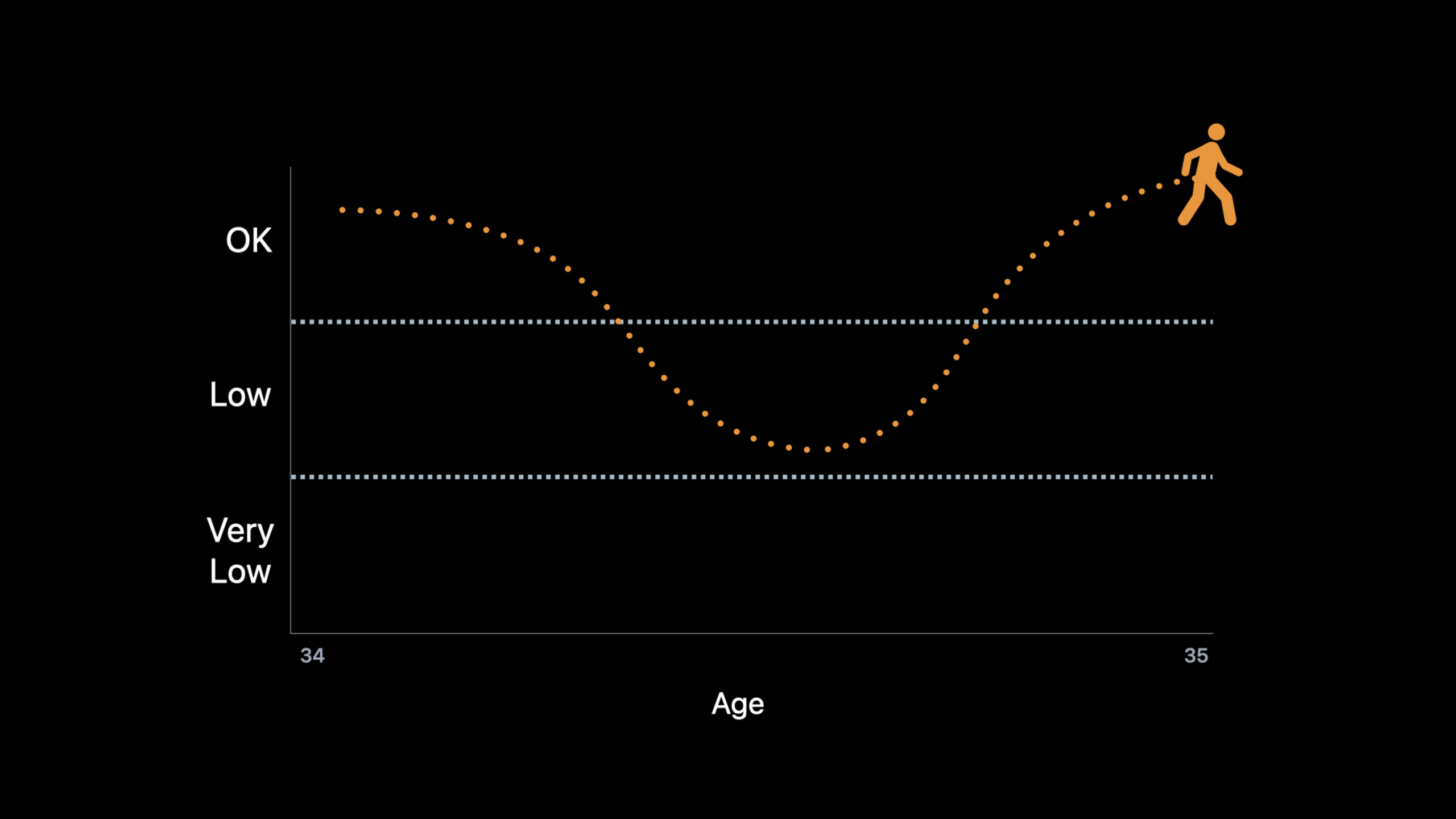
(06:24)Apple Walking Steadiness(行走稳定性)用 iPhone 测量行走质量。HealthKit 每周保存一次分数,并把分数归类为 OK、Low、Very Low。用户在健康 App 中开启后,稳定性降到 Low 或 Very Low 时,系统会写入通知事件。应用可以监听这些事件,提示患者安排复诊。
这两个能力的共同点很明确:把诊室里的阶段性评估,变成日常生活里的连续信号。开发者不需要额外硬件,也不需要让用户每天完成专门测试;前提是用户授权 HealthKit,并携带 iPhone 或 Apple Watch 产生足够的样本。
详细内容
1. Six-Minute Walk:先拿到读写授权
(03:39)重新校准通过 HKHealthStore.recalibrateEstimates 完成。Apple 在演讲中说明了三个要求:样本类型必须支持重新校准,应用需要新的 entitlement(授权能力),还需要同时获得读取和写入该类型的 HealthKit 授权。iOS 15 中可重新校准的类型是 sixMinuteWalkTestDistance。
import HealthKit

let healthStore = HKHealthStore()
let types: Set = [
    HKObjectType.quantityType(forIdentifier: .sixMinuteWalkTestDistance)!
]

healthStore.requestAuthorization(toShare: types, read: types) { success, error in
    if let error = error {
        print(error.localizedDescription)
        return
    }

    print("Six-Minute Walk authorization: \(success)")
}
关键点:
import HealthKit:使用 HealthKit 类型和授权 API。HKHealthStore():创建访问 HealthKit 数据库的入口。HKObjectType.quantityType(forIdentifier: .sixMinuteWalkTestDistance)!:取出 Six-Minute Walk 距离对应的数量类型。toShare: types:请求写入权限,重新校准需要这个权限。read: types:请求读取权限,应用需要读取估算结果。success:表示用户是否完成授权流程。error:处理授权请求失败。
2. Six-Minute Walk:用手术日期重新校准估算
(04:27)应用知道 Jamie 的手术日期后,调用 recalibrateEstimates(sampleType:date:)。系统会弹出提示,让用户确认这次操作会影响健康数据。重新校准不会改写 HealthKit 中已经存在的估算;它影响之后生成的估算。演讲还说明,重新校准后可能需要最多 14 天重新积累足够活动历史,效果也会随着日期变远而逐渐结束。
import HealthKit

let healthStore = HKHealthStore()
let sixMinuteWalkType = HKSampleType.quantityType(forIdentifier: .sixMinuteWalkTestDistance)!
let surgeryDate = Date()

if sixMinuteWalkType.allowsRecalibrationForEstimates {
    healthStore.recalibrateEstimates(sampleType: sixMinuteWalkType, date: surgeryDate) {
        success, error in

        if let error = error {
            print(error.localizedDescription)
            return
        }

        print("Recalibration requested: \(success)")
    }
}
关键点:
HKSampleType.quantityType(forIdentifier:):取得可传给重新校准方法的样本类型。surgeryDate:代表急性事件发生日期,例如手术日期或受伤日期。allowsRecalibrationForEstimates:检查该样本类型是否支持估算重新校准。recalibrateEstimates(sampleType:date:):要求 HealthKit 从指定日期之后重新建立估算。success:表示请求是否成功提交。error:处理 entitlement、授权或系统调用失败。
3. Walking Steadiness:读取最新分数
(11:22)Walking Steadiness 分数是 HealthKit quantity type(数量类型),名称为 appleWalkingSteadiness。它是 Apple 定义的只读指标,单位是 percent,范围从 0 到 1。分数每周写入一次;数据不足时,估算可能延迟。
import HealthKit

let healthKitStore = HKHealthStore()
let types: Set = [
    HKObjectType.quantityType(forIdentifier: .walkingSteadiness)!
]

healthKitStore.requestAuthorization(toShare: nil, read: types) { success, error in
    if let error = error {
        print(error.localizedDescription)
        return
    }

    print("Walking Steadiness authorization: \(success)")
}
关键点:
HKHealthStore():创建 HealthKit 访问入口。.walkingSteadiness:取出行走稳定性分数类型。toShare: nil:该指标只读,应用不写入。read: types:请求读取 Walking Steadiness 分数。success:记录授权结果。error:处理授权错误。
拿到授权后,查询最新一条分数。
import HealthKit

let healthStore = HKHealthStore()
let steadinessType = HKObjectType.quantityType(forIdentifier: .walkingSteadiness)!
let sortByEndDate = NSSortDescriptor(key: HKSampleSortIdentifierEndDate, ascending: false)

let query = HKSampleQuery(sampleType: steadinessType,
                          predicate: nil,
                          limit: 1,
                          sortDescriptors: [sortByEndDate]) { query, samples, error in

    if let error = error {
        print(error.localizedDescription)
        return
    }

    if let sample = samples?.first as? HKQuantitySample {
        let recentScore = sample.quantity.doubleValue(for: .percent())
        updateStatus(score: recentScore)
    }
}

healthStore.execute(query)
关键点:
steadinessType:HealthKit 中的 Walking Steadiness 数量类型。sortByEndDate:按样本结束时间倒序排序,让最新样本排在前面。HKSampleQuery:从 HealthKit 读取样本。predicate: nil:不限制时间范围,直接查全量样本。limit: 1:只要最新一条。samples?.first as? HKQuantitySample:把返回样本转换为数量样本。.percent():以百分比单位读取分数。updateStatus(score:):把分数显示到应用界面或状态模型。
4. Walking Steadiness:把分数转成分类
(12:21)单独的数值不容易解释。HealthKit 提供 HKAppleWalkingSteadinessClassification 枚举,把分数转换为 .ok、.low、.veryLow。演讲中的场景是物理治疗应用:患者是 Low 时,应用可以提示护理团队关注跌倒风险。
import HealthKit

let healthStore = HKHealthStore()
let steadinessType = HKObjectType.quantityType(forIdentifier: .walkingSteadiness)!
let sortByEndDate = NSSortDescriptor(key: HKSampleSortIdentifierEndDate, ascending: false)

let query = HKSampleQuery(sampleType: steadinessType,
                          predicate: nil,
                          limit: 1,
                          sortDescriptors: [sortByEndDate]) { query, samples, error in

    if let error = error {
        print(error.localizedDescription)
        return
    }

    if let sample = samples?.first as? HKQuantitySample {
        let recentScore = sample.quantity.doubleValue(for: .percent())
        let recentClassification = HKAppleWalkingSteadinessClassification(for: sample.quantity)

        updateStatus(classification: recentClassification, score: recentScore)
    }
}

healthStore.execute(query)
关键点:
HKSampleQuery:复用读取最新分数的查询。recentScore:保留原始分数,适合画趋势图。HKAppleWalkingSteadinessClassification(for:):用 HealthKit API 将样本数值转换成分类。recentClassification:得到 OK、Low 或 Very Low。updateStatus(classification:score:):同时展示分类和分数,方便患者理解。
5. Walking Steadiness Event:监听系统通知事件
(13:15)Walking Steadiness 通知会作为 HealthKit category type(分类类型)样本写入,名称是 appleWalkingSteadinessEvent。事件有四类:.initialLow、.initialVeryLow、.repeatLow、.repeatVeryLow。前两类在用户进入 Low 或 Very Low 大约一个月后触发;后两类在用户持续处于同一分类时大约每三个月提醒一次。
import HealthKit

let healthKitStore = HKHealthStore()
let types: Set = [
    HKObjectType.categoryType(forIdentifier: .walkingSteadinessEvent)!
]

healthKitStore.requestAuthorization(toShare: nil, read: types) { success, error in
    if let error = error {
        print(error.localizedDescription)
        return
    }

    print("Walking Steadiness Event authorization: \(success)")
}
关键点:
categoryType(forIdentifier:):读取 Walking Steadiness 事件使用分类类型。.walkingSteadinessEvent:对应系统写入的稳定性通知事件。toShare: nil:事件由系统写入,应用只读取。read: types:请求读取事件样本。success:确认用户是否授权读取。
授权后,用 HKObserverQuery 监听新事件。
import HealthKit

let healthStore = HKHealthStore()
let notificationType = HKCategoryType.categoryType(forIdentifier: .appleWalkingSteadinessEvent)!

let query = HKObserverQuery(sampleType: notificationType, predicate: nil) {
    query, completionHandler, errorOrNil in

    if let error = errorOrNil {
        print(error.localizedDescription)
        return
    }

    promptCheckupForNotification()

    completionHandler()
}

healthStore.execute(query)
关键点:
HKCategoryType.categoryType(forIdentifier:):取得 Walking Steadiness 通知事件类型。HKObserverQuery:监听 HealthKit 中新写入的样本。sampleType: notificationType:只监听行走稳定性通知事件。predicate: nil:监听该类型的所有新事件。errorOrNil:处理监听回调中的错误。promptCheckupForNotification():在应用中提示用户安排线上复诊。completionHandler():通知 HealthKit 事件处理完成。healthStore.execute(query):开始执行观察查询。
6. 查询六周数据,自己判断下降趋势
(15:12)系统通知只覆盖 Low 和 Very Low。物理治疗诊所还可能关心另一类患者:分类还没变差,但分数已经连续下降。演讲中的做法是查询过去六周的 Walking Steadiness 样本,计算 best-fit slope(最佳拟合斜率),如果每周平均下降超过 5 点,就提示复查。
import HealthKit

let healthStore = HKHealthStore()
let end = Date()
let start = Calendar.current.date(byAdding: .weekOfYear, value: -6, to: end)
let datePredicate = HKQuery.predicateForSamples(withStart: start, end: end, options: [])

let steadinessType = HKObjectType.quantityType(forIdentifier: .walkingSteadiness)!
let sortByEndDate = NSSortDescriptor(key: HKSampleSortIdentifierEndDate, ascending: false)

let query = HKSampleQuery(sampleType: steadinessType,
                          predicate: datePredicate,
                          limit: HKObjectQueryNoLimit,
                          sortDescriptors: [sortByEndDate]) { query, samples, error in

    if let error = error {
        print(error.localizedDescription)
        return
    }

    detectTrends(samples)
}

healthStore.execute(query)
关键点:
end = Date():查询窗口结束于当前时间。Calendar.current.date(byAdding:):把开始时间设为六周前。HKQuery.predicateForSamples(withStart:end:options:):限制 HealthKit 查询时间范围。steadinessType:目标样本仍然是 Walking Steadiness 分数。limit: HKObjectQueryNoLimit:取回窗口内所有样本。sortDescriptors:按结束时间倒序排列。detectTrends(samples):把样本交给自定义趋势判断函数。
趋势函数由应用自己实现。下面的示例只展示演讲中的判断入口:计算斜率,小于 -5 时提示复查。
import HealthKit

func detectTrends(_ samples: [HKSample]?) {
    let quantitySamples = samples as? [HKQuantitySample] ?? []
    let slope = bestFitSlope(for: quantitySamples)

    if slope < -5 {
        promptCheckupForNotification()
    }
}
关键点:
samples as? [HKQuantitySample]:把 HealthKit 样本转换为数量样本数组。bestFitSlope(for:):应用自定义函数,计算六周样本的最佳拟合斜率。slope < -5:对应演讲中的阈值,表示平均每周下降超过 5 点。promptCheckupForNotification():复用通知场景里的复诊提示。
7. 让用户持续产生 Walking Steadiness 样本
(16:21)应用能不能监测稳定性,取决于 HealthKit 是否有样本。Apple 给了四条实践建议。第一,用户需要在健康 App 中设置身高;体重和年龄也推荐设置。第二,提示用户开启 Apple Walking Steadiness 通知。第三,提醒用户走路时随身带 iPhone,放在裤袋、夹克口袋或贴近身体的包里都可以。第四,用 Walking Speed 样本判断用户是否携带设备足够稳定;连续两周有 Walking Speed 样本,是一个良好信号。
import HealthKit

let healthStore = HKHealthStore()
let walkingSpeedType = HKObjectType.quantityType(forIdentifier: .walkingSpeed)!
let end = Date()
let start = Calendar.current.date(byAdding: .weekOfYear, value: -2, to: end)
let predicate = HKQuery.predicateForSamples(withStart: start, end: end, options: [])

let query = HKSampleQuery(sampleType: walkingSpeedType,
                          predicate: predicate,
                          limit: HKObjectQueryNoLimit,
                          sortDescriptors: nil) { query, samples, error in

    if let error = error {
        print(error.localizedDescription)
        return
    }

    if samples?.isEmpty == true {
        promptUserToCarryPhoneWhileWalking()
    }
}

healthStore.execute(query)
关键点:
.walkingSpeed:演讲建议用 Walking Speed 样本判断用户是否满足携带 iPhone 的条件。start和end:查询最近两周。predicateForSamples:限制查询窗口。HKObjectQueryNoLimit:读取两周内全部 Walking Speed 样本。samples?.isEmpty == true:没有样本时,说明用户可能没有按要求携带 iPhone。promptUserToCarryPhoneWhileWalking():提示用户走路时随身携带手机。
核心启发
-
做什么:为术后患者做 Six-Minute Walk 恢复看板。 为什么值得做:重新校准 API 能让术后估算更快反映急性变化,避免术前数据稀释术后下降。 怎么开始:请求
sixMinuteWalkTestDistance的读写权限,拿到手术日期后调用HKHealthStore.recalibrateEstimates(sampleType:date:),再读取后续样本画恢复曲线。 -
做什么:为物理治疗诊所做跌倒风险提醒。 为什么值得做:Walking Steadiness 已经给出 OK、Low、Very Low 分类,适合给护理团队做分层视图。 怎么开始:读取
.walkingSteadiness最新样本,用HKAppleWalkingSteadinessClassification(for:)转换分类,把 Low 和 Very Low 患者放入复诊队列。 -
做什么:为远程康复 App 增加趋势下降预警。 为什么值得做:系统事件覆盖高风险分类,但分数下滑可以更早暴露训练不适合、用户未坚持或伤情变化。 怎么开始:每周查询过去六周
.walkingSteadiness样本,计算趋势斜率,低于阈值时提示线上复查。 -
做什么:为家人照护场景做长辈行走质量周报。 为什么值得做:Walking Steadiness 每周生成一次分数,适合用低频摘要展示变化,减少每天查看健康数据的负担。 怎么开始:在用户授权后读取最近数周分数,展示分类变化,并在
.appleWalkingSteadinessEvent出现时提示用户主动联系家人。 -
做什么:为健身或徒步 App 做路线难度建议。 为什么值得做:演讲提到稳定性可用于推荐更贴合个人跌倒风险的 workouts 和 hikes。 怎么开始:读取 Walking Steadiness 分类,把 Low 或 Very Low 用户引导到平缓路线或低冲击训练,把高风险说明放在开始训练前。
关联 Session
- Build a workout app for Apple Watch — 用 SwiftUI 和 HealthKit 构建 Apple Watch 训练 App,是理解运动健康数据写入的直接参考。
- Build a research and care app, part 1: Setup onboarding — 介绍研究与护理 App 的 onboarding,可用于健康数据授权和患者同意流程。
- Build a research and care app, part 2: Schedule tasks — 展示如何安排任务和调查,适合把复诊提醒与康复任务结合。
- Build a research and care app, part 3: Visualize progress — 展示如何可视化护理进展,可用于绘制 Walking Steadiness 趋势。
- Explore Verifiable Health Records — 讲解可验证健康记录,适合与运动健康指标一起构建更完整的患者资料。
评论
GitHub Issues · utterances