
Highlight
Apple 在 Xcode 13 中为 DocC 增加文档归档托管和
xcodebuild docbuild命令,开发者可以把 Swift 框架、库和包的文档发布到网站,并用脚本保持线上文档更新。
核心内容
你写了一个 Swift 框架,API 注释也补齐了。问题还在:用户必须先把框架拉进 Xcode,才能在 Developer Documentation 窗口里读到完整文档。
这对新用户不友好。用户还没有决定是否采用你的框架,就要先下载代码、打开工程、等待索引。团队内部也会遇到同样的问题:文档导出一次后,很快落后于主分支。
Xcode 13 的 DocC(Documentation Compiler,文档编译器)把这个流程往前推了一步。文档归档(.doccarchive)既能被 Xcode 导入阅读,也能作为网页托管。你可以把它放到已有网站目录里,让用户先在浏览器里读文档。
托管以后,还要解决更新问题。手工导出归档容易漏。session 给出的做法是用 xcodebuild docbuild 在命令行构建文档,再用脚本把生成的 .doccarchive 复制到网站目录。把脚本放进 CI 的 post-merge hook 后,线上文档就能跟随代码更新。
详细内容
托管 DocC 归档需要两类路由
(02:38)
DocC 文档归档是一个单页 Vue.js Web App。服务器要处理两类请求。
第一类是页面请求,路径以 /documentation/ 或 /tutorials/ 开头。服务器应该返回归档里的 index.html。
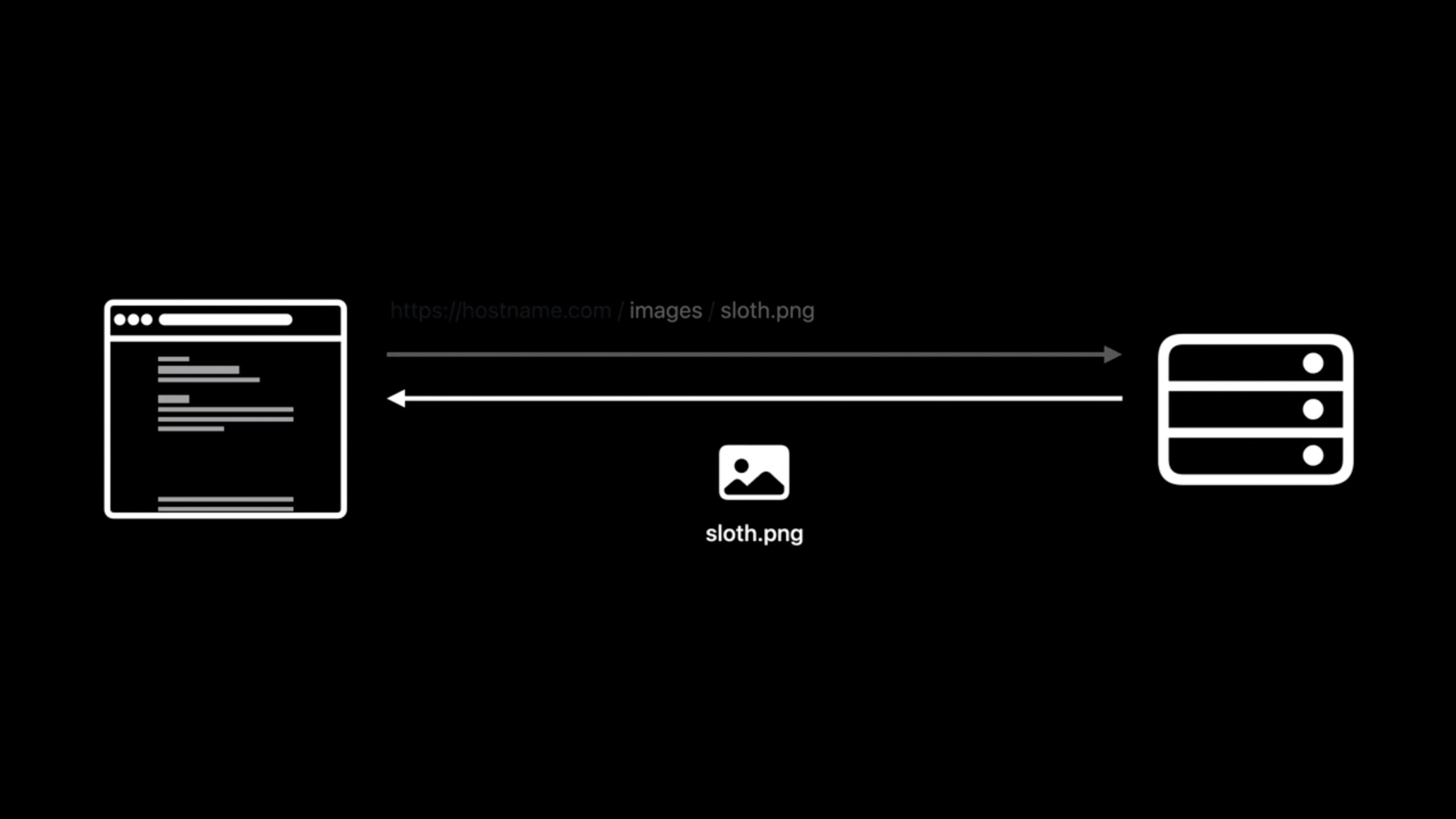
第二类是静态资源和数据请求。浏览器会按归档内部的相对路径请求 CSS、JavaScript、数据、图片、下载文件和媒体。服务器要把这些路径映射到 .doccarchive 目录里。
(04:49)
# Enable custom routing.
RewriteEngine On

# Route documentation and tutorial pages.
RewriteRule ^(documentation|tutorials)\/.*$ SlothCreator.doccarchive/index.html [L]

# Route files within the documentation archive.
RewriteRule ^(css|js|data|images|downloads|favicon\.ico|favicon\.svg|img|theme-settings\.json|videos)\/.*$ SlothCreator.doccarchive/$0 [L]
关键点:
RewriteEngine On打开 Apache 的重写规则。- 第一条
RewriteRule匹配以documentation或tutorials开头的 URL。 SlothCreator.doccarchive/index.html是单页应用入口,负责渲染文档页和教程页。[L]表示命中后停止继续匹配后续规则。- 第二条
RewriteRule明确匹配 DocC 归档的顶层资源目录和文件。 SlothCreator.doccarchive/$0把请求转发到归档内部的同名路径。- 规则列出具体目录,是因为同一个服务器还在托管项目网站,不能把网站请求全部转进文档归档。
xcodebuild docbuild 在命令行构建文档
(07:28)
Xcode 13 给 xcodebuild 增加了 docbuild action。它的使用方式接近普通 build:传入 scheme,必要时传入 project、workspace、SDK、destination 或 configuration。
构建过程中,Swift 编译器收集 public symbols(公开符号)、符号关系和源码里的文档注释,生成 symbol graph(符号图)。文档编译器再把符号图、Documentation Catalog(文档目录)里的文章、媒体和教程合并成 .doccarchive。
(09:17)
# Build documentation for the project.
xcodebuild docbuild                    \
  -scheme "SlothCreator"               \
  -derivedDataPath MyDerivedDataFolder

# Find all the built documentation archives
# to copy them to another location.
find MyDerivedDataFolder               \
  -name "*.doccarchive"
关键点:
xcodebuild docbuild触发文档构建。-scheme "SlothCreator"指定要构建文档的 scheme。-derivedDataPath MyDerivedDataFolder把构建产物写入固定目录,方便脚本查找。find MyDerivedDataFolder从构建目录开始搜索。-name "*.doccarchive"找出所有生成的 DocC 文档归档。- session 提到,依赖的 Swift framework、library 或 package 也会走同样流程,相关文档会被放到一个位置。
用脚本更新网站里的文档归档
(10:54)
自动化发布只需要两步:先构建文档,再把归档复制到网站目录。demo 中的网站目录是 ~/www。
这个脚本适合放到团队的自动化流程里。session 提到,可以在 CI 服务器的 post-merge hook 里运行它,让托管文档保持更新。
(09:18)
#!/bin/sh

# Build the SlothCreator documentation.
xcodebuild docbuild                  \
  -scheme "SlothCreator"             \
  -derivedDataPath MyDerivedDataPath

# Copy the documentation archive to ~/www where we
# host the SlothCreator website and documentation.
find MyDerivedDataPath               \
  -name "*.doccarchive"              \
  -exec cp -R {} ~/www \;
关键点:
#!/bin/sh让文件作为 shell 脚本运行。xcodebuild docbuild构建 SlothCreator 的文档。-derivedDataPath MyDerivedDataPath固定输出目录,避免脚本依赖 Xcode 默认 Derived Data 路径。find MyDerivedDataPath搜索本次构建产物。-name "*.doccarchive"只匹配 DocC 文档归档。-exec cp -R {} ~/www \;把每个归档递归复制到网站根目录。- 网站路由已经指向
SlothCreator.doccarchive,复制完成后刷新页面就能看到新增文章和教程。
没有 Xcode 界面时先列出 scheme
(11:18)
脚本需要知道 scheme 名称。demo 中 David 从 Xcode 的 scheme selector 里确认了 SlothCreator。如果机器上没有打开 Xcode,可以先在命令行列出可用 scheme。
xcodebuild -list关键点:
xcodebuild -list列出当前工程、workspace 或 Swift package 中可用的 scheme。- 找到 scheme 后,把名称传给
xcodebuild docbuild -scheme。 - session 建议在包含 project、workspace 或 Swift package 的目录里调用
xcodebuild,这样可以只传 scheme。
核心启发
-
做什么:给开源 Swift package 做一个在线文档入口。 为什么值得做:DocC 归档能直接托管到网站,用户不需要先导入 Xcode。 怎么开始:用 Xcode 导出
.doccarchive,放到网站目录,按 session 的.htaccess规则处理/documentation/和静态资源请求。 -
做什么:给公司内部框架加一个自动更新的文档站。 为什么值得做:
xcodebuild docbuild可以在命令行生成文档,适合接入 CI。 怎么开始:写一个 shell 脚本执行xcodebuild docbuild -scheme "YourFramework" -derivedDataPath MyDerivedDataPath,再用find -name "*.doccarchive"复制到内网站点。 -
做什么:把文档发布变成合并后的固定动作。 为什么值得做:session 明确提到 post-merge hook 可以让托管文档保持更新。 怎么开始:在 CI 的合并后步骤运行文档构建脚本,构建成功后替换网站目录中的旧
.doccarchive。 -
做什么:给多 target 工程生成统一的文档产物清单。 为什么值得做:
find MyDerivedDataPath -name "*.doccarchive"会找出构建产生的所有文档归档。 怎么开始:为每个需要公开的 scheme 运行docbuild,收集所有.doccarchive,再按归档名称复制到发布目录。 -
做什么:在产品官网加“Read Documentation”按钮。 为什么值得做:DocC 的 Web App 能渲染 reference documentation、articles 和 interactive tutorials,适合放在用户了解项目的入口。 怎么开始:把按钮链接指向
/documentation/下的顶层文档页,确认服务器对该路径返回归档里的index.html。
关联 Session
- Meet DocC documentation in Xcode — 从源码注释和 Markdown 开始生成 Swift 框架、库和包的 DocC 文档。
- Elevate your DocC documentation in Xcode — 用 Documentation Catalog、概念文章和自动链接补足 API 参考之外的说明。
- Build interactive tutorials using DocC — 用 DocC 指令创建教程目录、章节、步骤、图片和代码练习。
评论
GitHub Issues · utterances