
Highlight
Metal 在 WWDC21 把动态库、函数指针、二进制归档、私有链接函数和函数拼接扩展到新的 shader 编译流程,让开发者可以复用 GPU 二进制、运行时扩展渲染管线,并减少 shader 编译成本。
核心内容
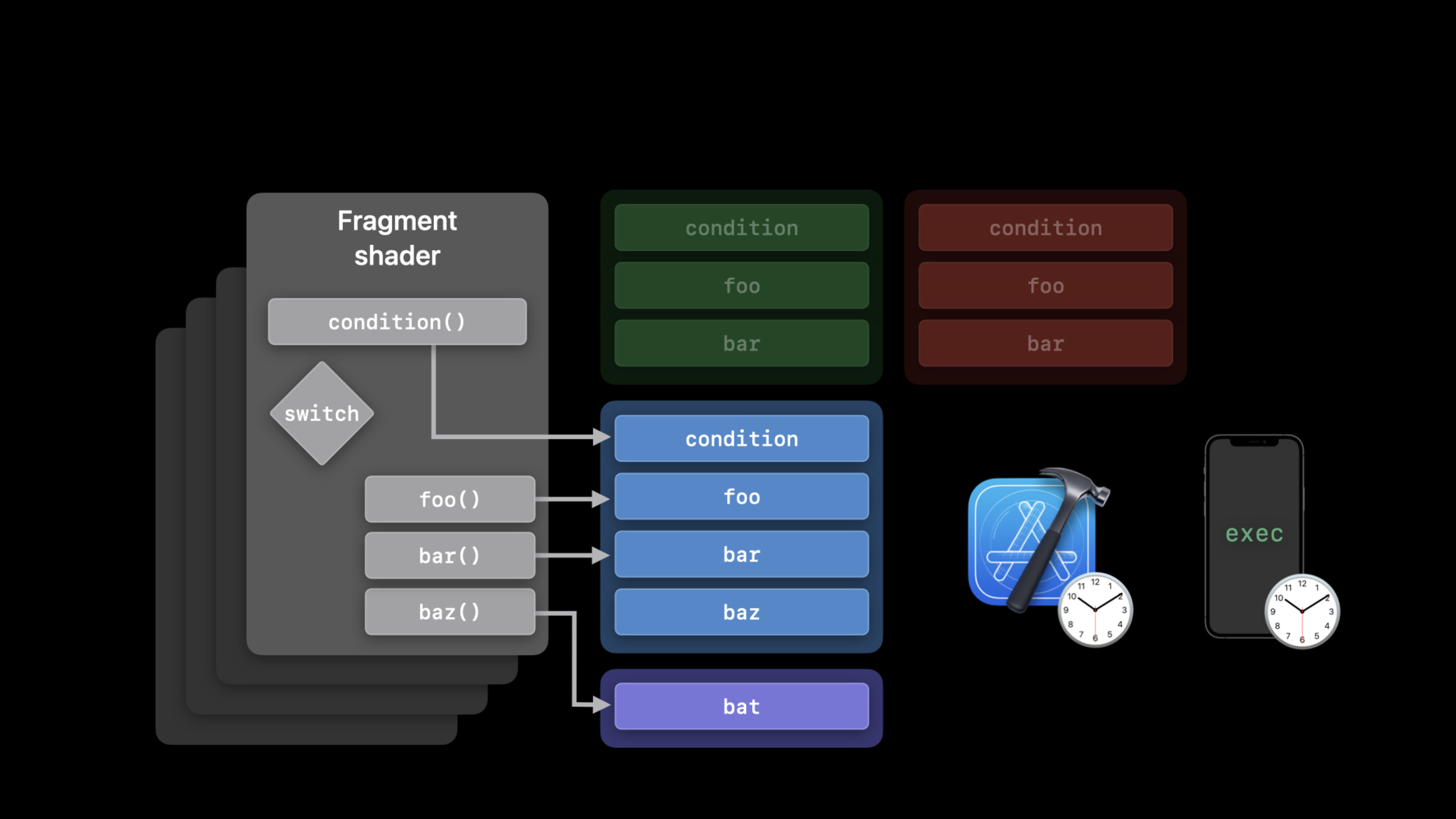
你写了一个 Metal 渲染器。多个 fragment shader 都会调用同一批工具函数,比如 foo() 和 bar()。旧做法很直接:把实现编进每个 pipeline。项目变大后,重复编译开始拖慢启动和首次渲染。
另一个问题来自运行时配置。材质、滤镜、用户自定义效果,都可能在 App 运行中变化。如果每次变化都重新拼 shader 源码,再从 Metal source 编到 AIR,用户会等,开发者也很难控制缓存粒度。
Apple 在这场 session 里给出几条路径。
固定的工具函数,可以放进动态库(Dynamic Library)。pipeline 创建时再链接它们,同一份 GPU binary 可以服务多个 render、tile、compute 工作负载。
运行时需要替换调用目标,可以使用函数指针(Function Pointer)和可见函数表(Visible Function Table)。shader 只知道函数签名,实际调用哪一个函数,由 CPU 端绑定的 table 决定。
编译成本需要跨启动复用,可以使用二进制归档(Binary Archive)。它把 pipeline 和 binary function pointer 的编译结果保存到磁盘,下一次启动直接查归档。
如果你现在靠字符串拼接生成 shader,函数拼接(Function Stitching)提供了更稳的做法。你把预编译的 [[stitchable]] 函数组成有向无环图,Metal 在 AIR 层生成新函数,跳过 Metal frontend 的运行时开销。
详细内容
动态库:把工具函数从 pipeline 里拆出来
(04:44)动态库的流程从 AIR 开始。你可以用 Xcode 的 Metal toolchain 在构建期生成 AIR,也可以在运行时调用 newLibraryWithSource。拿到 AIR 后,用 newDynamicLibrary 创建动态库,用 serializeToURL 写入磁盘,下一次用 newDynamicLibraryWithURL 复用。
id<MTLLibrary> airLibrary = [device newLibraryWithSource:source
                                                 options:nil
                                                   error:&error];

id<MTLDynamicLibrary> dynamicLibrary = [device newDynamicLibrary:airLibrary
                                                           error:&error];

[dynamicLibrary serializeToURL:libraryURL
                         error:&error];

id<MTLDynamicLibrary> cachedLibrary = [device newDynamicLibraryWithURL:libraryURL
                                                                  error:&error];
关键点:
newLibraryWithSource对应 transcript 中提到的运行时从 source 编译到 AIR 的入口newDynamicLibrary把已经编译出的 Metal library 转成 GPU binary 形式的动态库serializeToURL把动态库写到磁盘,供后续启动复用newDynamicLibraryWithURL从磁盘加载之前保存的动态库
(05:38)shader 里只声明外部函数,不提供实现。实现来自创建 pipeline 时加载的动态库。
// Declare external functions

extern float4 foo(FragmentInput input);
extern float4 bar(FragmentInput input);

// Use functions in shader

fragment float4 main(FragmentInput input [[stage_in]])
{
    switch(condition(input))
    {
        case 0:
            return foo(input);
        case 1:
            return bar(input);
    }
}
关键点:
extern float4 foo(...)声明函数签名,当前 shader 文件不提供函数体extern float4 bar(...)也是外部符号,稍后由动态库解析main是 fragment shader,输入来自[[stage_in]]switch(condition(input))决定调用哪个外部函数return foo(input)和return bar(input)的实现可以在运行时通过加载不同动态库替换
(06:04)把动态库加入对应 stage 的 preloaded libraries 数组后,符号会按数组顺序解析。fragment、vertex、tile 等 stage 都有对应属性。
renderPipeDesc.fragmentPreloadedLibraries = @[cachedLibrary];关键点:
fragmentPreloadedLibraries对应 fragment stage- 数组里的动态库提供
foo()、bar()这类extern函数的实现 - transcript 明确说明,符号按加入数组的顺序解析
函数指针:让 shader 在运行时选择调用目标
(09:01)函数指针的第一步,是把可调用函数实例化。为了加速 pipeline 创建,可以把函数编译成 binary 形式。
// Declare a descriptor and set CompileToBinary options

MTLFunctionDescriptor* functionDescriptor = [MTLFunctionDescriptor new];
functionDescriptor.options = MTLFunctionOptionCompileToBinary;

// Backend compile the function

functionDescriptor.name = @"foo";
id<MTLFunction> foo = [library newFunctionWithDescriptor:functionDescriptor
                                                     error:&error];
关键点:
MTLFunctionDescriptor描述要从 library 里取出的函数MTLFunctionOptionCompileToBinary要求 backend compiler 生成 GPU binaryfunctionDescriptor.name = @"foo"指定函数名newFunctionWithDescriptor:error:根据 descriptor 创建MTLFunction
(09:30)创建 pipeline descriptor 时,要告诉 Metal 当前 stage 可能调用哪些函数。AIR 函数和 binary 函数走不同数组。
// Provide a list of functions that the pipeline stage may call

// AIR functions

renderPipeDesc.fragmentLinkedFunctions.functions = @[foo, bar, baz];

// Binary functions

renderPipeDesc.fragmentLinkedFunctions.binaryFunctions = @[foo, bar, baz];
关键点:
fragmentLinkedFunctions绑定 fragment stage 的可调用函数集合functions放 AIR 形式的函数,compiler 可以在 AIR 层做静态链接和优化binaryFunctions放已经 backend 编译的函数,用来缩短 pipeline 创建时间- transcript 提到,如果 binary 函数有复杂调用链,需要正确设置最大调用栈深度,避免 stack overflow
(10:47)pipeline 创建完成后,创建可见函数表,再把函数 handle 放进表中。
// Create visible function table

id<MTLVisibleFunctionTable> visibleFunctionTable =
    [renderPipeline newVisibleFunctionTableWithDescriptor:tableDescriptor
                                                    stage:MTLFunctionStageFragment];

// Create function handles

id<MTLFunctionHandle> fooHandle =
    [renderPipeline functionHandleWithFunction:foo
                                         stage:MTLFunctionStageFragment];

// Insert handles into table

[visibleFunctionTable setFunction:fooHandle
                           atIndex:0];
关键点:
newVisibleFunctionTableWithDescriptor:stage:创建指定 stage 的函数表functionHandleWithFunction:stage:从 pipeline 中拿到 stage 专用的函数 handlesetFunction:atIndex:把 handle 写入函数表槽位- table 和 handle 都绑定到某个 pipeline 与某个 stage
(11:21)渲染时,CPU 端绑定函数表,shader 端把函数表当作 buffer 参数使用。
// Bind visible function table objects to each stage

[renderCommandEncoder setFragmentVisibleFunctionTable:visibleFunctionTable
                                        atBufferIndex:0];
// Usage in shader
fragment float4 shaderFunc(FragmentData vo[[stage_in]],
visible_function_table<float4(float3)>materials[[buffer(0)]])
{
// ...
return materials[materialSelector](coord);
}关键点:
setFragmentVisibleFunctionTable:atBufferIndex:把函数表绑定到 fragment stage 的 buffer indexvisible_function_table<float4(float3)>声明函数表中每个函数的签名materials[[buffer(0)]]与 CPU 端的atBufferIndex:0对应materials[materialSelector](coord)通过索引选择函数并调用
增量 pipeline:后续添加 binary function
(12:20)创建好 pipeline 后,可能又发现需要调用新函数 bat()。重新用完整 descriptor 创建第二个 pipeline 会触发 pipeline 编译。Metal 允许先声明这个 pipeline 未来可以扩展,然后基于旧 pipeline 快速创建新 pipeline。
// Enable incrementally adding binary functions per stage

renderPipeDesc.supportAddingFragmentBinaryFunctions = YES;

// Create render pipeline functions descriptor

MTLRenderPipelineFunctionsDescriptor extraDesc;
extraDesc.fragmentAdditionalBinaryFunctions = @[bat];

// Instantiate render pipeline state

id<MTLRenderPipelineState> renderPipeline2 =
  [renderPipeline1 newRenderPipelineStateWithAdditionalBinaryFunctions:extraDesc
                                                                 error:&error];
关键点:
supportAddingFragmentBinaryFunctions = YES在原始 pipeline descriptor 上声明 fragment stage 可扩展MTLRenderPipelineFunctionsDescriptor描述新增函数集合fragmentAdditionalBinaryFunctions = @[bat]只添加新的 binary functionnewRenderPipelineStateWithAdditionalBinaryFunctions:error:基于renderPipeline1创建包含bat的新 pipeline state
Binary Archive:把编译结果存到磁盘
(14:15)Binary Archive 在 WWDC20 已经用于 pipeline。WWDC21 增加了把 visible function 和 intersection function 存入 archive 的能力。保存函数时,调用 addFunctionWithDescriptor,并把 function descriptor 和 source library 传进去。
[archive addFunctionWithDescriptor:functionDescriptor
                            library:library
                              error:&error];

functionDescriptor.binaryArchives = @[archive];

id<MTLFunction> foo = [library newFunctionWithDescriptor:functionDescriptor
                                                     error:&error];
关键点:
addFunctionWithDescriptor:library:error:把函数的 binary 编译结果加入 archivefunctionDescriptor.binaryArchives = @[archive]让后续函数创建先查 archivenewFunctionWithDescriptor:error:如果在 archive 中找到已编译函数,会直接返回- transcript 提到,archive 可以同时存 render、tile、compute pipeline,以及 binary function pointer
(14:55)查找规则也影响错误处理。Metal 先查 binary archive 列表;找不到时,再看 CompileToBinary 选项;如果要求 binary 编译,还要看 pipeline option 里的 FailOnBinaryArchiveMiss。
functionDescriptor.options = MTLFunctionOptionCompileToBinary;
functionDescriptor.binaryArchives = @[archive];

id<MTLFunction> foo = [library newFunctionWithDescriptor:functionDescriptor
                                                     error:&error];
关键点:
binaryArchives是查找 binary function 的 archive 列表MTLFunctionOptionCompileToBinary表示 archive miss 后仍需要 binary 形式- transcript 说明,
FailOnBinaryArchiveMiss会决定 archive miss 时是运行时编译,还是返回nil
私有链接函数:给优化留空间
(17:45)linkedFunctions 里的 functions 和 privateFunctions 都在 AIR 层静态链接。差别在可见性。privateFunctions 不能生成 function handle,也不能放进 visible function table。它们是 pipeline 内部实现,compiler 可以更充分地优化。
renderPipeDesc.fragmentLinkedFunctions.privateFunctions = @[foo, bar];关键点:
privateFunctions适合只给当前 pipeline 内部调用的外部函数- 它们在 AIR 层静态链接
- 不能为 private function 创建 function handle
- transcript 说明,这个能力在 macOS Monterey 和 iOS 15 的所有设备可用,因为它工作在 AIR 层
Function Stitching:用图生成运行时函数
(19:03)函数拼接从计算图生成函数。图是有向无环图(Directed Acyclic Graph)。输入节点表示生成函数的参数,函数节点表示函数调用。数据边表示数据流,控制边表示调用顺序。
[[stitchable]] int FunctionA(device int*, int) {…}
[[stitchable]] int FunctionC(int, int) {…}

[[stitchable]]
int ResultFunction(device int* Input0,
                   int Input1,
                   int Input2)
{
  int N0 = FunctionA(Input0, Input1);
  int N1 = FunctionA(Input0, Input2);
  int N2 = FunctionC(N0, N1);
  return N2;
}
关键点:
[[stitchable]]标记函数可以被 function stitching API 使用FunctionA和FunctionC是预先存在于 library 中的可拼接函数ResultFunction展示拼接结果等价于怎样的 Metal 函数- transcript 说明,真正的 stitching 会直接在 AIR 层生成 library,跳过 Metal frontend
(21:32)Objective-C 端先创建输入节点,再创建函数节点,最后创建 graph。
// Create input nodes

inputs[0] = [[MTLFunctionStitchingInputNode alloc] initWithArgumentIndex:0];

// Create function nodes

n0 = [[MTLFunctionStitchingFunctionNode alloc] initWithName:@"FunctionA"
                                                  arguments:@[inputs[0], inputs[1]]
                                        controlDependencies:@[]];
n1 = [[MTLFunctionStitchingFunctionNode alloc] initWithName:@"FunctionA"
                                                  arguments:@[inputs[0], inputs[2]]
                                        controlDependencies:@[]];
n2 = [[MTLFunctionStitchingFunctionNode alloc] initWithName:@"FunctionC"
                                                  arguments:@[n0, n1]
                                        controlDependencies:@[]];

// Create graph

graph = [[MTLFunctionStitchingGraph alloc] initWithFunctionName:@"ResultFunction"
                                                          nodes:@[n0, n1]
                                                     outputNode:n2
                                                     attributes:@[]];
关键点:
MTLFunctionStitchingInputNode用 argument index 映射生成函数的参数MTLFunctionStitchingFunctionNode用函数名和参数列表表示一次函数调用controlDependencies:@[]表示这里没有额外的执行顺序约束MTLFunctionStitchingGraph指定生成函数名、节点列表、输出节点和属性
(22:18)有了 graph 后,创建 stitched library descriptor,把可拼接函数和 graph 放进去,再从新 library 里取出生成函数。
// Configure stitched library descriptor

MTLStitchedLibraryDescriptor* descriptor = [MTLStitchedLibraryDescriptor new];

descriptor.functions      = @[stitchableFunctions];
descriptor.functionGraphs = @[graph];

// Create stitched function

id<MTLLibrary> lib = [device newLibraryWithDescriptor:descriptor
                                                error:&error];

id<MTLFunction> stitchedFunction = [lib newFunctionWithName:@"ResultFunction"];
关键点:
MTLStitchedLibraryDescriptor是创建 stitched library 的入口functions放 graph 中可以调用的 stitchable functionsfunctionGraphs放要生成的函数图newLibraryWithDescriptor:error:根据 descriptor 生成 librarynewFunctionWithName:@"ResultFunction"取出 stitched function,它可以继续用于 pipeline、function pointer 或其他 stitching graph
核心启发
-
做什么:为 3D 编辑器做运行时材质系统。 为什么值得做:函数指针让 shader 通过
visible_function_table调用材质函数,切换材质不需要重建完整 pipeline。 怎么开始:把不同材质函数编译成MTLFunction,通过newVisibleFunctionTableWithDescriptor:stage:创建表,用setFunction:atIndex:写入 handle,在 shader 中用materials[materialSelector](coord)调用。 -
做什么:为滤镜 App 做用户可组合的效果链。 为什么值得做:function stitching 可以把预编译的
[[stitchable]]函数按图组合,避免运行时拼 Metal source 字符串。 怎么开始:把基础滤镜写成[[stitchable]]函数,用MTLFunctionStitchingInputNode和MTLFunctionStitchingFunctionNode组图,再用MTLStitchedLibraryDescriptor生成函数。 -
做什么:为游戏引擎做 shader 工具库缓存。 为什么值得做:动态库可以把 helper functions 编译成独立 GPU binary,render、tile、compute pipeline 共用。 怎么开始:把工具函数编成 AIR,调用
newDynamicLibrary生成动态库,用serializeToURL落盘,启动时通过newDynamicLibraryWithURL加载,并放入对应 stage 的 preloaded libraries。 -
做什么:为首次进入场景减少卡顿。 为什么值得做:Binary Archive 可以保存 pipeline 和 binary function pointer 的编译结果,下一次启动减少 shader 编译时间和编译内存成本。 怎么开始:创建
MTLBinaryArchive,用addFunctionWithDescriptor:library:error:预填函数,把 archive 写入磁盘;加载时设置functionDescriptor.binaryArchives后再创建函数。 -
做什么:为插件式渲染器支持用户提供 shader 函数。 为什么值得做:动态库允许用户提供已编译实现,主 shader 只保留
extern声明;函数指针允许 pipeline 调用编译时未见过的函数。 怎么开始:约定函数签名,主 shader 用extern或visible_function_table声明调用点,加载用户动态库或 binary function 后绑定到 pipeline。
关联 Session
- Explore Core Image kernel improvements — 展示 Core Image kernel 如何使用 Metal Shading Language、dynamic library 和 stitchable functions。
- Explore bindless rendering in Metal — 讲解 argument buffers 与 bindless rendering,适合继续改造大型渲染器。
- Discover Metal debugging, profiling, and asset creation tools — 介绍 Xcode 中 Metal 调试、性能分析和资源制作工具。
- Enhance your app with Metal ray tracing — 讲解 Metal ray tracing 的 scene、shader 和渲染流程。
评论
GitHub Issues · utterances