
Highlight
Xcode 13 的 Metal Debugger 新增 Acceleration Structure Viewer、GPU Timeline、shader validation 和 texture converter,覆盖光追调试、性能分析和资源创建全流程。
核心内容
你的 Metal 应用出现了渲染问题。画面有伪影,或者某些场景帧率突然下降。你需要工具来定位问题:是 shader 错了?是资源绑定有问题?还是 GPU 性能瓶颈?
Xcode 13 的 Metal Debugger 今年有重大更新,覆盖光追、性能分析和纹理处理。
详细内容
Acceleration Structure Viewer
(01:25)
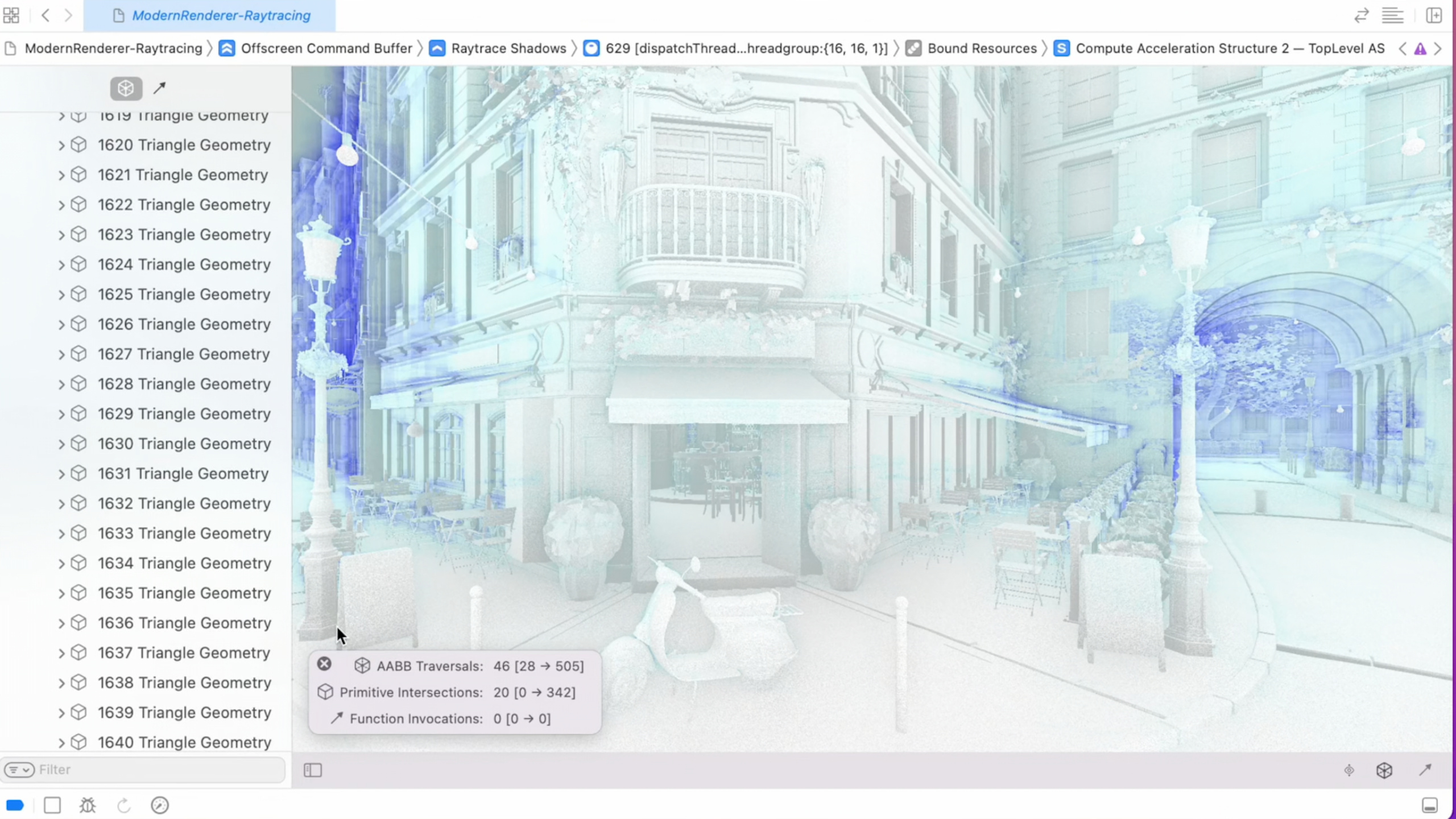
光追的加速结构是黑盒,出了问题很难调试。Xcode 13 新增了 Acceleration Structure Viewer,可以可视化 BVH 的层次结构。
在 GPU Frame Capture 中,选中一个 ray tracing dispatch,在 Bound Resources 中找到 acceleration structure,点击即可打开 Viewer。
Viewer 左侧显示 instance 层次树,右侧显示 3D 预览。点击某个 instance,可以看到它的包围盒、primitive 数量和变换矩阵。
(02:00)
关键点:
- 在 GPU Frame Capture 中查看 acceleration structure
- 左侧树形结构显示 instance 层次
- 右侧 3D 视图显示几何体
- 可以检查每个 instance 的包围盒和变换
GPU Timeline
(04:30)
GPU Timeline 是 Xcode 13 全新的性能分析视图。它以时间线方式展示 GPU 工作的执行过程。
时间线显示:
- 每个 render pass 和 compute dispatch 的开始时间和持续时间
- 内存带宽使用情况
- tile 内存压力
- 各阶段之间的重叠程度
通过时间线可以回答:哪个 pass 最耗时?GPU 是否有空闲周期?带宽是否成为瓶颈?
(05:15)
关键点:
- 时间线显示 GPU 工作的实际执行顺序
- 可以放大查看单个 pass 的细节
- 颜色编码表示不同类型的工作(render/compute/blit)
- 配合 GPU counters 查看具体指标
Shader Validation
(08:20)
Xcode 13 扩展了 shader validation 的覆盖范围,新增检测:
- 越界内存访问
- 未初始化的变量使用
- 除零错误
- NaN/Inf 传播
启用方式:在 Scheme 的 Metal 选项中勾选 “Shader Validation”。
(09:10)
关键点:
- 在开发期间启用,发布时关闭
- 有一定性能开销
- 可以捕获到发布版本中难以复现的 shader bug
- 支持 vertex、fragment 和 compute shader
Texture Converter
(12:00)
Xcode 13 新增了命令行纹理转换工具,支持所有现代 GPU 纹理格式。
# 把 PNG 转换为 ASTC 压缩纹理
xcrun textureconverter input.png -o output.astc -f ASTC_4x4_LDR

# 把 HDR 图像转换为 RGBM 编码
xcrun textureconverter input.hdr -o output.rgbm -f RGBM(27:51)
RGBM 编码把 HDR 值编码到 RGBA8 纹理中:
// RGBM 编码
float4 encodeRGBM(float3 hdrColor) {
    float maxRGB = max(hdrColor.r, max(hdrColor.g, hdrColor.b));
    float M = saturate(maxRGB / 6.0);
    M = ceil(M * 255.0) / 255.0;
    float3 rgb = hdrColor / (M * 6.0);
    return float4(rgb, M);
}

// RGBM 解码
float3 decodeRGBM(float4 rgbm) {
    return rgbm.rgb * (rgbm.a * 6.0);
}(28:41)
关键点:
- 命令行工具集成到 Xcode 工具链
- 支持 ASTC、BC、PVRTC 等压缩格式
- RGBM 编码让 HDR 纹理可以用 8-bit 存储
- 可以集成到构建脚本中
Metal Texture Swizzles
(30:55)
纹理 swizzle 允许你在采样时重新排列通道顺序,不需要修改 shader 代码。
let descriptor = MTLTextureDescriptor()
descriptor.swizzle = MTLTextureSwizzleChannels(
    red: .blue,
    green: .red,
    blue: .green,
    alpha: .one
)(30:55)
关键点:
- 在纹理创建时设置 swizzle
- 所有采样操作自动应用
- 适合处理不同格式的源数据
- 零运行时开销
Reconstruct Normal from Height
(31:55)
Xcode 13 的 texture converter 支持从 height map 生成 normal map。
xcrun textureconverter height.png -o normal.astc -f ASTC_4x4_LDR --generate-normal-map(31:55)
关键点:
- 从单通道 height map 生成三通道 normal map
- 支持多种压缩格式输出
- 可以指定 height scale 和 wrap mode
核心启发
-
用 Acceleration Structure Viewer 调试光追问题。检查 BVH 的包围盒是否合理,instance 变换是否正确。入口 API:Xcode 13 GPU Frame Capture → Acceleration Structure Viewer。
-
用 GPU Timeline 定位性能瓶颈。找到最耗时的 pass,检查是否有足够的并行重叠。入口 API:Xcode 13 → Metal GPU Timeline。
-
在开发期间始终启用 Shader Validation。捕获越界访问、未初始化变量等 shader bug。入口 API:Scheme → Metal → Shader Validation。
-
用 texture converter 集成纹理压缩到构建流程。自动把源纹理转换为 GPU 压缩格式。入口 API:
xcrun textureconverter。 -
用 texture swizzle 处理不同通道顺序的源数据。不需要为每种格式写单独的 shader。入口 API:
MTLTextureDescriptor.swizzle。
关联 Session
- Optimize high-end games for Apple GPUs — Apple GPU TBDR 架构游戏优化
- Enhance your app with Metal ray tracing — Metal 光线追踪 API
- Create image processing apps powered by Apple silicon — Apple Silicon 图像处理优化
评论
GitHub Issues · utterances