
Highlight
Apple Silicon 的统一内存架构让 CPU-GPU 零拷贝数据传输成为可能;TBDR 架构下的 tile shading 和 memoryless attachment 让图像滤镜管线完全在 on-chip tile 内存中执行,大幅降低内存带宽。
核心内容
你的图像处理应用从相机获取一帧图像,应用一系列滤镜,然后显示结果。在离散 GPU 上,每一步都要把数据从 CPU 内存拷贝到 GPU 内存,滤镜之间还要来回传递纹理。这些拷贝消耗大量时间和电量。
Apple Silicon 改变了这个局面。CPU 和 GPU 共享同一块物理内存,数据不需要拷贝。
详细内容
统一内存架构的优势
(00:52)
Apple Silicon 的所有组件(CPU、GPU、Neural Engine、Media Engine)通过统一的内存接口访问同一块系统内存。
这意味着:
- 用
MTLBuffer创建的 buffer,CPU 可以直接读写,GPU 可以直接使用 IOSurface和CVPixelBuffer不需要拷贝就能在 CPU 和 GPU 之间传递- 图像处理管线的每一步都可以就地操作
// 从相机获取的 CVPixelBuffer
let pixelBuffer: CVPixelBuffer = ...

// 直接创建 Metal texture,零拷贝
let texture = CVMetalTextureCacheCreateTextureFromImage(
    allocator: kCFAllocatorDefault,
    textureCache: textureCache,
    sourceImage: pixelBuffer,
    textureAttributes: nil,
    pixelFormat: .bgra8Unorm,
    width: width,
    height: height,
    planeIndex: 0
)(02:30)
关键点:
CVMetalTextureCache创建与 pixel buffer 共享内存的 texture- 没有 CPU-GPU 之间的数据拷贝
- 整个处理管线都在 GPU 上执行
- 适合实时相机滤镜场景
Tile Shading:在 Tile 内存中处理
(03:45)
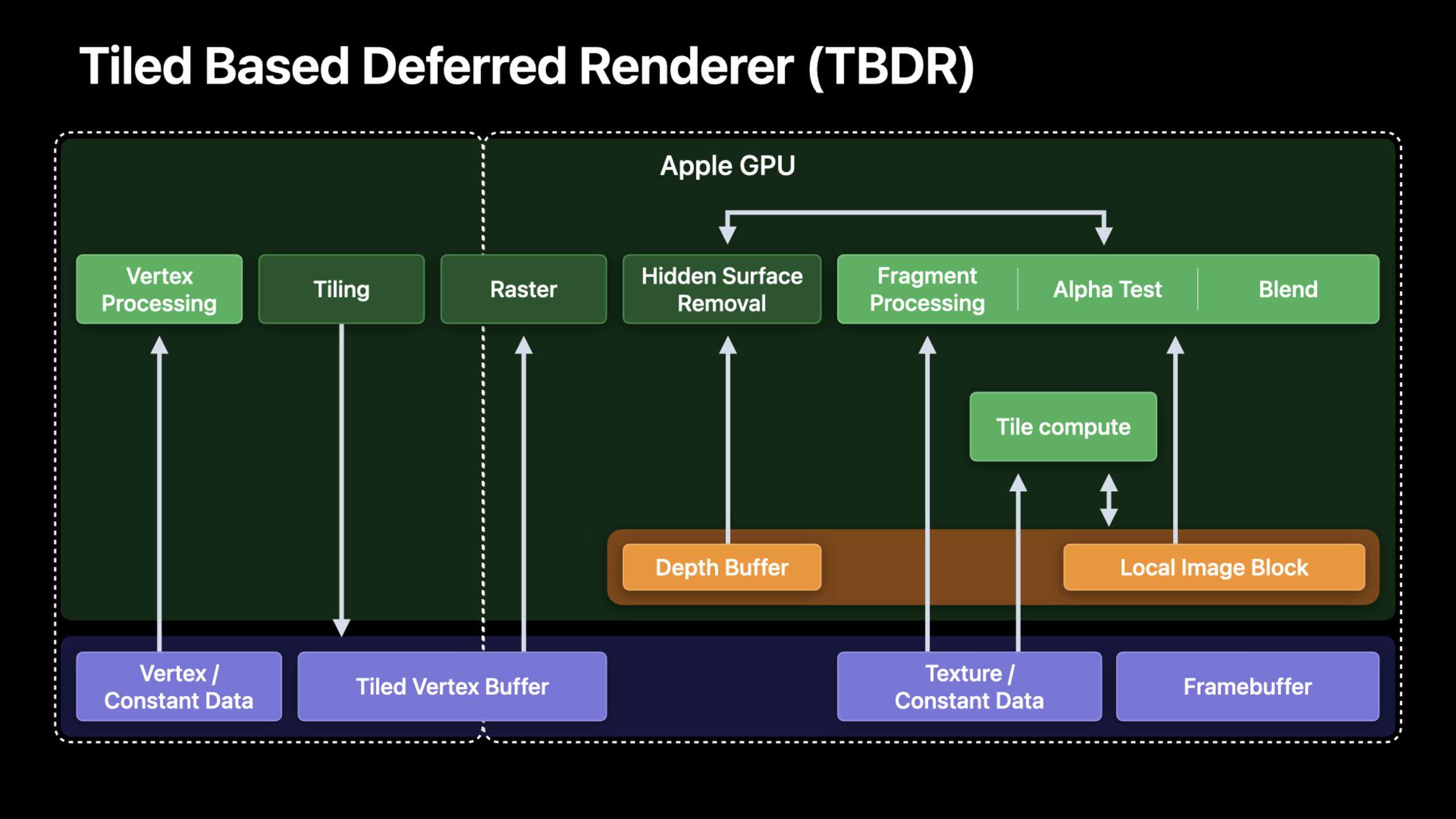
Apple GPU 的 TBDR 架构把画面分成小块(tile),每块在 on-chip tile 内存中处理。tile 内存的带宽比主内存高一个数量级。
对于图像处理,这意味着多个滤镜可以合并到一个 render pass 中,中间结果留在 tile 内存。
// 传统方式:每个滤镜一个 compute pass,写回主内存
kernel void blurPass1(...) { ... }  // 写主内存
kernel void blurPass2(...) { ... }  // 写主内存
kernel void sharpen(...) { ... }    // 写主内存

// 优化方式:tile shader,中间结果留在 tile 内存
[[kernel]] void imageProcessingTileShader(
    texture2d<float> source [[texture(0)]],
    device ImageProcessingParams* params [[buffer(0)]],
    uint2 gid [[thread_position_in_grid]]
) {
    // 读取源图像
    float4 color = source.read(gid);

    // 应用多个滤镜,数据留在 tile memory
    color = applyBlur(color, params->blurRadius);
    color = applySharpen(color, params->sharpenAmount);
    color = applyColorAdjust(color, params->brightness, params->contrast);

    // 只写最终结果回主内存
    destination.write(color, gid);
}(05:20)
关键点:
- tile shader 在 tile memory 中执行
- 多个滤镜合并为一个 kernel
- 中间结果不写出到主内存
- 大幅减少内存带宽
Memoryless Attachment
(10:53)
render pass 的中间 attachment 可以标记为 memoryless,只存在于 tile 内存中,不写入主内存。
let descriptor = MTLRenderPassDescriptor()

// 中间 G-Buffer attachment,memoryless
descriptor.colorAttachments[0].texture = intermediateTexture
descriptor.colorAttachments[0].storeAction = .dontCare  // 不写回主内存
intermediateTexture.storageMode = .memoryless

// 最终输出 attachment
descriptor.colorAttachments[1].texture = outputTexture
descriptor.colorAttachments[1].storeAction = .store // 写回主内存(10:53)
关键点:
.memorylessstorage mode 只存在于 tile 内存.dontCarestore action 不写入主内存- 适合 G-Buffer、中间处理结果
- 最终输出用
.store保存
Uber-Shader 优化
(12:25)
图像处理应用通常有很多滤镜组合。如果每个组合都写一个单独的 shader,shader 数量会爆炸。uber-shader 用条件分支处理所有滤镜,但会导致寄存器压力。
解决方案:用 function constants 在编译期确定启用的滤镜。
[[function_constant(0)]] const bool enableBlur = false;
[[function_constant(1)]] const bool enableSharpen = false;
[[function_constant(2)]] const bool enableVignette = false;

fragment float4 imageFilterFragment(...) {
    float4 color = source.sample(sampler, uv);

    if (enableBlur) {
        color = applyBlur(color, uv);
    }
    if (enableSharpen) {
        color = applySharpen(color, uv);
    }
    if (enableVignette) {
        color = applyVignette(color, uv);
    }

    return color;
}(13:32)
关键点:
- function constants 在编译期确定
- 未启用的滤镜代码被剔除
- 减少寄存器压力
- 需要为每种组合创建 pipeline state
图像处理滤镜图
(23:02)
复杂的图像处理应用需要管理滤镜之间的依赖关系。一个典型的滤镜图:
Input Image → Blur → Blend with Original → Sharpen → Color Adjust → Output
                ↑___________________________|
在 Apple Silicon 上,这个图可以用单个 render pass 完成:
// 设置 render pass,所有中间结果用 memoryless
let descriptor = MTLRenderPassDescriptor()
descriptor.colorAttachments[0].storeAction = .dontCare
descriptor.colorAttachments[0].texture.storageMode = .memoryless

// 编码所有滤镜为一个 render command
encoder.setRenderPipelineState(uberPipeline)
encoder.setFragmentTexture(input, index: 0)
encoder.setFragmentBytes(&filterParams, length: ...)
encoder.drawPrimitives(...)(23:02)
关键点:
- 分析滤镜依赖关系,找出可以合并的步骤
- 中间结果用 memoryless attachment
- 最终输出用
.store - 减少 render pass 切换和内存带宽
核心启发
-
用 CVMetalTextureCache 实现零拷贝相机滤镜。从相机获取的 pixel buffer 直接转为 Metal texture,整个处理管线在 GPU 上完成。入口 API:
CVMetalTextureCacheCreateTextureFromImage。 -
把多个滤镜合并为单个 tile shader。中间结果留在 tile 内存,只写最终结果。入口 API:
[[kernel]] tileShader。 -
中间 attachment 用 memoryless storage。G-Buffer 和临时纹理不需要持久化到主内存。入口 API:
texture.storageMode = .memoryless+storeAction = .dontCare。 -
用 function constants 优化 uber-shader。根据当前启用的滤镜组合编译专用 shader,减少寄存器压力。入口 API:
[[function_constant(N)]]。 -
从离散 GPU 迁移时重新设计数据流。Apple Silicon 不需要 CPU-GPU 拷贝,把原来为了最小化拷贝而做的复杂设计简化。入口 API:统一内存 +
MTLStorageMode.shared。
关联 Session
- Optimize high-end games for Apple GPUs — Apple GPU TBDR 架构游戏优化
- Explore Core Image kernel improvements — Core Image Metal kernel 新写法
- Discover Metal debugging, profiling, and asset creation tools — Xcode 13 Metal 调试工具
评论
GitHub Issues · utterances