
探索 Swift 结构化并发
Highlight
结构化并发用”任务树”管理并发生命周期:父任务必须等所有子任务完成才能结束,子任务错误向上传播,取消操作从父到子级联生效。
async let处理固定数量的并发,TaskGroup处理动态数量的并发,两者都比手动管理线程更安全、更易推理。
核心内容
并发代码有一个长期困扰开发者的问题:控制流散落到各处。Completion handler 嵌套、GCD 调用散落在不同方法中、线程生命周期手动管理——这些非结构化的并发模式让代码难以理解和维护。
Swift 5.5 的结构化并发借鉴了结构化编程的思想。就像 goto 被淘汰是因为破坏了代码结构,非结构化的并发也需要被更清晰的抽象替代。核心机制是”任务树”:每个任务有明确的父任务,子任务的生命周期被父任务管理,错误和取消沿着树结构传播。
详细内容
从非结构化到结构化
传统的 completion handler 代码是非结构化的(01:57)。缩略图获取函数递归调用自身,错误处理分散在多个闭包中:
func fetchThumbnails(for ids: [String], completion handler: @escaping ([String: UIImage]?, Error?) -> Void) {
    guard let id = ids.first else { return handler([:], nil) }
    let request = thumbnailURLRequest(for: id)
    let dataTask = URLSession.shared.dataTask(with: request) { data, response, error in
        guard let response = response, let data = data else {
            return handler(nil, error)
        }
        UIImage(data: data)?.prepareThumbnail(of: thumbSize) { image in
            guard let image = image else {
                return handler(nil, ThumbnailFailedError())
            }
            fetchThumbnails(for: Array(ids.dropFirst())) { thumbnails, error in
                // 递归处理剩余 ID...
            }
        }
    }
    dataTask.resume()
}
async/await 版本是结构化的(02:56)。代码的执行顺序就是阅读顺序,错误通过 throws 统一传播:
func fetchThumbnails(for ids: [String]) async throws -> [String: UIImage] {
    var thumbnails: [String: UIImage] = [:]
    for id in ids {
        let request = thumbnailURLRequest(for: id)
        let (data, response) = try await URLSession.shared.data(for: request)
        try validateResponse(response)
        guard let image = await UIImage(data: data)?.byPreparingThumbnail(ofSize: thumbSize) else {
            throw ThumbnailFailedError()
        }
        thumbnails[id] = image
    }
    return thumbnails
}
async let:固定宽度的并发
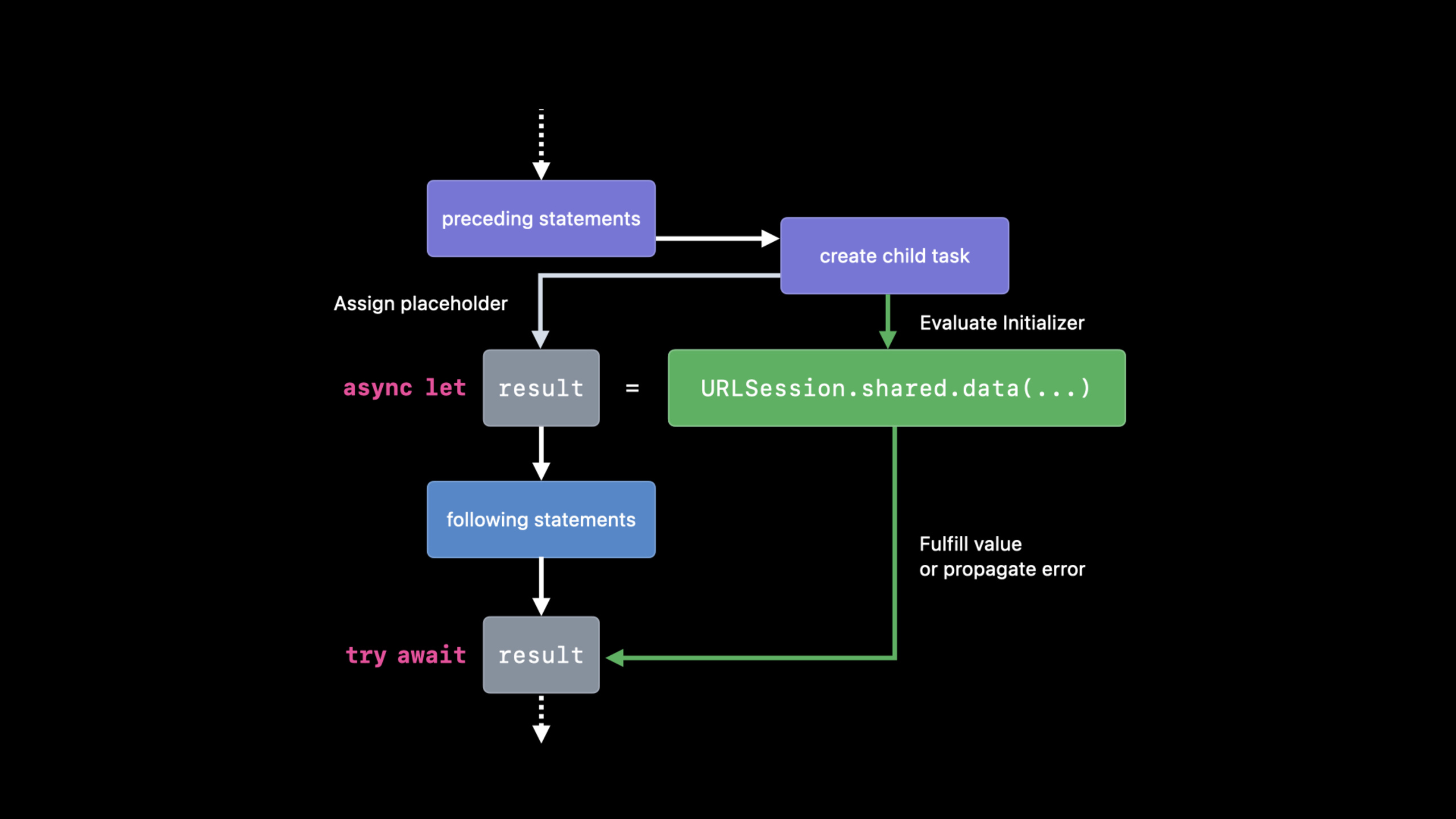
当需要同时发起多个独立的异步请求时,使用 async let(07:59)。它创建并发子任务,但子任务数量在编译期确定:
func fetchOneThumbnail(withID id: String) async throws -> UIImage {
    let imageReq = imageRequest(for: id)
    let metadataReq = metadataRequest(for: id)

    async let (data, _) = URLSession.shared.data(for: imageReq)
    async let (metadata, _) = URLSession.shared.data(for: metadataReq)

    guard let size = parseSize(from: try await metadata),
          let image = try await UIImage(data: data)?.byPreparingThumbnail(ofSize: size)
    else {
        throw ThumbnailFailedError()
    }
    return image
}
两个 async let 语句同时开始执行。try await metadata 和 await data 是挂起点,但两个请求是并行发起的。async let 适合并发数量固定的场景(13:13)。
TaskGroup:动态宽度的并发
当并发数量在运行时才能确定时,使用 TaskGroup(13:58)。例如批量获取缩略图:
func fetchThumbnails(for ids: [String]) async throws -> [String: UIImage] {
    var thumbnails: [String: UIImage] = [:]
    try await withThrowingTaskGroup(of: (String, UIImage).self) { group in
        for id in ids {
            group.async {
                return (id, try await fetchOneThumbnail(withID: id))
            }
        }
        // 按完成顺序获取结果
        for try await (id, thumbnail) in group {
            thumbnails[id] = thumbnail
        }
    }
    return thumbnails
}
注意 withThrowingTaskGroup 的闭包返回后,所有子任务必须已完成。for try await 按完成顺序消费结果,不是按提交顺序。
任务取消
结构化并发中的取消是协作式的。子任务通过两种方式响应取消(11:46):
调用会抛出取消错误的 API:
func fetchThumbnails(for ids: [String]) async throws -> [String: UIImage] {
    var thumbnails: [String: UIImage] = [:]
    for id in ids {
        try Task.checkCancellation()  // 如果已取消,抛出 CancellationError
        thumbnails[id] = try await fetchOneThumbnail(withID: id)
    }
    return thumbnails
}
或者手动检查取消状态(12:16):
func fetchThumbnails(for ids: [String]) async throws -> [String: UIImage] {
    var thumbnails: [String: UIImage] = [:]
    for id in ids {
        if Task.isCancelled { break }
        thumbnails[id] = try await fetchOneThumbnail(withID: id)
    }
    return thumbnails
}
Task.checkCancellation() 适合在循环中定期调用;Task.isCancelled 适合需要自定义清理逻辑的场景。
非结构化任务
有些场景需要脱离任务树的限制,例如 UI 事件触发的异步操作。使用 Task 创建非结构化任务(20:39):
@MainActor
class MyDelegate: UICollectionViewDelegate {
    func collectionView(_ view: UICollectionView, willDisplay cell: UICollectionViewCell, forItemAt item: IndexPath) {
        let ids = getThumbnailIDs(for: item)
        Task {
            let thumbnails = await fetchThumbnails(for: ids)
            display(thumbnails, in: cell)
        }
    }
}
非结构化任务需要手动管理生命周期。存储任务引用以便后续取消(22:11):
@MainActor
class MyDelegate: UICollectionViewDelegate {
    var thumbnailTasks: [IndexPath: Task<Void, Never>] = [:]

    func collectionView(_ view: UICollectionView, willDisplay cell: UICollectionViewCell, forItemAt item: IndexPath) {
        let ids = getThumbnailIDs(for: item)
        thumbnailTasks[item] = Task {
            defer { thumbnailTasks[item] = nil }
            let thumbnails = await fetchThumbnails(for: ids)
            display(thumbnails, in: cell)
        }
    }

    func collectionView(_ view: UICollectionView, didEndDisplay cell: UICollectionViewCell, forItemAt item: IndexPath) {
        thumbnailTasks[item]?.cancel()  //  cell 离开屏幕时取消
    }
}
Detached Task
Task.detached 创建一个完全独立的任务,不继承当前任务的任何上下文(24:09)。适合真正独立的后台工作:
Task.detached(priority: .background) {
    writeToLocalCache(thumbnails)
}
Detached task 内部也可以创建 task group(24:57):
Task.detached(priority: .background) {
    withTaskGroup(of: Void.self) { g in
        g.async { writeToLocalCache(thumbnails) }
        g.async { log(thumbnails) }
        g.async { ... }
    }
}
核心启发
-
优先使用结构化并发:
async let和TaskGroup的生命周期由编译器和运行时自动管理,错误传播和取消级联都是自动的。非结构化Task只在 UI 回调等必要场景使用。 -
async let优于TaskGroup的场景:当并发数量固定且已知时,async let语法更简洁,编译器检查更严格。只在子任务数量动态变化时才用TaskGroup。 -
实现协作式取消:长时间运行的异步操作务必定期检查
Task.isCancelled或调用Task.checkCancellation()。这是结构化并发的”礼貌”,也是避免不必要计算的关键。 -
用
defer清理非结构化任务:存储Task引用时,在任务体开头用defer { thumbnailTasks[item] = nil }确保任务完成后自动清理字典,防止内存泄漏。 -
谨慎使用
Task.detached:它脱离了任务树,取消不会级联传播,错误不会被父任务捕获。只在真正独立的后台工作(如日志写入、缓存持久化)中使用。
关联 Session
- WWDC2021 10132 - Swift 中的 async/await — async/await 语法基础
- WWDC2021 10133 - 用 Swift Actor 保护可变状态 — Actor 与结构化并发的配合
- WWDC2021 10019 - SwiftUI 中的并发 — 在 SwiftUI 中使用 Task 和 async/await
- WWDC2021 10058 - 认识 AsyncSequence — 异步序列与结构化并发的结合
评论
GitHub Issues · utterances