
Highlight
Foundation 在 iOS 15 和 macOS Monterey 中引入 Swift 原生的 AttributedString、全新的格式化 API(
.formatted())和自动语法一致引擎,大幅简化国际化、本地化和富文本处理。
核心内容
富文本处理的困境
Foundation 框架提供所有 App 和框架的基础功能,其中国际化/本地化是每个 App 都需要的。今年,Foundation 在国际化方面有史以来最大的更新。
富文本处理一直是 iOS 开发中的一个痛点。NSAttributedString 是一个引用类型,不是 Swift 原生的值类型。它与 Swift String 的字符计数行为不一致,也不支持本地化。开发者需要手动处理复杂的范围计算,容易出错。
AttributedString:Swift 原生富文本
(02:05)iOS 15 引入全新的 AttributedString 结构体,专为 Swift 设计:
- 值类型:可以安全复制、传递、作为属性存储
- 字符计数一致:与 Swift String 使用相同的字符计数逻辑
- 原生本地化:完全支持本地化字符串
- 类型安全:属性使用正确的类型(如 SwiftUI 的 Font)
- Codable 支持:可以安全地序列化和反序列化
格式化 API 的重构
(17:28)旧的 DateFormatter、NumberFormatter 类比较重量级,需要创建实例、配置样式、处理线程问题。新的 API 直接在类型上调用 .formatted() 方法,简洁且线程安全。
自动语法一致引擎
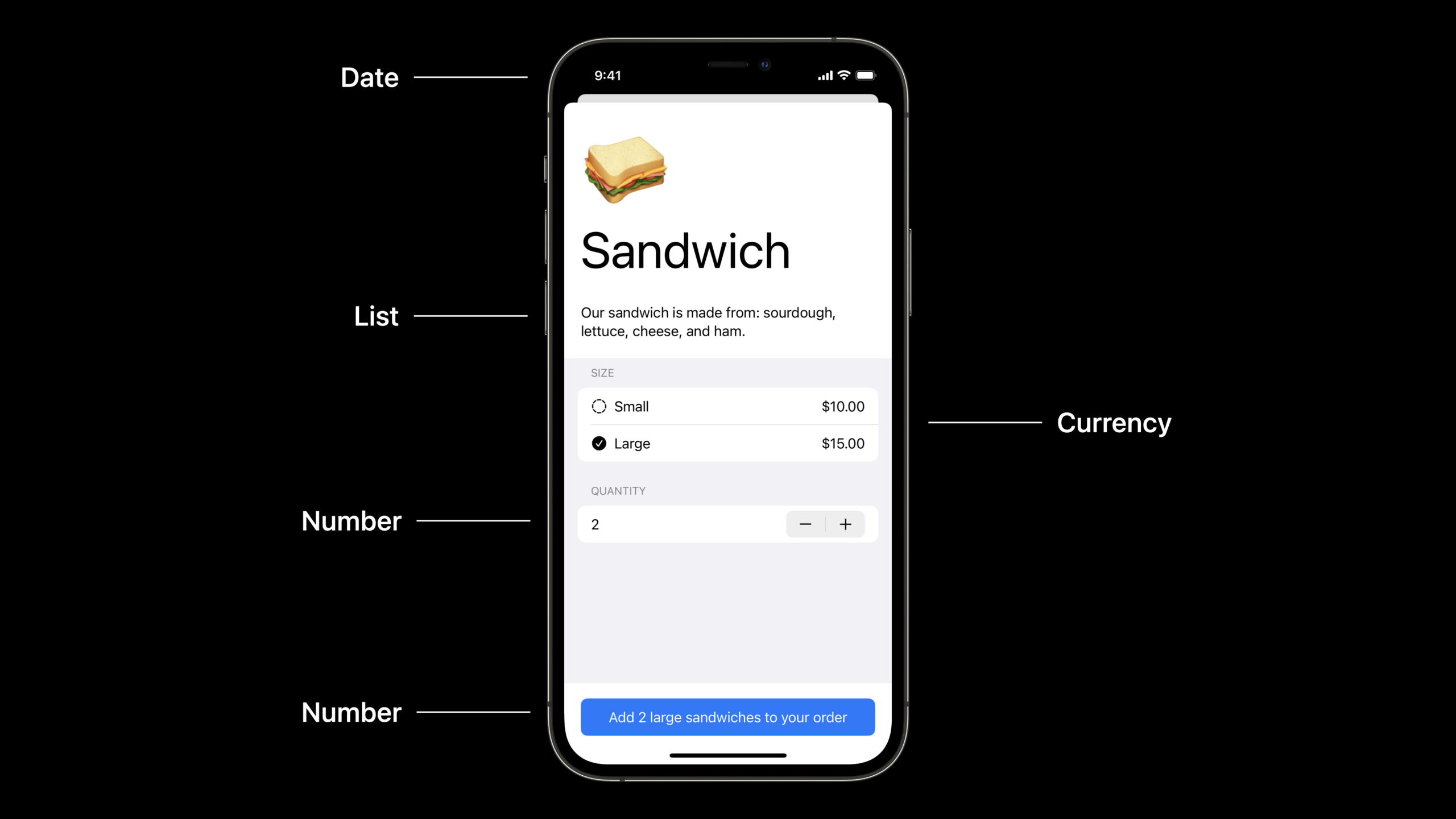
(29:41)多语言应用中最头疼的问题之一是语法一致性。例如,用户在英文界面选择了 “2 large salads”,切换到西班牙语时,应该显示 “2 ensaladas grandes” 而不是 “2 grandes ensaladas”。过去需要为每种语言准备多个版本的字符串。
新的自动语法一致引擎通过 inflect: true 参数自动处理这些问题。
详细内容
AttributedString 基础
(02:50)创建 AttributedString 并设置属性:
func attributedStringBasics(important: Bool) {
    var thanks = AttributedString("Thank you!")
    thanks.font = .body.bold()

    var website = AttributedString("Please visit our website.")
    website.font = .body.italic()
    website.link = URL(string: "http://www.example.com")

    var container = AttributeContainer()
    if important {
        container.foregroundColor = .red
        container.underlineColor = .primary
    } else {
        container.foregroundColor = .primary
    }

    thanks.mergeAttributes(container)
    website.mergeAttributes(container)

    print(thanks)
    print(website)
}
关键点:
AttributedString是结构体,需要用var修饰才能修改属性- 属性直接设置在实例上,如
font、link、foregroundColor AttributeContainer是一个属性集合,可以批量合并到字符串中mergeAttributes会合并容器的所有属性到目标字符串
从 Markdown 创建 AttributedString
(07:29)使用 localized 参数可以从 Markdown 创建本地化的 AttributedString:
func prompt(for document: String) -> String {
    String(localized: "Would you like to save the document "\(document)"?")
}

func attributedPrompt(for document: String) -> AttributedString {
    AttributedString(localized: "Would you like to save the document "\(document)"?")
}
关键点:
AttributedString(localized:)会解析 Markdown 格式(粗体、斜体、链接)- 插值
\()会自动处理本地化参数的正确位置 - Markdown 语法
_表示斜体,**表示粗体,[text](url)表示链接
自定义 Markdown 属性
(10:42)可以定义自定义属性并通过 Markdown 语法设置:
enum RainbowAttribute : CodableAttributedStringKey, MarkdownDecodableAttributedStringKey {
    enum Value : String, Codable {
        case plain
        case fun
        case extreme
    }

    public static var name = "rainbow"
}
Markdown 语法 ^[an attribute](rainbow: 'extreme') 会解析为自定义属性。
关键点:
CodableAttributedStringKey协议让属性支持序列化MarkdownDecodableAttributedStringKey协议让属性可以从 Markdown 解析^[text](key: 'value')是自定义属性的 Markdown 语法
日期格式化
(17:28)新的 .formatted() API 让日期格式化变得极其简单:
func formattingDates() {
    let date = Date.now

    let formatted = date.formatted()
    // example: "6/7/2021, 9:42 AM"

    let onlyDate = date.formatted(date: .numeric, time: .omitted)
    // example: "6/7/2021"

    let onlyTime = date.formatted(date: .omitted, time: .shortened)
    // example: "9:42 AM"
}
关键点:
formatted()使用当前 locale 自动格式化.numeric、.omitted、.shortened等预定义样式简化配置- 线程安全,不需要创建 formatter 实例
复杂日期格式
(18:36)使用 Fluent API 构建复杂格式:
func formattingDatesMoreExamples() {
    let date = Date.now

    let formatted = date.formatted(.dateTime.year().day().month())
    // example: "Jun 7, 2021"

    let formattedWide = date.formatted(.dateTime.year().day().month(.wide))
    // example: "June 7, 2021"

    let logFormat = date.formatted(.iso8601)
    // example: "20210607T164200Z"

    let fileNameFormat = date.formatted(.iso8601.year().month().day().dateSeparator(.dash))
    // example: "2021-06-07"
}
关键点:
.dateTime开始构建格式,链式调用.year()、.month()等方法.wide、.numeric等参数控制每个部分的样式.iso8601提供标准化的日期格式
日期范围格式化
(20:30)格式化日期范围:
func formattingIntervals() {
    let now = Date.now
    let later = now + TimeInterval(5000)

    let range = (now..<later).formatted()
    // example: "6/7/21, 9:42 – 11:05 AM"

    let timeDuration = (now..<later).formatted(.timeDuration)
    // example: "1:23:20"

    let components = (now..<later).formatted(.components(style: .wide))
    // example: "1 hour, 23 minutes, 20 seconds"

    let relative = later.formatted(.relative(presentation: .named, unitsStyle: .wide))
    // example: "in 1 hour"
}
关键点:
- 日期范围会智能合并相同部分(如月、日、年只显示一次)
.timeDuration显示持续时间长度.components显示组件分解.relative显示相对时间描述
数字格式化
(25:30)数字格式化同样简洁:
func formattingNumbersWithStyles() {
    let percent = 25
    let percentFormatted = percent.formatted(.percent)
    // percentFormatted is "25%"

    let scientific = 42e9
    let scientificFormatted = scientific.formatted(.number.notation(.scientific))
    // scientificFormatted is "4.2E10"

    let price = 29
    let priceFormatted = price.formatted(.currency(code: "usd"))
    // priceFormatted is "$29.00"
}
关键点:
.percent、.currency、.number.notation等预定义样式- 自动处理 locale 相关的格式(如货币符号位置)
- 线程安全,不需要创建 formatter 实例
SwiftUI TextField 集成
(26:05)SwiftUI TextField 直接支持格式化:
struct ReceiptTipView: View {
    @State var tip = 0.15

    var body: some View {
        HStack {
            Text("Tip")
            Spacer()
            TextField("Amount",
                      value: $tip,
                      format: .percent)
        }
    }
}
关键点:
- TextField 的
format参数直接接受格式化样式 .percent会自动处理百分号输入和显示- 绑定值保持为数值类型,不需要手动转换
自动语法一致
(29:41)inflect: true 参数自动处理语法一致:
func addToOrderEnglish() {
    let quantity = 2
    let size = "large"
    let food = "salad"

    let message = AttributedString(localized: "Add ^[\(quantity) \(size) \(food)](inflect: true) to your order")
    print(message)
}
关键点:
^[...](inflect: true)标记需要语法一致的文本- 系统会根据当前语言自动调整词语顺序和形态
- 支持数词、形容词、名词的语法一致
核心启发
-
用 AttributedString 替代 NSAttributedString:新项目直接使用
AttributedString,它会自动处理本地化和 Markdown 解析。配合 SwiftUI 的 Text 视图使用时,无需桥接。 -
用 .formatted() 替代 Formatter 类:日期、数字、货币格式化改用新的
.formatted()API。代码更简洁,无需考虑线程安全和实例管理,性能也更好。 -
利用 Markdown 定义本地化字符串:在
.strings文件中直接使用 Markdown 语法(粗体、斜体、链接),AttributedString(localized:)会自动解析。这减少了代码中的格式化逻辑。 -
用自动语法一致减少翻译量:多语言 App 中使用
inflect: true参数,让系统自动处理数词、形容词的语法一致。这可以大幅减少需要翻译的字符串变体数量。 -
TextField 直接绑定数值类型:在 SwiftUI 中使用 TextField 的
format参数绑定数值,而不是手动处理字符串转换。.percent、.currency等样式开箱即用。
关联 Session
- What’s new in SwiftUI — SwiftUI 新特性,与 AttributedString 配合使用
- Discover concurrency in UIKIt and macOS — UIKit 并发更新
- Text and display in SwiftUI — SwiftUI 文本渲染
评论
GitHub Issues · utterances