
Highlight
RealityKit 2 引入了自定义系统、PhysicallyBasedMaterial、动画混合层、角色控制器和运行时资源生成,让 AR 应用开发从”放置模型”升级到”构建完整交互体验”。
核心内容
RealityKit 2019 年发布时,定位是”让 AR 开发变简单”。加载 USDZ 模型、放到检测到的平面上,几行代码就能跑起来。
但开发者反馈很明确:我们需要更多控制权。自定义着色器、自定义游戏逻辑、更灵活的动画、物理交互——这些在 RealityKit 1 中很难实现。
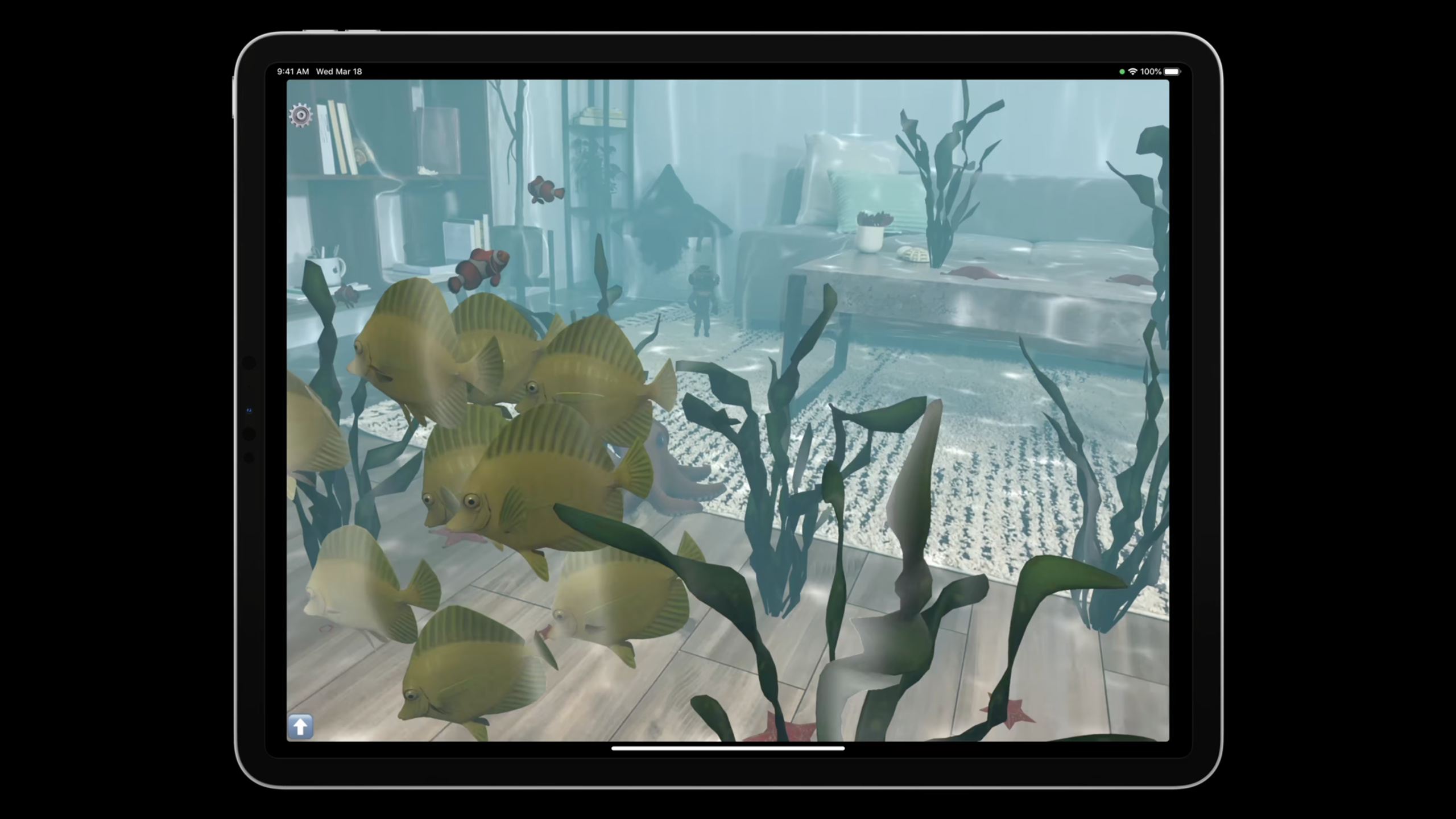
WWDC2021 的回应是 RealityKit 2。Session 用一个水下 AR 演示贯穿全程:鱼群在客厅中游动,潜水员在沙发和地板间跳跃,章鱼在受到惊吓时变色逃走。所有这些效果都用新 API 实现。
详细内容
自定义系统:纯 ECS 架构
RealityKit 2 向更纯粹的 ECS(Entity Component System)架构演进。功能放在 System 中,状态放在 Component 中,Entity 只是组件的标识符。
class FlockingSystem: RealityKit.System {
    required init(scene: RealityKit.Scene) { }

    static var dependencies: [SystemDependency] { [.before(MotionSystem.self)] }

    private static let query = EntityQuery(where: .has(FlockingComponent.self)
                                                && .has(MotionComponent.self)
                                                && .has(SettingsComponent.self))

    func update(context: SceneUpdateContext) {
        context.scene.performQuery(Self.query).forEach { entity in
            guard var motion: MotionComponent = entity.components[MotionComponent.self]
                else { continue }

            // Boids 模拟:分离、聚合、对齐
            motion.forces.append(/* forces */)

            entity.components[MotionComponent.self] = motion
        }
    }
}
关键点:
- 自定义系统遵循
RealityKit.System协议(07:10) dependencies指定执行顺序,.before(MotionSystem.self)确保本系统在运动系统之前运行EntityQuery高效筛选参与系统的实体,无需遍历整个场景图- Component 是 Swift struct(值类型),修改后需要写回 entity
- 符合
Codable的 Component 在多玩家 AR 中自动网络同步(08:15)
架构变化:Game Manager 角色弱化
以前,每帧的更新逻辑写在 SceneEvents.update 的闭包中,通常集中在 Game Manager 类里。现在,更新逻辑被拆分到独立的 System 中,由引擎按依赖顺序调用。
以前,通过 Entity 子类的协议遵循来表达组件组合。现在不需要子类化 Entity 了,组件可以在运行时动态添加和移除。
// 新方式:运行时添加/移除组件
entity.components[FlockingComponent.self] = FlockingComponent()
entity.components[FlockingComponent.self] = nil
关键点:
- Game Manager 只需给 Entity 添加 Component,System 自动处理逻辑(10:15)
- Entity 子类化不再是必须的
TransientComponent:克隆 Entity 时不继承的组件,如临时状态标记(11:25)storeWhileEntityActive:事件订阅随 Entity 生命周期自动管理(11:58)
SwiftUI 与 RealityKit 的数据传递
用 SwiftUI 构建设置面板,将数据传递到 RealityKit 的自定义系统中。
class Settings: ObservableObject {
    @Published var separationWeight: Float = 1.6
}

struct ContentView: View {
    @StateObject var settings = Settings()
    var body: some View {
        ZStack {
            ARViewContainer(settings: settings)
            MovementSettingsView()
                .environmentObject(settings)
        }
    }
}

struct SettingsComponent: RealityKit.Component {
    var settings: Settings
}

class UnderwaterView: ARView {
    let settings: Settings
    private func addEntity(_ entity: Entity) {
        entity.components[SettingsComponent.self] =
            SettingsComponent(settings: self.settings)
    }
}
关键点:
Settings作为@StateObject和environmentObject在 SwiftUI 中传递(12:36)- 包装为
SettingsComponent后附加到 Entity - 自定义系统从 Entity 的组件中读取设置值
材质系统升级
RealityKit 2 新增了 PhysicallyBasedMaterial,与 USD 材质规范对齐,是 SimpleMaterial 的超集。
var faceMaterial = PhysicallyBasedMaterial()
faceMaterial.roughness = 0.1
faceMaterial.metallic = 1.0
faceMaterial.blending = .transparent(opacity: .init(scale: 1.0))

let sparklyNormalMap = try! TextureResource.load(named: "sparkly")
faceMaterial.normal.texture = PhysicallyBasedMaterial.Texture.init(sparklyNormalMap)

faceMaterial.baseColor.texture = PhysicallyBasedMaterial.Texture.init(faceTexture)
faceEntity.model!.materials = [faceMaterial]
关键点:
PhysicallyBasedMaterial包含标准 PBR 属性:baseColor、roughness、metallic、normal、ambientOcclusion、clearcoat 等(13:57)- 支持透明度纹理和 opacityThreshold(14:35)
VideoMaterial新增透明度支持(13:42)CustomMaterial允许用 Metal 代码编写自定义着色器(15:05)
动画增强
动画 API 新增了混合层(Blend Layers)和程序化动画。
// 动画过渡
entity.playAnimation(animation, transitionDuration: 0.3)

// 混合层:Walking 在上层,Idle 在下层
// 调整 blend factor 控制权重
// 改变 playback speed 控制速度
关键点:
transitionDuration让新旧动画平滑过渡(15:55)- Blend Layers:多个动画在不同层播放,通过 blend factor 混合(16:22)
- 改变 playback speed 让角色走快或走慢(16:47)
- 用角色相对地面的速度控制 blend factor 和 speed,减少脚步滑动(16:55)
FromToByAnimation程序化创建变换动画(18:33)AnimationView从 USD 时间轴切片出多个动画片段(17:47)
角色控制器
角色控制器让 Entity 与场景中的碰撞体进行物理交互。
// 创建胶囊体形状的角色控制器
let characterController = CharacterController(
    height: capsuleHeight,
    radius: capsuleRadius
)
entity.components[CharacterControllerComponent.self] =
    CharacterControllerComponent(characterController)

// 每帧调用,自动避开障碍物
characterController.move(to: targetPosition)

// 忽略障碍物,直接瞬移
characterController.teleport(to: targetPosition)
关键点:
- 胶囊体形状匹配角色轮廓(19:55)
move(to:)自动与环境网格(LiDAR 生成)碰撞检测(20:08)teleport(to:)忽略障碍物直接移动(20:19)- 演示中潜水员在沙发和地板间跳跃,自动与房间网格交互
运行时资源生成
面部网格
SceneUnderstanding 现在可以识别人脸并返回带 ModelComponent 的 Entity。
static let sceneUnderstandingQuery =
    EntityQuery(where: .has(SceneUnderstandingComponent.self) && .has(ModelComponent.self))

func findFaceEntity(scene: RealityKit.Scene) -> HasModel? {
    let faceEntity = scene.performQuery(sceneUnderstandingQuery).first {
        $0.components[SceneUnderstandingComponent.self]?.entityType == .face
    }
    return faceEntity as? HasModel
}
关键点:
SceneUnderstandingComponent.entityType区分.face和.meshChunk(21:26)- 获取面部 Entity 后可以替换其材质
- 演示中用 PencilKit 绘制图案,实时应用到面部网格
音频缓冲区
从任意 AVAudioBuffer 创建空间音频资源。
let synthesizer = AVSpeechSynthesizer()

func speakText(_ text: String, forEntity entity: Entity) {
    let utterance = AVSpeechUtterance(string: text)
    utterance.voice = AVSpeechSynthesisVoice(language: "en-IE")

    synthesizer.write(utterance) { audioBuffer in
        guard let audioResource = try? AudioBufferResource(
            buffer: audioBuffer,
            inputMode: .spatial,
            shouldLoop: true
        ) else { return }

        entity.playAudio(audioResource)
    }
}
关键点:
AudioBufferResource从AVAudioBuffer创建(23:09)inputMode: .spatial启用 3D 定位音频- 其他模式:
.nonSpatial、.ambient - 可用
AVSpeechSynthesizer将文字转为语音,或录制麦克风输入
核心启发
-
用 ECS 架构组织 AR 游戏逻辑:将行为拆分为独立的 System,状态放在 Component 中。Entity 只是标识符。这让代码更清晰,也便于多玩家同步。
-
角色控制器简化 AR 物理交互:不需要自己写碰撞检测和导航网格,角色控制器自动与 LiDAR 扫描的环境网格交互。
-
面部 AR 的新玩法:SceneUnderstanding 提供的人脸网格 + 自定义材质,可以实现虚拟妆容、面部滤镜、表情追踪等效果。
-
程序化音频生成:
AudioBufferResource让 AR 中的音效不再依赖预置文件,可以实时合成、处理和应用音频。 -
PBR 材质让虚拟内容更真实:
PhysicallyBasedMaterial提供了完整的 PBR 工作流,配合 normal map、clearcoat 等高级属性,虚拟物体可以更好地融入真实环境光照。
关联 Session
- Create 3D models with Object Capture — 用照片快速创建逼真的 3D 模型,为 RealityKit 提供内容素材
- Explore ARKit 5 — ARKit 5 的新特性包括位置锚点和面部追踪改进
- Discover geometry-aware audio with ARKit — ARKit 中的几何感知音频
- Render with Metal — Metal 渲染管线,为 CustomMaterial 编写 shader 的基础
评论
GitHub Issues · utterances