
Highlight
第三章要求玩家把 Swan 卷轴上的节奏转换成
Pitch、NoteProtocol和固定间隔的Timer,再用ToneOutput播放不同长度的音符。
核心内容
第二章只处理一种音符长度,固定间隔的 Timer 足够完成挑战。第三章回到 lizard 的小屋后,Swan 的新卷轴要求玩家演奏有节奏差异的旋律:四分音符、二分音符、附点二分音符都可能出现。原来的循环只会按同一个节拍推进,遇到长音就失去表达能力。
Apple 先把问题拆成两个模型。Pitch 负责告诉 ToneOutput 要播放哪个频率,NoteProtocol 负责描述一个音符对应的 tone 和长度。长度用四分音符的倍数表达,所以二分音符返回 2.0,八分音符返回 0.5。
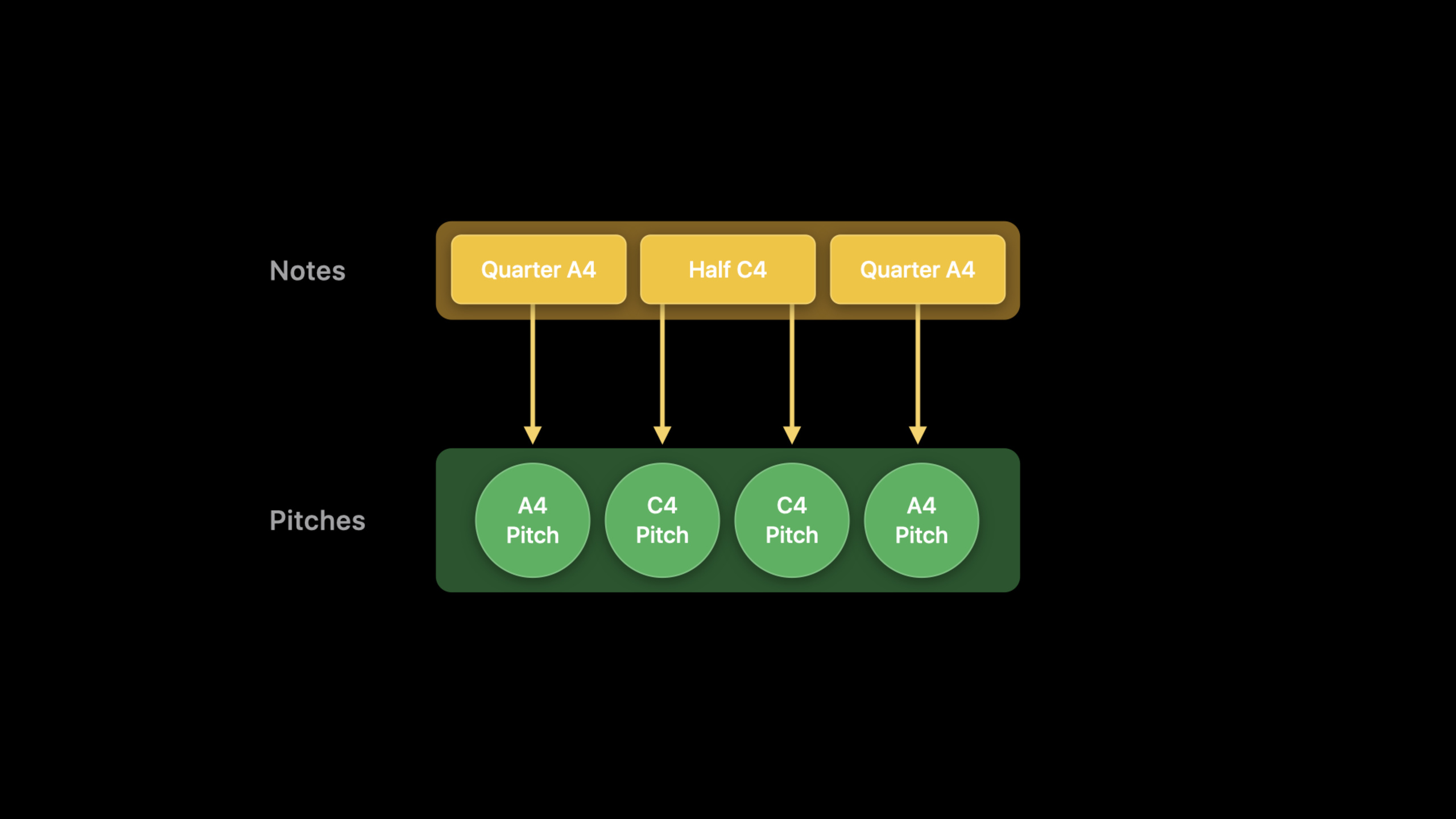
难点在计时器。逐字稿明确提醒,ToneOutput 会持续发声,直到被要求停止。这个 session 的做法是把 Timer 固定在最短支持音符的间隔上,再把较长音符拆成多次 pitch 指令。这样循环仍然保持简单,却能表达不同长度的音符。
详细内容
用 Pitch 描述频率
(01:50)Music.swift 里预留了协议让玩家实现。第一步是把卷轴上的每个音高映射成频率,供 ToneOutput 使用。
// Example Pitch implementation

public enum Pitch: Double, PitchProtocol {
    case a4 = 440.0

    var frequency: Double {
        return self.rawValue
    }
}
关键点:
Pitch遵守PitchProtocol,用Doubleraw value 保存频率。.a4对应 440.0,逐字稿要求玩家为 Swan 卷轴中的每个 pitch 增加 case。frequency直接返回 raw value,后面的Tone会读取这个频率。
用 NoteProtocol 描述音符长度
(02:08)音高解决后,还要表达一个音符持续多久。官方片段把音符拆成两个属性:播放用的 tone,以及相对四分音符的 length。
// Music.swift

public protocol NoteProtocol {

    /// Play this Note through a ToneOutput
    var tone: Tone { get }

    /// The duration of this Note as a multiple of quarter notes,
    /// e.g., a half note is 2.0, an eighth note is 0.5
    var length: Float { get }
}
关键点:
tone是送给ToneOutput的声音对象。length用四分音符做基准,二分音符是2.0,八分音符是0.5。- 这个协议让同一个旋律数组同时携带 pitch 和 rhythm 信息。
官方给出的 note 实现先覆盖了最小形态:一个四分音符 case,把 pitch 转成 Tone,再返回固定长度。
// Example Note implementation

public enum Note: NoteProtocol {
    case quarter(pitch: Pitch)

    var tone: Tone {
        switch self {
        case .quarter(let pitch):
            return Tone(pitch: pitch.frequency, volume: 0.3)
        }
    }

    var length: Float {
        switch self {
        case .quarter(_):
            return 1.0
        }
    }
}
关键点:
quarter(pitch:)把一个 pitch 包成四分音符。tone用 pitch 的frequency创建Tone,音量在片段里设为0.3。length对四分音符返回1.0,玩家需要继续为卷轴里的其他长度增加 case。
固定 Timer 间隔
(03:18)原来的 Timer 不会自动理解 note length。解决办法是先告诉协议最短支持音符有多长,再用这个值计算 timer interval。演讲者以 120 BPM 为例,四分音符长度是 500 毫秒。
// Music.swift

public protocol NoteProtocol {

    /// Play this Note through a ToneOutput
    var tone: Tone { get }

    /// The duration of this Note as a multiple of quarter notes,
    /// e.g., a half note is 2.0, an eighth note is 0.5
    var length: Float { get }

    /// Length of the smallest Note supported
    static var shortestSupportedNoteLength: Float { get }
}
关键点:
shortestSupportedNoteLength是类型级别属性,所有 note 共享同一个最短单位。- 逐字稿中的 Swan 卷轴以四分音符作为最短单位,所以示例选择 quarter note。
Timer后续按这个最短单位触发,长音通过重复 pitch 指令表达。
把长音符拆成 pitch 指令
(04:15)长音符需要被拆成一组 pitch。四分音符发出一个指令,二分音符发出两个指令,附点二分音符发出三个指令。官方把这一步命名为 subdivide()。
// Music.swift

public protocol NoteProtocol {
    associatedtype PitchType: PitchProtocol

    /// Play this Note through a ToneOutput
    var tone: Tone { get }

    /// The duration of this Note as a multiple of quarter notes,
    /// e.g., a half note is 2.0, an eighth note is 0.5
    var length: Float { get }

    /// Length of the smallest Note supported
    static var shortestSupportedNoteLength: Float { get }

    /// Subdivide into a series pitches, according to the shortest
    /// supported note
    func subdivide() -> [PitchType]
}
关键点:
associatedtype PitchType把 note 协议和具体 pitch 类型连接起来。subdivide()返回 pitch 数组,数组长度由 note length 和最短支持长度决定。- timer 循环不再直接消费 note,而是消费已经展开的 pitch。
完整播放循环
(04:30)最后一步是在播放前把所有 notes 展开成 pitches,再让固定间隔的 Timer 逐个播放。
// Play more than one tone redux

let toneOutput = ToneOutput()
let notes = [Note.quarter(pitch: .a4), .half(pitch: .a4), .quarter(pitch: .a4)]
var pitches = [Pitch]()
for note in notes {
    pitches.append(contentsOf: note.subdivide())
}
var index = 0

let interval = TimeInterval(Note.shortestSupportedNoteLength * 0.5)
Timer.scheduledTimer(withTimeInterval: interval, repeats: true) { timer in
    guard index < pitches.count else {
        timer.invalidate()
        owner.endPerformance()
        return
    }
    toneOutput.play(tone: Tone(pitch: pitches[index].frequency, volume: 0.3))
    index += 1
}
关键点:
notes保留原始乐谱结构,pitches是播放前的展开结果。for note in notes把每个 note 的subdivide()结果追加进同一个数组。interval使用shortestSupportedNoteLength * 0.5,对应逐字稿里的 120 BPM 示例。guard index < pitches.count到末尾后停止 timer,并结束表演。toneOutput.play每次按当前 pitch 的frequency发声,循环靠index += 1前进。
核心启发
- 做什么:做一个节奏练习 playground。为什么值得做:这场 session 已经把四分音符、二分音符和附点二分音符的长度关系讲清楚。怎么开始:用
PitchProtocol和NoteProtocol定义少量音高与长度,再用ToneOutput播放用户排列出的 notes。 - 做什么:做一个乐谱校验器。为什么值得做:Swan 的挑战要求玩家把卷轴上的 “Ode to Joy” 转成可播放的代码。怎么开始:把用户输入的 note 数组先交给
subdivide()展开,再检查展开后的 pitch 数量是否符合预期节拍。 - 做什么:给旋律加低音声部。为什么值得做:side quest 明确提示可以用多个 timers 叠加 tones,给主旋律下面铺 bass chords。怎么开始:保留主旋律 timer,再为 bass notes 准备第二组
pitches和第二个 timer,使用同一个 tempo 基准。 - 做什么:做一个播放调试输出。为什么值得做:官方完整片段用
index逐个推进pitches,很适合暴露当前播放位置。怎么开始:在播放循环旁记录当前 index、pitch frequency 和剩余 pitch 数,让学习者看到 subdivision 后的真实播放序列。
关联 Session
- Swan’s Quest, Chapter 2: A time for tones — 先学习
ToneOutput、Timer和固定长度音符的播放方式。 - Swan’s Quest, Chapter 4: The sequence completes — 继续把音乐挑战推进到 sequencer、MIDI note 和 track。
- Swan’s Quest, Chapter 1: Voices in the dark — 回到 Swan’s Quest 系列开篇,理解 playground book 的挑战结构。
- Create Swift Playgrounds content for iPad and Mac — 如果要制作类似的跨平台 playground book,可以继续看这一场。
- Build a SwiftUI view in Swift Playgrounds — 了解如何在 Swift Playgrounds 里编辑、运行和预览 live view。
评论
GitHub Issues · utterances