
Highlight
Apple 以 Caffè Macs 企业 App 为例,展示了如何用用户默认地点、Core Location 的 iBeacon 监控与测距、DateFormatter 和 NumberFormatter,把园区级定位体验扩展到全球员工场景。
核心内容
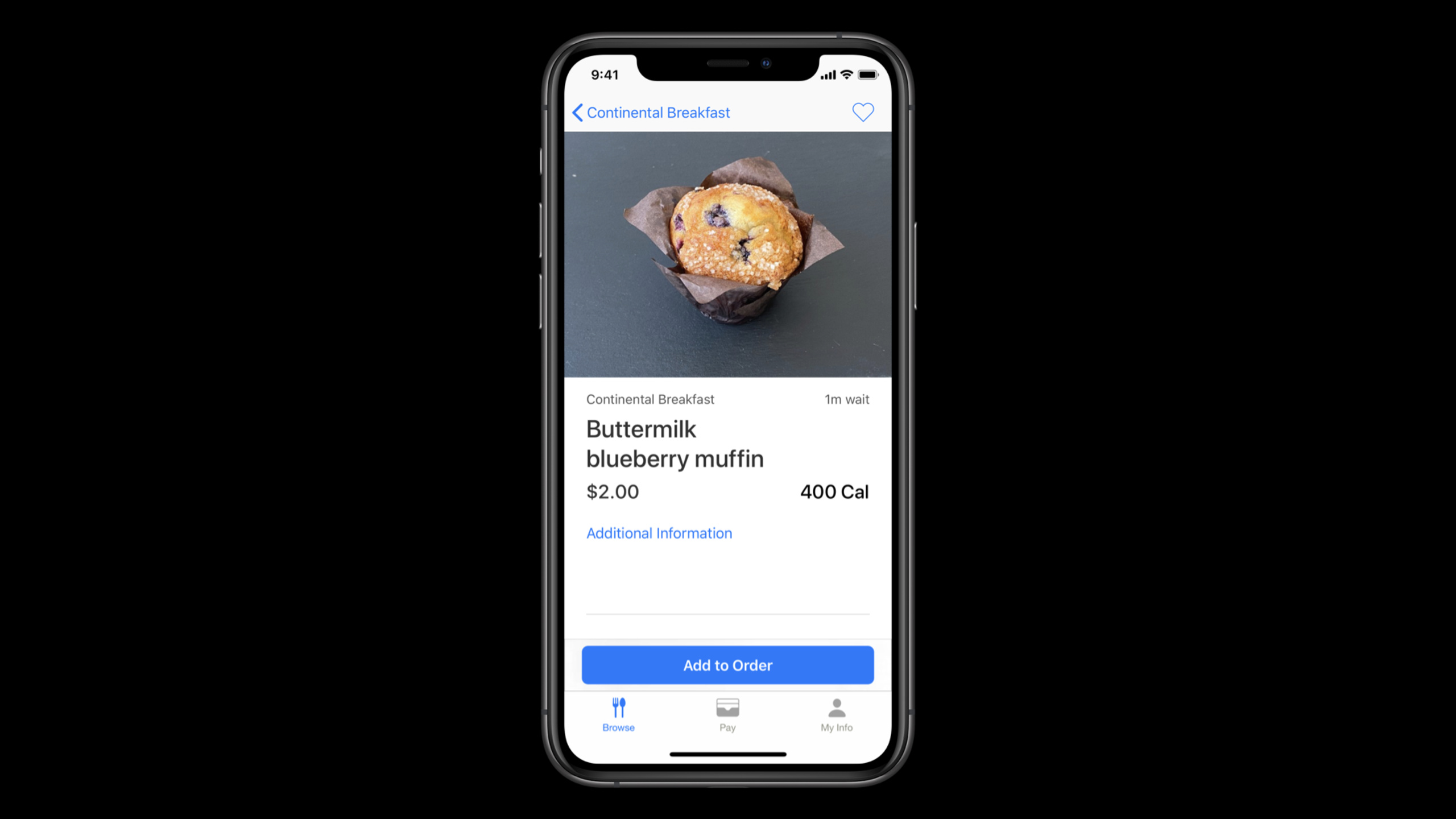
Caffè Macs 在 Apple Park 里承担的是员工餐厅入口。员工用 iPhone App 浏览菜单、下单、用 Apple Pay 支付;访客用 iPad kiosk 点餐;厨房再通过 iPad 上的 Kitchen Display System 接单和通知取餐。这里的定位需求很具体:员工打开 App 时,应该看到自己要去的那家 Caffè 的菜单。
难点来自园区环境。主 Caffè 和附近的 coffee station 距离很近,一个人可能同时接近多个餐饮点。如果 App 只用粗粒度位置,很容易把菜单切到错误地点,订单也会被送到用户没打算去的柜台。
Apple 的处理顺序很克制。先让员工选择默认地点,给出 “Closest to Me” 和具体 Caffè 两种入口;只有用户需要自动匹配附近地点时,才进入 Core Location 授权流程。这样,即使员工拒绝位置权限,App 仍然能按用户偏好打开指定菜单。
当 App 真正需要现场体验时,它使用 Core Location 和 iBeacon。region monitoring 先判断附近是否有目标 beacon,beacon ranging 再根据距离判断最近的位置。最后,DateFormatter、NumberFormatter 和本地化布局把同一套企业体验带到不同地区,避免时间、金额和阅读语言在全球员工场景里出错。
详细内容
先用用户偏好建立默认地点
(03:28)演讲先处理一个容易被忽略的问题:别急着弹定位权限。Caffè Macs 允许员工选择 “Closest to Me”,也允许员工直接指定某一家 Caffè。后者完全不需要定位权限,适合用户预先拒绝或暂时不想授权的情况。
// Storing the user's preference using UserDefaults

UserDefaults.standard.set(defaultLocation.id, forKey: "defaultLocationId")

let defaultLocationId = UserDefaults.standard.integer(forKey: "defaultLocationId")
关键点:
defaultLocation.id是用户选择的默认地点,适合放进UserDefaults这类小型持久化存储。defaultLocationId在下一次启动时读回,用来决定首页展示哪一家 Caffè 的菜单。- 这一步发生在定位服务之前,所以它也是定位授权失败时的 fallback。
请求刚好够用的位置权限
(06:14)Caffè Macs 只请求 “When in Use” 授权。演讲明确说,“Always” 授权允许后台访问位置,但这个 App 的场景不需要它。企业 App 应该只请求功能所需的数据,并用 Info.plist 的 purpose string 解释原因。
// Add NSLocationWhenInUseUsageDescription to your Info.plist
// e.g. "Location is required for placing orders while using the app."

locationManager.requestWhenInUseAuthorization()

func locationManager(
    _ manager: CLLocationManager,
    didChangeAuthorization status: CLAuthorizationStatus) {

    switch status {
    case .restricted, .denied:
        disableLocationFeatures()

    case .authorizedWhenInUse, .authorizedAlways:
        enableLocationFeatures()

    case .notDetermined:
        // The user hasn't chosen an authorization status
    }
}
关键点:
NSLocationWhenInUseUsageDescription必须存在,否则授权请求会立即失败。requestWhenInUseAuthorization()要放在用户执行相关任务时调用,避免用户看不懂弹窗来源。didChangeAuthorization是权限状态变化的入口,用户在系统设置里关闭权限时也会触发。.restricted和.denied走降级路径,回到前面的默认地点偏好。
先确认设备支持 beacon 能力
(07:02)定位服务依赖硬件能力。演讲要求在使用某项定位服务之前,先调用 CLLocationManager 的能力检查方法。这样 iPad kiosk、旧设备或受管设备缺少相关能力时,App 还有可控的替代路径。
if CLLocationManager.isMonitoringAvailable(for: CLBeaconRegion.self) {
    // Supports region monitoring to detect beacon regions
}

if CLLocationManager.isRangingAvailable() {
    // Supports obtaining the relative distance to a nearby iBeacon device
}
关键点:
isMonitoringAvailable(for:)检查能否监听 beacon region 的进入和离开。isRangingAvailable()检查设备能否估算附近 iBeacon 的相对距离。- 任一能力不可用时,App 不应该把用户卡在现场定位流程里。
用 region monitoring 找到附近 beacon
(08:54)iBeacon 支持分两步:先用 region monitoring 发现附近是否存在匹配 beacon。部署 beacon 硬件时,需要写入 proximity UUID、major 和 minor。演讲建议用这些值表达层级,例如 Caffè 层级或某个 food station。
// Stage 1: Region Monitoring

func monitorBeacons() {
    if CLLocationManager.isMonitoringAvailable(for: CLBeaconRegion.self) {

        let constraint = CLBeaconIdentityConstraint(uuid: proximityUUID)

        let beaconRegion = CLBeaconRegion(
            beaconIdentityConstraint: constraint,
            identifier: beaconID
        )

        self.locationManager.startMonitoring(for: beaconRegion)
    }
}
关键点:
CLBeaconIdentityConstraint用 proximity UUID 描述要匹配的 beacon 集合。CLBeaconRegion把约束和业务 identifier 绑定起来。startMonitoring(for:)注册后,系统会在进入或离开匹配区域时通知 delegate。- 调用前需要先创建
CLLocationManager并设置 delegate。
用 beacon ranging 判断最近地点
(09:30)进入 region 后,App 再启动 ranging。ranging 提供更细的相对距离信息,适合解决同一园区里多个餐饮点距离接近的问题。
// Stage 2: Beacon Ranging

func locationManager(_ manager: CLLocationManager, didEnterRegion region: CLRegion) {
    guard let region = region as? CLBeaconRegion,
        CLLocationManager.isRangingAvailable()
        else { return }

    let constraint = CLBeaconIdentityConstraint(uuid: region.uuid)
    manager.startRangingBeacons(satisfying: constraint)
    beaconsToRange.append(region)
}

func locationManager(_ manager: CLLocationManager, didExitRegion region: CLRegion) {

}
关键点:
didEnterRegion表示系统已经检测到匹配 beacon。guard同时确认 region 类型和 ranging 能力。startRangingBeacons(satisfying:)开始获取附近 beacon 的距离信息。beaconsToRange记录当前测距对象,方便后续按需停止。
(10:09)收到 ranging 结果后,Caffè Macs 取最近的 beacon,并用 major、minor 和 proximity 判断要展示哪个地点的信息。
// Stage 2: Beacon Ranging

func locationManager(
    _ manager: CLLocationManager,
    didRangeBeacons beacons: [CLBeacon],
    in region: CLBeaconRegion) {

    guard let nearestBeacon = beacons.first else { return }
    let major = CLBeaconMajorValue(truncating: nearestBeacon.major)
    let minor = CLBeaconMinorValue(truncating: nearestBeacon.major)

    switch nearestBeacon.proximity {
    case .near, .immediate:
        displayInformation(for: major, and: minor)

    default:
        handleUnknownOrFarBeacon(for: major, and: minor)
    }
}
关键点:
beacons.first代表当前结果里最接近的 beacon。major和minor用来映射业务对象,例如某一层、某个 Caffè 或某个 station。.near与.immediate才展示地点信息,距离未知或较远时走保守处理。- 如果多个 beacon 共享相同 UUID、major 和 minor,演讲提醒结果可能只能通过 proximity 和 accuracy 区分。
把地点体验扩展到全球员工
(11:32)位置还有宏观层面。员工分布在不同地区时,同一个取餐时间不能用单一格式展示。DateFormatter 负责把 Date 转成用户区域习惯下的文本。
// Formatting Dates
let dateFormatter = DateFormatter()
dateFormatter.dateStyle = .medium
dateFormatter.timeStyle = .short
dateFormatter.string(from: Date())
// "Jun 25, 2020 at 9:41 AM"
关键点:
dateStyle控制日期部分的展示粒度。timeStyle控制时间部分的展示粒度。string(from:)会依据 formatter 配置生成用户可读文本。- Caffè Macs 的 pickup window 场景需要正确的本地化时间。
(12:41)金额格式也不能只看设备 locale。演讲里的 kiosk 示例显示,用户 locale 和业务地点可能不同;德州餐厅的订单金额应按美元配置,而不是误用其他地区货币。
// Configuring the Format of Currency
let formatter = NumberFormatter()
formatter.currencyCode = "CAD"
formatter.numberStyle = .currency
formatter.string(from: amount)
// "CA$1.00"
关键点:
numberStyle = .currency使用预定义货币格式。currencyCode使用 ISO 4217 三字母货币代码,例如CAD。- NumberFormatter 只负责格式化,不负责货币换算。
- 全球企业 App 通常要同时考虑用户 locale 和业务地点的货币规则。
核心启发
1. 园区点餐 App 的默认地点
做什么:为公司餐厅、健身房或班车 App 增加默认地点设置。
为什么值得做:本 session 的 Caffè Macs 先用用户偏好决定首页状态,定位权限失败时仍然能展示正确地点。
怎么开始:用 UserDefaults 保存地点 ID;首页启动时先读偏好;只有用户选择 “Closest to Me” 时才进入 Core Location 流程。
2. 近距离设施识别
做什么:在仓库货架、楼层入口或会议室门口部署 beacon,让 App 自动识别员工所在区域。
为什么值得做:region monitoring 和 beacon ranging 能解决多个地点距离很近时的识别问题。
怎么开始:为 beacon 规划 proximity UUID、major、minor;用 CLBeaconIdentityConstraint 和 CLBeaconRegion 监听区域;进入区域后调用 startRangingBeacons 获取相对距离。
3. 隐私优先的位置入口
做什么:给企业 App 增加手动选择地点的入口,并把位置权限作为增强功能。
为什么值得做:演讲强调员工自己决定是否授权位置服务,App 仍需优雅处理拒绝、受限和临时授权。
怎么开始:在授权前展示业务选择;Info.plist 写清楚用途;在 didChangeAuthorization 中把 .restricted 和 .denied 映射到手动地点模式。
4. 全球员工的时间和金额展示
做什么:为跨地区员工 App 统一处理取餐时间、预约窗口、订单金额和报销金额。
为什么值得做:DateFormatter 和 NumberFormatter 能减少手写字符串带来的地区格式错误。
怎么开始:日期用 DateFormatter 配置 dateStyle 与 timeStyle;金额用 NumberFormatter 的 .currency 样式,并显式设置业务所需的 currencyCode。
5. 多语言企业界面验收
做什么:把企业 App 的本地化布局纳入发布前检查。
为什么值得做:演讲结尾把国际化作为全球企业体验的一部分,用户界面文件会生成 .strings 占位文本供翻译。
怎么开始:先抽取用户可见文案;用 Xcode 的本地化工具生成 .strings;用更长的语言和从右到左语言检查布局弹性。
关联 Session
- What’s new in location — 继续看 Core Location 在 iOS 14 中的位置隐私控制和授权行为变化。
- Design for location privacy — 从设计角度理解如何请求位置数据,并让用户知道自己在授权什么。
- Formatters: Make data human-friendly — 深入学习日期、时间、数字、姓名和列表的本地化格式化。
- Build localization-friendly layouts using Xcode — 补齐全球员工场景下的长文本和从右到左语言布局检查。
- Build scalable enterprise app suites — 继续了解多款企业 App 如何共享能力、配置和生产发布策略。
评论
GitHub Issues · utterances