
Highlight
VoiceOver 的 Rotor 让用户用上下滑在选定维度内跳转;自定义 Rotor 让 App 把地图标注、文本警告等内容按自己的类别暴露给屏幕阅读器用户。
核心内容
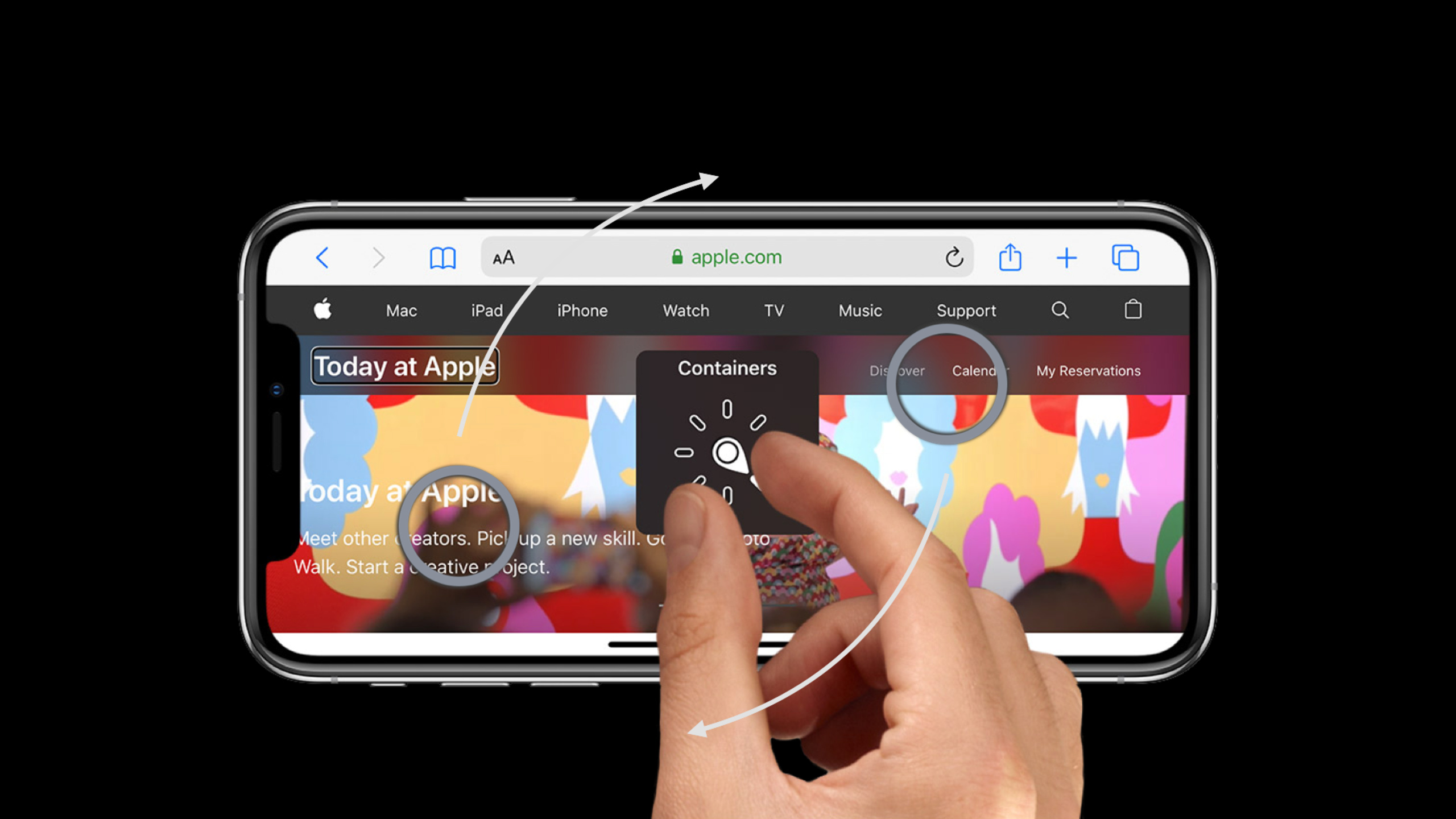
VoiceOver 用户看不到屏幕时,会通过触摸听取当前位置,再用手势在界面元素之间移动。Rotor 是这个流程里的效率入口:用户用两指旋转选择一个维度,再用上滑或下滑移动到上一项或下一项。系统已经提供字符、单词、行这类通用维度,但复杂 App 经常有自己的内容分类。(00:29)
Session 的第一个例子是地图。地图上同时有 Apple Store、公园、桥和其他兴趣点。看屏幕的人能靠图标颜色只关注某一类地点;VoiceOver 用户默认要按界面顺序逐个听完所有标注。Apple 的做法是找出视觉上最重要的类别,为 Apple Store 和 parks 各建一个 custom rotor,并按用户距离排序。(01:19)
第二个例子是文本 brochure。内置 Lines rotor 可以逐行阅读,但用户为了找到 park alert,要先听完前面的普通内容。自定义 Alerts rotor 把带有 alert attribute 的文字范围提取出来,用户上下滑时只在这些警告之间移动。这个例子说明 custom rotor 不只适合地图标注,也适合富文本、表单、时间线和其他内容密集界面。(06:13)
这场 session 的重点是给 VoiceOver 用户提供和视觉用户等价的浏览路径,而不只是给每个元素增加更多 label。实现上,开发者只需要创建 UIAccessibilityCustomRotor,在 closure 里根据方向返回下一个 UIAccessibilityCustomRotorItemResult,再把 rotor 放进相关 view 的 accessibilityCustomRotors。(09:13)
详细内容
把 custom rotors 挂到目标视图
(04:04)VoiceOver 聚焦到 map view 时,会读取这个 view 的 accessibilityCustomRotors。地图例子需要两个 rotor:一个浏览 Apple Store,一个浏览 parks。两个 rotor 都复用同一个 factory 方法,只把 POI 类型作为输入。
mapView.accessibilityCustomRotors = [customRotor(for: .stores), customRotor(for: .parks)]关键点:
accessibilityCustomRotors属于承载内容的 view;VoiceOver 到达该 view 后,用户才会看到这些自定义选项。- 数组里可以放多个 rotor,适合地图、图库、文档这类有多种浏览维度的界面。
customRotor(for:)的输入是业务分类,session 里分别是 Apple Store 和 parks。
在 closure 里返回上一个或下一个目标
(04:31)UIAccessibilityCustomRotor 用本地化名称初始化,并接收一个 closure。closure 的参数包含当前 rotor item 和搜索方向。地图例子先把当前元素转成 MKAnnotationView,再从同类标注数组里计算目标下标。
// Custom map rotors

func customRotor(for poiType: POI) -> UIAccessibilityCustomRotor {
    UIAccessibilityCustomRotor(name: poiType.rotorName) { [unowned self] predicate in
        let currentElement = predicate.currentItem.targetElement as? MKAnnotationView
        let annotations = self.annotationViews(for: poiType)
        let currentIndex = annotations.firstIndex { $0 == currentElement }
        let targetIndex: Int
        switch predicate.searchDirection {
        case .previous:
            targetIndex = (currentIndex ?? 1) - 1
        case .next:
            targetIndex = (currentIndex ?? -1) + 1
        }
        guard 0..<annotations.count ~= targetIndex else { return nil } // Reached boundary
        return UIAccessibilityCustomRotorItemResult(targetElement: annotations[targetIndex],
                                                    targetRange: nil)
    }
}
关键点:
predicate.currentItem.targetElement是 VoiceOver 当前停留的元素,地图里期望它是MKAnnotationView。annotationViews(for:)返回当前 rotor 对应的同类标注,例如只返回 parks。predicate.searchDirection区分用户上滑还是下滑,代码据此递减或递增 index。- 越界时返回
nil,VoiceOver 会留在当前兴趣点;命中目标时返回UIAccessibilityCustomRotorItemResult。 - 地图元素不是文本范围,所以
targetRange传nil。
用 attributed text 做 Alerts rotor
(08:07)文本例子把所有 alert 文案标记为自定义 NSAttributedString.Key。Rotor closure 的工作是从当前 UITextRange 出发,根据上滑或下滑决定搜索范围和方向,再找到下一个带该 attribute 的 range。
// Custom text rotor

func customRotor(for attribute: NSAttributedString.Key) -> UIAccessibilityCustomRotor {
    UIAccessibilityCustomRotor(name: attribute.rotorName) { [unowned self] predicate in
        var targetRange: UITextRange? // Goal: find the range of following `attribute`
        let beginningRange = self.textRange(from: self.beginningOfDocument,
                                            to: self.beginningOfDocument)
        guard let currentRange = predicate.currentItem.targetRange ?? beginningRange else {
            return nil
        }
        let searchRange: NSRange, searchOptions: NSAttributedString.EnumerationOptions
        switch predicate.searchDirection {
        case .previous:
            searchRange = self.rangeOfAttributedTextBefore(currentRange)
            searchOptions = [.reverse]
        case .next:
            searchRange = self.rangeOfAttributedTextAfter(currentRange)
            searchOptions = []
        }
        self.attributedText.enumerateAttribute(
            attribute, in: searchRange, options: searchOptions) { value, range, stop in
            guard value != nil else { return }
            targetRange = self.textRange(from: range)
            stop.pointee = true
        }
        return UIAccessibilityCustomRotorItemResult(targetElement: self,
                                                    targetRange: targetRange)
    }
}
关键点:
beginningRange给第一次进入 rotor 的用户一个起点,避免当前 item 没有targetRange时无法搜索。targetRange的类型必须是UITextRange;transcript 特别提醒,文本 rotor 的targetElement也要符合UITextInput。.previous使用反向枚举,.next使用正向枚举,这样第一处命中就是用户要去的上一条或下一条 alert。enumerateAttribute命中非空 attribute 后,把NSRange转成UITextRange并停止继续搜索。- 没有命中时
targetRange保持nil,VoiceOver 会把它当作到达边界处理。
核心启发
-
给地图和门店搜索页增加类别 Rotor。做什么:让 VoiceOver 用户在“门店”“停车点”“卫生间”“出入口”等类别之间选择,然后只浏览该类别。为什么值得做:session 的地图 demo 显示,视觉用户靠图标颜色完成的筛选,VoiceOver 用户需要一个等价的导航维度。怎么开始:为每个 POI 类别维护排序后的 accessibility element 数组,并把对应 rotor 放到 map view 的
accessibilityCustomRotors。 -
为长文本增加警告或重点 Rotor。做什么:在协议、景区说明、医疗报告、课程材料里标记 warnings、deadlines、errors 或 action items。为什么值得做:brochure demo 里,Alerts rotor 让用户直接听到“Picnic area closed”和天气警告。怎么开始:用 attributed string 给目标文本打 attribute,在 rotor closure 里枚举该 attribute 并返回
targetRange。 -
把视觉筛选条件转成 VoiceOver 浏览维度。做什么:审查界面里依赖颜色、图标、位置或密度表达的类别,把真正影响任务完成的类别做成 rotor。为什么值得做:transcript 提醒开发者先找出“视觉上吸引注意”的元素,再按类别分组。怎么开始:让设计和无障碍测试一起列出 2-3 个高价值维度,先在最复杂的一屏实现。
-
在 QA 中加入 Rotor 路径测试。做什么:打开 VoiceOver,从复杂页面入口开始,用 rotor 完成一次核心任务。为什么值得做:session 结尾要求开发者找出视觉复杂区域,并确认 VoiceOver 是否能同样容易到达内容。怎么开始:为地图、富文本、表格或日程视图写一份人工检查清单,记录每个 rotor 的名称、顺序和边界行为。
关联 Session
- App accessibility for Switch Control — 解释 Switch Control 如何复用无障碍信息,并用自定义操作、分组和焦点回调降低操作成本。
- Make your app visually accessible — 从颜色、文字、动效和视觉设置检查界面是否适合更多视觉能力的用户。
- Create a seamless speech experience in your apps — 讲解 AVSpeechSynthesizer、VoiceOver announcement 和辅助技术语音设置之间的边界。
- Accessibility design for Mac Catalyst — 把 iPad App 带到 Mac Catalyst 时,补齐键盘、鼠标、分组和检查工具等无障碍细节。
评论
GitHub Issues · utterances