
Highlight
Apple 在这场 session 中示范如何用
setUpWithError、launch arguments、waitForExistence、XCTUnwrap、XCTContext.runActivity、attachments 和XCTSkip把 UI 测试失败转化成可在 result bundle 中快速定位的问题。
核心内容
很多团队写测试时,第一目标是看到绿色通过。Kelly Keenan 在开场换了一个角度:测试真正有价值的时刻,是它在 CI 里发现产品问题,而开发者手里只有一份 result bundle。测试写一次,失败会被排查很多次,所以测试代码应该提前为失败准备上下文。
这场 session 以 UI test 和 integration test 为主线,把一次测试拆成 setup、actions、assertions、tear down。每一步都服务同一个目标:失败时让报告直接说明发生了什么、在哪里发生、为什么值得调查。setUpWithError 负责明确初始状态,launch arguments 让 App 进入待测入口,测试方法名和领域化 helper 让动作有语义。
断言部分是诊断质量的核心。一个裸 XCTAssertEqual 只能告诉你数值不等,带上下文的断言消息会说明哪个 smoothie 的 ingredients 少了什么。遇到异步 UI,session 建议用 waitForExistence(timeout:),让测试在可控时间内轮询目标元素,而不是用固定 sleep 拖慢所有结果。
共享测试代码的设计也很关键。session 明确建议 shared code 抛出错误,而不是直接 assert。这样同一个 helper 可以被正向测试、负向测试和错误弹窗测试复用。配合 XCTContext.runActivity 和 XCTAttachment,result bundle 会留下可读的步骤、元素 debugDescription、文件或日志,让 CI 上的失败不必等到本地复现才开始定位。
详细内容
1. 用 setup 固定每个测试的起点
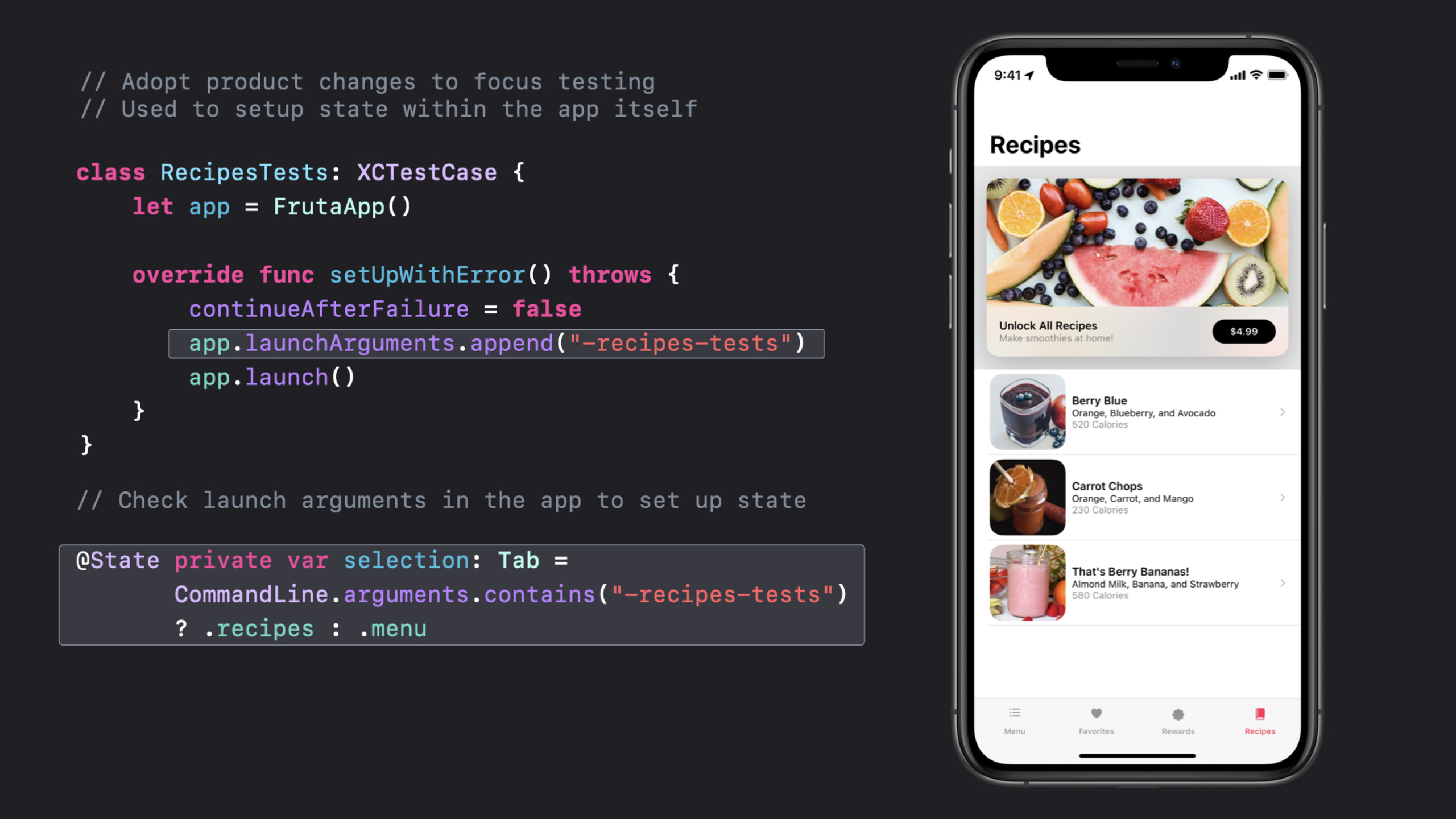
(01:58)Xcode 11.4 引入的 setUpWithError() 可以抛出错误。session 用它在每个测试前设置初始状态、关闭继续执行、传入 launch argument,并启动 App。
class RecipesTests: XCTestCase {
    let app = FrutaApp()

    override func setUpWithError() throws {
        continueAfterFailure = false
        app.launchArguments.append("-recipes-tests")
        app.launch()
    }
}

@State private var selection: Tab =
       CommandLine.arguments.contains("-recipes-tests")
       ? .recipes : .menu
关键点:
setUpWithError()允许 setup 阶段把错误交给 XCTest,而不是让测试在未知状态继续跑。continueAfterFailure = false让测试在第一个问题处停下,减少 result bundle 里的噪音。app.launchArguments.append("-recipes-tests")把测试意图传给 App。- App 侧读取
CommandLine.arguments后直接进入 Recipes tab,避开与本次目标无关的 Menu tab。
2. 让测试动作围绕一个明确目标
(04:12)session 的示例测试只做一件事:选择 Berry Blue recipe,然后验证 ingredients list。方法名、动作和断言都围绕同一个目标。
func testIngredientsListAccuracy() throws {
    // Select Berry Blue recipe
    let recipe = try
        app.smoothieList().selectRecipe
                           (smoothie: .berryBlue)

    // Verify ingredients list
    try recipe.verify(ingredients:
        SmoothieType.berryBlue.ingredients)
}
关键点:
testIngredientsListAccuracy直接写出测试目标,报告里不用再猜这条测试在验证什么。- 测试动作只有选择 recipe,失败时排查范围很小。
verify(ingredients:)把断言细节放进 helper,测试方法保留业务语义。
(04:56)UI label 经常变化,session 建议把字符串集中到 enum。拼写或文案变化只需要改一个地方。
public enum SmoothieType : String {
    case berryBlue = "Berry Blue"
    case carrotChops = "Carrot Chops"
    case berryBananas = "That's Berry Bananas!"

    var ingredients : [String] {
        switch self {
        case .berryBlue:
            return ["Orange", "Blueberry", "Avocado"]
        case .carrotChops:
            return ["Orange", "Carrot", "Mango"]
        case .berryBananas:
            return ["Almond Milk", "Banana", "Strawberry"]
        }
    }
}
关键点:
rawValue保存 UI 上可见的 label。ingredients把预期数据放在同一个类型里,测试不用到处分散硬编码数组。- UI 文案改动时,失败会集中到 enum,而不是散落在多条测试里。
3. 用领域模型封装 UI 层级
(05:25)多个测试都会进入 smoothie list,再选择某个 recipe。session 把这段路径抽成 FrutaApp、SmoothieList 和 Recipe 等测试对象,让测试代码像 App 领域语言一样表达动作。
let recipe = try app.smoothieList().selectRecipe(smoothie: .berryBlue)

public class FrutaApp : XCUIApplication {
   public func smoothieList() throws -> SmoothieList {
        let element = tables["Smoothie List"]
        if !element.waitForExistence(timeout: 5) {
            throw FrutaError.elementDoesNotExist("Smoothie List table")
        }
        return SmoothieList(app: self, element: element)
    }
}

public class SmoothieList : FrutaUIElement {
    public func selectRecipe(smoothie: SmoothieType) throws -> Recipe {
       element.buttons[smoothie.rawValue].tap()
       return try app.recipe()
   }
}
关键点:
app.smoothieList()把底层 query 收进 helper,测试方法不直接操作 table 查询细节。waitForExistence(timeout: 5)给异步 UI 一个确定的等待窗口。- 找不到
"Smoothie List"时抛出带上下文的错误,result bundle 会指向真正缺失的元素。 selectRecipe(smoothie:)返回Recipe,让后续断言继续沿着 App 的 UI 层级前进。
4. 给断言、optional 和异步等待留下上下文
(08:17)断言消息是给人和自动化系统看的。session 建议消息要具体,但不要塞入时间戳或唯一文件路径,因为这些会妨碍自动化系统把同类失败归在一起。
XCTAssertEqual(
    count,
    expectedCount,
    "\(SmoothieType.berryBlue.rawValue) smoothie is expected to have \(expectedCount) ingredients: \(expectedIngredients), however, there were \(count) found."
)
关键点:
count和expectedCount是机器能比较的数值。- 消息补充了 smoothie 名称和预期 ingredients,人读报告时能知道业务含义。
- 消息没有加入本机路径或时间戳,同类失败更容易聚合。
(09:21)异步 UI 不应该靠 sleep。示例在点击 recipe 后等待 Ingredients View 出现,超时后抛出明确错误。
public func selectRecipe(smoothie: SmoothieType) throws -> Recipe {
    element.buttons[smoothie.rawValue].tap()
    return try app.recipe()
}

public func recipe() throws -> Recipe {
    let element = scrollViews["Ingredients View"]
    if !element.waitForExistence(timeout: 5) {
        throw FrutaError.elementDoesNotExist(
                        "Ingredients View scroll view")
    }
    return Recipe(app: self, element: element)
}
关键点:
tap()触发界面变化。waitForExistence(timeout: 5)轮询目标元素,元素提前出现时测试会提前继续。- 超时路径抛出
"Ingredients View scroll view",比固定等待后继续失败更好定位。
(10:56)optional 直接强拆会让测试崩溃,CI 报告只剩 signal。session 列出 Swift 解包方式,并特别提到 XCTUnwrap 会把开发者提供的消息写进 result bundle。
if let favs = favorites { }
guard let favs = favorites else { /* throw an error */ }
let favs = favorites ?? []
let favs = try XCTUnwrap(favorites, "favorites is nil, so there is nothing to count")
关键点:
if let适合只在局部使用解包值。guard let适合在 nil 时抛出你定义的错误。?? []适合 nil 有合理默认值的场景。XCTUnwrap会在 nil 时抛出 XCTest 可记录的失败,并保留自定义说明。
5. 从 shared code 抛错,并把排查材料写入 result bundle
(12:19)shared testing code 会被很多测试复用。有些测试正好要验证负向路径,所以 session 建议 helper 抛出错误,而不是直接 assert。
public func verify(ingredients: [String]) throws {
    try XCTContext.runActivity(named: "Verifying \(ingredients) exists in the Recipe screen.") { verifyingRecipe in
        for ingredient in ingredients {
            if !element.switches[ingredient].waitForExistence(timeout: 5) {
                let attachment = XCTAttachment(string: element.debugDescription)
                verifyingRecipe.add(attachment)
                throw RecipeError.ingredientDoesNotExist(ingredient)
            }
        }
    }
}

public enum RecipeError : Error, CustomStringConvertible {
    case ingredientDoesNotExist(String)

    public var description : String {
        switch self {
        case .ingredientDoesNotExist(let ingredient):
            return "\(ingredient) does not exist in the Ingredients View."
        }
    }
}
关键点:
XCTContext.runActivity在 result bundle 中创建一个可读步骤。- activity 名称写出当前验证的 ingredients,失败时保留动作上下文。
XCTAttachment(string: element.debugDescription)把 UI 元素状态随失败一起保存。RecipeError实现CustomStringConvertible,错误描述能直接说明缺失的 ingredient。
(14:50)有些测试暂时不应该运行。session 用 XCTSkip 系列 API 保留测试存在感,同时在报告中说明跳过原因。
let debuggingTests = false

func testSelectSmoothie() throws {
    try XCTSkipUnless(debuggingTests == true, "This test is not yet implemented.")
}
关键点:
XCTSkipUnless条件不满足时跳过测试。- 消息会出现在 result bundle 中,团队知道这条测试为什么没有运行。
- 跳过状态比注释掉测试更容易追踪,后续可以回到同一条测试继续实现或修复。
核心启发
-
为 UI 测试增加启动状态开关:做什么:给关键 UI test 加专用 launch argument,让 App 直接进入待测 tab、页面或 mock 状态。为什么值得做:session 的 Recipes 示例减少了无关 Menu tab 失败,让 result bundle 聚焦在本次测试目标。怎么开始:在 test target 中追加
app.launchArguments,在 App 启动路径读取CommandLine.arguments并切换初始 tab。 -
把常用 UI 路径封装成测试领域模型:做什么:为 App、列表页、详情页和弹窗建立
XCUIApplication/XCUIElementhelper。为什么值得做:多个测试共享同一条 UI 路径时,集中加waitForExistence和错误描述能降低 flaky failure。怎么开始:从最常失败的列表选择路径开始,把底层 query 包进类似app.smoothieList().selectRecipe(...)的方法。 -
给 CI 失败报告补充可读线索:做什么:为核心断言补充业务消息,并在 UI helper 里使用
XCTContext.runActivity和XCTAttachment。为什么值得做:CI 上通常只有 result bundle,session 强调测试应当主动收集排查产品失败所需的数据。怎么开始:先给最难复现的 UI failure 加 activity 名称,再把element.debugDescription、日志或文件作为 attachment 放进去。 -
用
waitForExistence替换固定等待:做什么:把 UI test 里的sleep改成带 timeout 的元素等待。为什么值得做:固定等待会拖慢成功路径,也会让异步失败缺少目标元素上下文。怎么开始:把页面跳转、网络加载后的第一个关键元素封装成 helper,统一在 helper 里等待并抛出具体错误。 -
建立跳过测试的显式规则:做什么:用
XCTSkip、XCTSkipIf或XCTSkipUnless记录平台限制、未实现测试和暂时无法修复的测试。为什么值得做:测试报告会显示 skipped 状态,不会把未运行的测试藏在注释或编译条件里。怎么开始:先替换测试套件里被注释掉的占位用例,为每条 skip 写清原因和恢复条件。
关联 Session
- Triage test failures with XCTIssue — 用 XCTIssue 把测试失败转成结构化记录,便于在 CI 和 result bundle 中诊断。
- Handle interruptions and alerts in UI tests — 用 UI interruption handlers 和权限状态管理处理 UI 测试里的系统弹窗。
- Get your test results faster — 通过 test plans、timeouts、execution time allowances 和并行化缩短测试反馈周期。
- XCTSkip your tests — 用 XCTSkip、XCTSkipIf 和 XCTSkipUnless 在报告中明确记录哪些测试被条件跳过。
- Eliminate animation hitches with XCTest — 用 Performance XCTest 测量滚动和动画 hitch,捕获用户可感知的性能回归。
评论
GitHub Issues · utterances