
Highlight
Apple 演示了 Mac 视频 App 的 ProRes 解码管线:AVAssetReader 可以自动启用硬件解码和 Afterburner,并把解码后的 CVPixelBuffer 以原生像素格式交给 Metal;需要自管解码时,开发者可以用 CMSampleBuffer、VTDecompressionSession 和 CVMetalTextureCache 控制同一条路径。
核心内容
很多专业视频 App 的问题不在“能不能解码”,而在解码之后能不能把帧高效送进自己的渲染器。ProRes 文件来自剪辑、调色或后期流程,App 端常见目标是把它读出来、解码成帧,再交给 Metal 做预览、滤镜、合成或导出前检查。中间多一次格式转换、多一次内存拷贝,都会变成带宽和延迟。
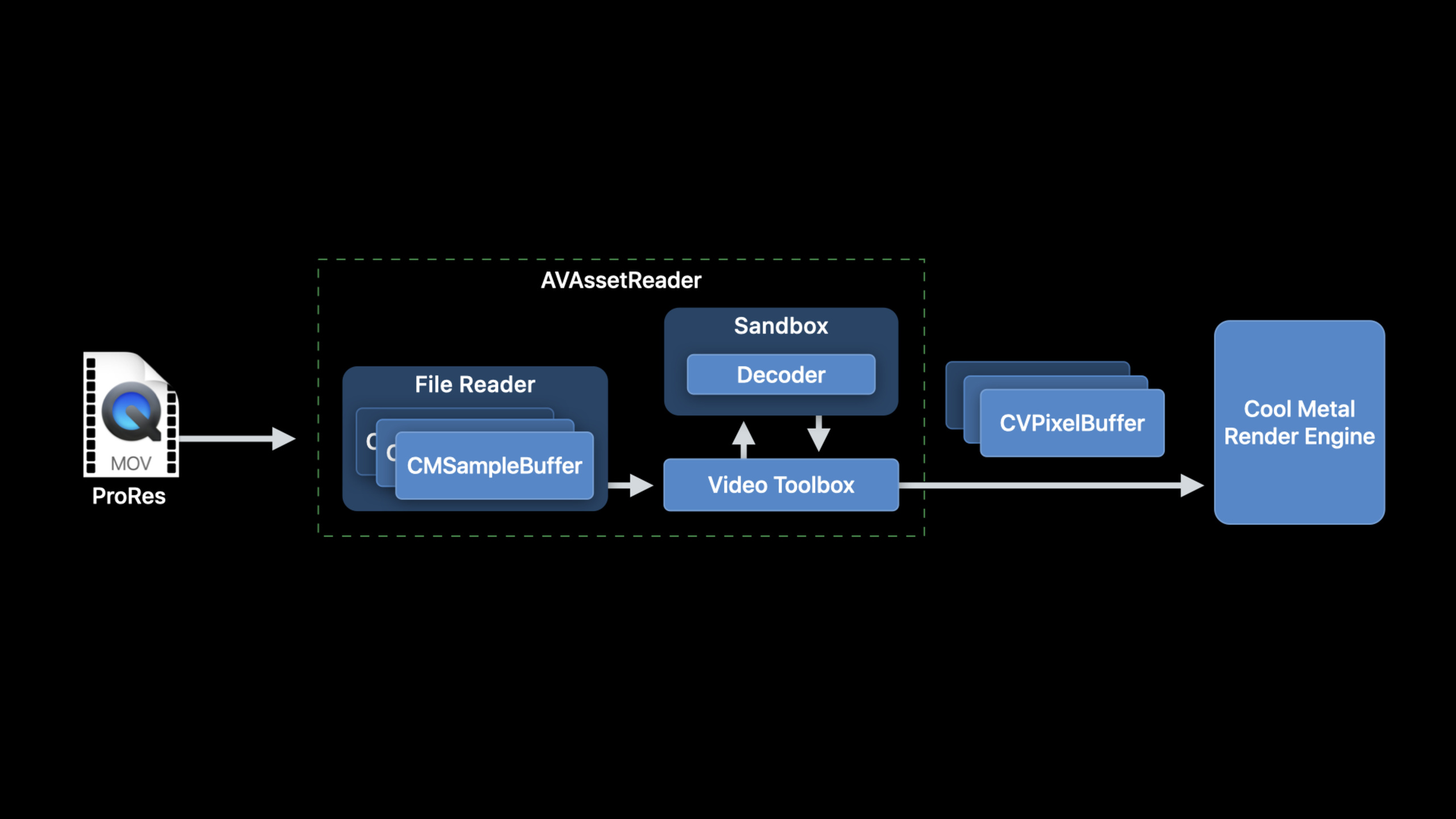
这场 session 把路径分成两层。第一层是让 AVFoundation 接管:AVAssetReader 读取源文件,准备适合跨进程传递给解码器的样本,调用 VideoToolbox 解码,并返回指定格式的 CVPixelBuffer。当前系统默认会使用可用的硬件解码器,包含 Afterburner。
第二层是开发者自己驱动 VideoToolbox。这个选择适合已有文件读取器、网络样本源,或者需要控制硬件解码策略的 App。代价是你要正确构造 CMSampleBuffer,创建 VTDecompressionSession,处理异步回调,再把 CVPixelBuffer 安全绑定为 Metal texture。
最后一段才是性能容易出错的地方。解码器输出的 CVPixelBuffer 通常来自 CVPixelBufferPool,底层 IOSurface 会被复用。Metal 命令还没执行完时,如果这个 surface 被池回收,画面就可能读到错误数据。session 给出两条路径:手动管理 IOSurface use count,或优先使用 CVMetalTextureCache。
详细内容
1. 用 AVAssetReader 走默认高效路径
(07:41)如果输入是本地 ProRes movie file,AVAssetReader 是最短路径。它从 AVAsset 创建 reader,再通过 AVAssetReaderTrackOutput 指定输出格式。
// Constructing an AVAssetReader

// Create an AVAsset with an URL pointing at a local asset
AVAsset *sourceMovieAsset = [AVAsset assetWithURL:sourceMovieURL];

// Create an AVAssetReader for the asset
AVAssetReader *assetReader = [AVAssetReader assetReaderWithAsset:sourceMovieAsset
                                                           error:&error];
关键点:
AVAsset表示源视频文件,session 里的场景是本地 ProRes movie file。AVAssetReader负责从 asset 中读样本,并让 AVFoundation 处理后续解码链路。- 系统会在可用时自动使用硬件解码器,Afterburner 也在默认硬件解码路径里。
(07:58)读取 decoded output 时,关键是给 track output 请求接近解码器原生格式的 pixel format。ProRes 4444 推荐 16-bit 4:4:4:4 YCbCr with alpha,也就是 Y416。
// Configuring AVAssetReaderTrackOutput

// Copy the array of video tracks from the source movie
NSArray<AVAssetTrack*>  *tracks = [sourceMovieAsset tracksWithMediaType:AVMediaTypeVideo];

// Get the first video track
AVAssetTrack *track = [sourceMovieVideoTracks objectAtIndex:0];

// Create the asset reader track output for this video track, requesting ‘y416’ output
NSDictionary *outputSettings = @{ (id)kCVPixelBufferPixelFormatTypeKey :
                                  @(kCVPixelFormatType_4444AYpCbCr16) };

AVAssetReaderTrackOutput* assetReaderTrackOutput
= [AVAssetReaderTrackOutput assetReaderTrackOutputWithTrack:track
                                             outputSettings:outputSettings];

// Set the property to instruct the track output to return the samples
// without copying them
assetReaderTrackOutput.alwaysCopiesSampleData = NO;

// Connect the the AVAssetReaderTrackOutput to the AVAssetReader
[assetReader addOutput:assetReaderTrackOutput];
关键点:
tracksWithMediaType:AVMediaTypeVideo取出视频轨,示例里选择第一个视频轨。kCVPixelBufferPixelFormatTypeKey指定输出CVPixelBuffer的 pixel format。kCVPixelFormatType_4444AYpCbCr16对应 Y416,适合 ProRes 4444 的 native decoder output。alwaysCopiesSampleData = NO让返回样本避免额外拷贝,但这些 sample buffer 可能被别处持有,不能修改。- 如果请求的格式不是解码器原生格式,AVAssetReader 会转换 buffer;session 明确建议避免这类复制。
(08:57)开始读取后,循环调用 copyNextSampleBuffer。配置为 decoded output 时,从 CMSampleBuffer 里取出的就是 CVImageBufferRef。
// Running AVAssetReader

BOOL success = [assetReader startReading];

if (success) {
   CMSampleBufferRef sampleBuffer = NULL;

   // output is a AVAssetReaderOutput
   while ((sampleBuffer = [output copyNextSampleBuffer]))
   {
       CVImageBufferRef imageBuffer = CMSampleBufferGetImageBuffer(sampleBuffer);

       if (imageBuffer)
       {
          // Use the image buffer here
          // if imageBuffer is NULL, this is likely a marker sampleBuffer
       }
    }
}
关键点:
startReading启动 reader。copyNextSampleBuffer按顺序返回 sample buffer。CMSampleBufferGetImageBuffer有值时代表这是解码后的图像帧。- 空 image buffer 可能是 marker sample buffer,用来在媒体管线中携带 timed attachments。
2. 取压缩样本给 VideoToolbox
(11:40)有些 App 不能把全部工作交给 AVAssetReader。比如自有文件读取逻辑、网络数据源、或者需要直接控制 VideoToolbox。此时可以让 AVAssetReader 只读取压缩数据,把 outputSettings 设为 nil。
AVAssetReaderTrackOutput* assetReaderTrackOutput
= [AVAssetReaderTrackOutput assetReaderTrackOutputWithTrack:track
                                             outputSettings:nil];
关键点:
outputSettings:nil表示不请求 decoded pixel buffer,而是取 compressed sample。- 这条路径仍然保留 AVAssetReader 的 track-level 语义,能处理 edits 和 frame dependencies。
- AVAssetReader 生成的 compressed samples 会针对送入 VideoToolbox 的跨进程 RPC 做优化。
(12:24)另一条路径是 AVSampleBufferGenerator。它通过 AVSampleCursor 控制读取位置,更接近 media-level access。session 提醒,它不理解 edits 和 frame dependencies,ProRes 场景较直接,HEVC 或 H.264 这类有帧间依赖的内容要更小心。
AVSampleCursor* cursor = [assetTrack makeSampleCursorAtFirstSampleInDecodeOrder];

AVSampleBufferRequest* request = [[AVSampleBufferRequest alloc] initWithStartCursor:cursor];

request.direction = AVSampleBufferRequestDirectionForward;
request.preferredMinSampleCount = 1;
request.maxSampleCount = 1;

AVSampleBufferGenerator* generator
= [[AVSampleBufferGenerator alloc] initWithAsset:srcAsset timebase:nil];

BOOL notDone = YES;

while(notDone)
{
   CMSampleBufferRef sampleBuffer = [generator createSampleBufferForRequest:request];

   // do your thing with the sampleBuffer

   [cursor stepInDecodeOrderByCount:1];
}
关键点:
makeSampleCursorAtFirstSampleInDecodeOrder从 decode order 的第一个 sample 建立游标。AVSampleBufferRequest描述这次要取几个 sample,以及读取方向。timebase:nil让示例走同步请求;session 建议性能敏感路径提供 timebase 并使用异步请求。- 每次
createSampleBufferForRequest后,用stepInDecodeOrderByCount:1前进一个 sample。
(13:40)如果样本来自自有文件格式或网络,就要自己创建 CMSampleBuffer。组成部分是 CMBlockBuffer、CMVideoFormatDescription 和 CMSampleTimingInfo。
CMBlockBufferCreateWithMemoryBlock(kCFAllocatorDefault, sampleData, sizeof(sampleData),
                                   kCFAllocatorMalloc, NULL, 0, sizeof(sampleData), 0,
                                   &blockBuffer);

CMVideoFormatDescriptionCreate(kCFAllocatorDefault, kCMVideoCodecType_AppleProRes4444, 1920,
                               1080, extensionsDictionary, &formatDescription);

CMSampleTimingInfo timingInfo;

timingInfo.duration = CMTimeMake(10, 600);
timingInfo.presentationTimeStamp = CMTimeMake(frameNumber * 10, 600);

CMSampleBufferCreateReady(kCFAllocatorDefault, blockBuffer, formatDescription, 1, 1,
                          &timingInfo, 1, &sampleSize, &sampleBuffer);
关键点:
CMBlockBufferCreateWithMemoryBlock把压缩 sample data 包进 Core Media block buffer。CMVideoFormatDescriptionCreate描述 codec、尺寸和扩展信息;session 特别提到要在 extensions dictionary 放入 color tags。CMSampleTimingInfo给 sample 写入 duration 和 presentation timestamp。- 自建
CMSampleBuffer不会自动获得 AVFoundation 为 sandbox RPC 做的优化。
3. 用 VTDecompressionSession 解码
(17:47)拿到 compressed CMSampleBuffer 后,可以创建 VTDecompressionSession。它内部有解码器、输出用的 CVPixelBufferPool,请求格式不匹配时还会使用 VTPixelTransferSession 做转换。
// VTDecompressionSession Creation

CMFormatDescriptionRef formatDesc = CMSampleBufferGetFormatDescription(sampleBuffer);

CFDictionaryRef pixelBufferAttributes = (__bridge CFDictionaryRef)@{
    (id)kCVPixelBufferPixelFormatTypeKey :
    @(kCVPixelFormatType_4444AYpCbCr16) };

VTDecompressionSessionRef decompressionSession;

OSStatus err = VTDecompressionSessionCreate(kCFAllocatorDefault,
                                            formatDesc,
                                            NULL,
                                            pixelBufferAttributes,
                                            NULL,
                                            &decompressionSession);
关键点:
CMSampleBufferGetFormatDescription取出的 format description 必须匹配后续送入 session 的 samples。pixelBufferAttributes描述输出需求,可以包含尺寸、pixel format,或者 Core Animation compatible 这类高层要求。- 第三个参数是
videoDecoderSpecification;示例传NULL,表示使用 VideoToolbox 的默认解码器选择。 - 需要强制硬件解码时,可通过 decoder specification 设置
RequireHardwareAcceleratedVideoDecoder;要禁用硬件解码,则设置EnableHardwareAcceleratedVideoDecoder为 false。 - 专业视频工作流需要访问专用解码器时,App 启动时调用一次
VTRegisterProfessionalVideoWorkflowVideoDecoders。
(18:30)session 建议 DecodeFrame 调用开启异步解码。block-based API 会在输出 block 中返回 status、decoded image buffer、presentation timestamp 和 duration。
// Running a VTDecompressionSession

uint32_t inFlags = kVTDecodeFrame_EnableAsynchronousDecompression;

VTDecompressionOutputHandler  outputHandler
 = ^(OSStatus status,
     VTDecodeInfoFlags infoFlags,
     CVImageBufferRef imageBuffer,
     CMTime presentationTimeStamp,
     CMTime presentationDurationVTDecodeInfoFlags)
 {
     // Handle decoder output in this block
     // Status reports any decoder errors
     // imageBuffer contains the decoded frame if there were no errors
 };

VTDecodeInfoFlags outFlags;

OSStatus err = VTDecompressionSessionDecodeFrameWithOutputHandler(decompressionSession,
                                                   sampleBuffer, inFlags,
                                                   &outFlags, outputHandler);
关键点:
kVTDecodeFrame_EnableAsynchronousDecompression打开异步解码,适合性能敏感视频管线。VTDecompressionSessionDecodeFrameWithOutputHandler接收 compressed sample buffer,并通过 output handler 返回结果。status报告解码错误;没有错误时,imageBuffer包含解码后的帧。- decoder output 是串行返回的;不要在 output block 里做耗时工作,否则会给后续帧制造 back pressure。
4. 把 CVPixelBuffer 安全交给 Metal
(20:54)CVPixelBuffer 通常由 CVPixelBufferPool 分配。buffer 释放后,底层 IOSurface 会回到池里复用。直接把它绑定成 Metal texture 时,要保证 Metal 使用期间 surface 不会被回收。
// CVPixelBuffer to Metal texture: IOSurface

IOSurfaceRef surface = CVPixelBufferGetIOSurface(imageBuffer);

id <MTLTexture> metalTexture = [metalDevice newTextureWithDescriptor:descriptor
                                                           iosurface:surface
                                                               plane:0];

// Mark the IOSurface as in-use so that it won’t be recycled by the CVPixelBufferPool
IOSurfaceIncrementUseCount(surface);

// Set up command buffer completion handler to decrement IOSurface use count again
[cmdBuffer addCompletedHandler:^(id<MTLCommandBuffer> buffer) {
     IOSurfaceDecrementUseCount(surface);
 }];
关键点:
CVPixelBufferGetIOSurface取出 pixel buffer 背后的 IOSurface。newTextureWithDescriptor:iosurface:plane:让 Metal 直接使用这块 memory。IOSurfaceIncrementUseCount防止 surface 在 GPU 还没用完时被CVPixelBufferPool回收。- command buffer 完成后调用
IOSurfaceDecrementUseCount,把 surface 归还给池。
(21:42)更简单的做法是使用 CVMetalTextureCache。它把 CVPixelBuffer 到 MTLTexture 的绑定交给 Core Video 管理,还能在 pool 复用 IOSurface 时减少重复绑定成本。
// Create a CVMetalTextureCacheRef

CVMetalTextureCacheRef metalTextureCache = NULL;

id <MTLDevice> metalDevice = MTLCreateSystemDefaultDevice();

CVMetalTextureCacheCreate(kCFAllocatorDefault, NULL, metalDevice, NULL, &metalTextureCache);

// Create a CVMetalTextureRef using metalTextureCache and our pixelBuffer
CVMetalTextureCacheCreateTextureFromImage(kCFAllocatorDefault,
                                          metalTextureCache,
                                          pixelBuffer,
                                          NULL,
                                          pixelFormat,
                                          CVPixelBufferGetWidth(pixelBuffer),
                                          CVPixelBufferGetHeight(pixelBuffer),
                                          0,
                                          &cvTexture);

id <MTLTexture>  texture = CVMetalTextureGetTexture(cvTexture);
// Be sure to release the cvTexture object when the Metal command buffer completes!
关键点:
CVMetalTextureCacheCreate需要绑定目标MTLDevice。CVMetalTextureCacheCreateTextureFromImage从CVPixelBuffer创建CVMetalTextureRef。CVMetalTextureGetTexture取出真正给 Metal 使用的MTLTexture。CVMetalTextureRef也要等 Metal command buffer 完成后再释放。
核心启发
-
做 ProRes 时间线预览器:用
AVAssetReader读取 ProRes 文件,直接请求 Y416 或 v216,交给现有 Metal renderer 预览。这样能避开额外 pixel format 转换,并自动使用可用硬件解码器。 -
做自定义网络样本解码器:当视频样本来自网络或私有容器时,把 sample data 包成
CMBlockBuffer和CMSampleBuffer,再喂给VTDecompressionSession。开始时先保证 format description、timestamp 和 color tags 正确,再优化异步解码。 -
做解码性能诊断开关:在开发版里用
RequireHardwareAcceleratedVideoDecoder检查硬件解码是否可用,再用EnableHardwareAcceleratedVideoDecoder关闭硬解做对照测试。这样能把“解码器选择”与“渲染器性能”分开排查。 -
做 Metal 帧生命周期封装:把
CVMetalTextureCache、command buffer completion handler 和 texture 释放封装成一个小对象。调用方只拿MTLTexture,不用到处手写 IOSurface use count 管理。 -
做 ProRes 4444 alpha 合成工具:AVAssetReader 请求
kCVPixelFormatType_4444AYpCbCr16,把带 alpha 的 ProRes 4444 帧送进 Metal 合成器,适合标题、特效片段、调色前预览这类专业视频工作流。
关联 Session
- Edit and play back HDR video with AVFoundation — 补充 AVFoundation 视频编辑和播放侧的 HDR、Core Image filter 与自定义 compositor。
- Export HDR media in your app with AVFoundation — 讲解导出侧的 AVAssetExportSession、AVAssetWriter 和 ProRes preset,和本文的解码路径互补。
- Optimize the Core Image pipeline for your video app — 继续讨论视频帧进入 Core Image 与 Metal 后的内存、队列和渲染性能。
- Build Metal-based Core Image kernels with Xcode — 展示如何把 Metal Shading Language 写成 Core Image kernel,用于解码后的视频效果处理。
评论
GitHub Issues · utterances