
Highlight
iOS 14 在 SiriKit 中加入 app 内 Intent 处理,并让自定义 Intent 支持带图片和副标题的消歧、动态搜索、分页和可弃用标记,开发者可以把 Siri 与 Shortcuts 动作做得更快、更清楚。
核心内容
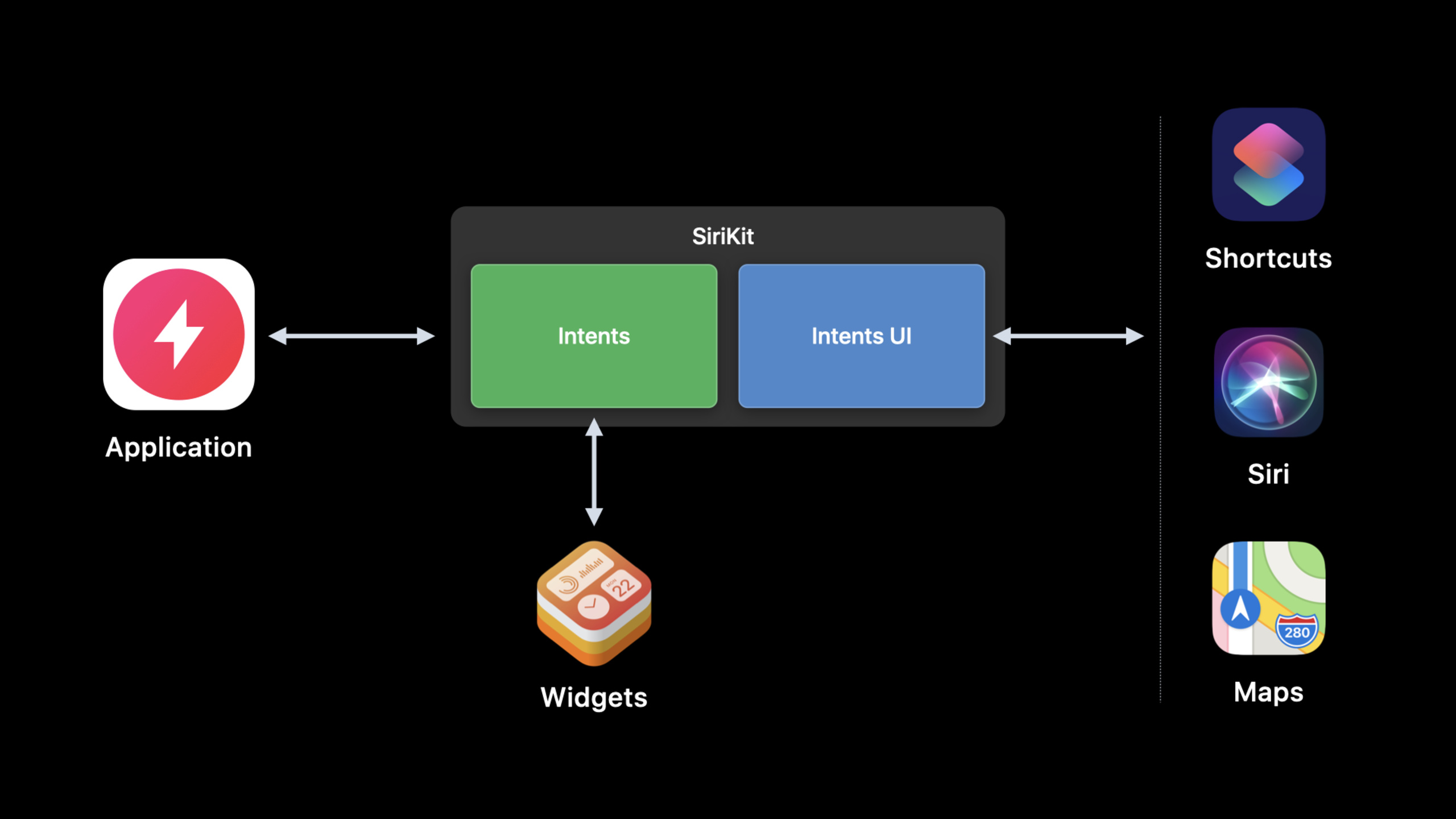
SiriKit 集成最容易被低估的地方,是它运行在 App 之外。用户对 Siri 说一句话,系统会连接到你的 intent handler。这个 handler 可能在 Intents extension 里,也可能需要把用户带回 App。无论走哪条路径,resolve、confirm、handle 每一步都只有 10 秒预算,extension 启动、加载 framework、执行静态初始化都会吃掉这段时间。
过去,媒体播放、健身训练、屏幕上正在进行的任务,经常要拆成两段:extension 负责 resolve 和 confirm,App 负责真正执行。这样会增加状态传递,也会让代码被迫拆到共享 framework。iOS 14 给了新的选择:app 内 Intent 处理。只要 App 支持多窗口并采用 UIScene 生命周期,就可以在 App 进程里接收 SiriKit 请求,把和当前 UI 或重型处理相关的 intent 留在 App 内完成。
这场 session 的后半段讲的是自定义 Intent 的体验质量。iOS 14 让消歧列表可以带副标题和图片,让 Siri 的口头列表可以分页,让动态选项支持用户输入的搜索词,并允许把参数拆成 configurable 和 resolvable 两个维度。它处理的是另一类问题:用户已经愿意用 Shortcuts 或 Siri 触发你的动作,但参数列表、候选项和迁移策略不能让人困惑。
所以,这不是一场只讲“怎么接入 Siri”的 session。它的核心是拆分决策:哪些 intent 应该继续放在轻量 extension,哪些应该搬进 App;哪些参数应该在配置时选定,哪些要在运行时由 Siri 追问;哪些旧 intent 应该被弃用,哪些 UI intent 应该和无 UI intent 分开维护。
详细内容
1. 先算清 10 秒预算
(02:00)每次用户与 intent 交互,无论处在 resolve、confirm 还是 handle 阶段,intent handler 都有 10 秒完成请求。计时从系统连接到 extension 开始。如果 extension 尚未运行,启动时间也算在内。
SiriKit request lifecycle:
1. User request initiates a connection to the handler.
2. System launches the Intents extension when needed.
3. The process loads linked frameworks and runs +load/static initializers.
4. Handler performs resolve, confirm, or handle business logic.
5. Each interaction phase must finish within 10 seconds.
关键点:
- 10 秒不是纯业务逻辑时间;进程启动、framework 加载、
+load和静态初始化都会占用它。 - Intents extension 通常比完整 App 更轻,因为它是独立进程,内存占用也更低。
- Apple 建议 extension 只链接真正需要的 framework。链接越多,Siri 等待越久。
- 如果某个 intent 可以在 extension 内完成,优先让 extension 处理,这样更容易优化启动时间。
2. 决定哪些 Intent 留在 App 内处理
(03:57)iOS 14 引入 app 内 Intent 处理。App 可以添加 intent handler,直接处理 SiriKit 的 resolve、confirm、handle 请求。演讲给出的典型场景包括媒体播放控制、开始 workout、影响屏幕上实时 UI 的操作,以及受 extension 内存限制影响的照片或视频处理。
Use in-app intent handling when:
- The action starts or controls media playback.
- The action starts a workout.
- Handling changes UI that is already live on screen.
- The work needs memory that is inconvenient for an extension.
- Existing app structure cannot easily move logic into an extension.
关键点:
- 媒体和 workout 以前常见的拆法是 extension 做 resolve/confirm,App 做 handle;iOS 14 允许整条链路放在 App 进程。
- 如果 intent 的结果要改变当前屏幕内容,App 内处理能直接访问当前 UI 状态。
- 照片、视频处理这类任务可能超过 extension 的内存舒适区,适合评估 app 内处理。
- App 启动时间同样计入 10 秒预算。搬进 App 不代表可以忽略启动性能。
3. App 内处理需要 UIScene 和 dispatcher
(05:34)实现 app 内 Intent 处理时,第一步是确认 App 支持 multiple windows,并采用 UIScene 生命周期。SiriKit 请求启动 App 时,App 可能还没有连接任何 UIScene。然后,在 App target 的 Supported Intents 区域列出要由 App 处理的 intent,并在 App delegate 中实现 handlerForIntent:。
func application(_ application: UIApplication, handlerFor intent: INIntent) -> Any? {
    if intent is ShowDirectionsIntent {
        return IntentHandlerStore.shared.currentHandler
    }

    return nil
}
关键点:
handlerForIntent:在 transcript 中被定义为 dispatcher:它把传入 intent 映射到能够处理该 intent 的对象。- 返回对象必须采用对应的 handling protocol。演讲举例说,
ProcessPhotoIntent需要返回采用ProcessPhotoIntentHandling的对象。 - Recipe Assistant 示例中,App 把
ShowDirectionsIntent加入 Supported Intents。 - 讲者把当前 handler 存在一个 singleton 里,并在每个 view controller 的
viewDidAppear中更新它,让屏幕上当前页面能够响应 “Next Step”。
4. 需要 UI 时,用 continueInApp 把用户带回前台
(06:37)如果处理 intent 需要用户看见 App 内某个界面,handler 必须确认相关 UI 已经在屏幕上。App 在后台时,handler 可以用 continueInApp response code 请求系统打开 App。Recipe Assistant 示例里,用户用 Siri 说 “next step”,App 会前进到菜谱的下一步。
ShowDirectionsIntent handling flow:
1. resolve recipe parameter.
2. If recipe is missing, ask for disambiguation.
3. If recipe exists, return success.
4. In handle, make sure the app is in the foreground.
5. If the app is in the background, respond with continueInApp.
6. SceneDelegate continues the user activity.
7. Current view controller runs nextStep().
关键点:
- 这个流程来自演讲中的 Recipe Assistant demo,intent 名称是
ShowDirections。 continueInApp出现在 handle 阶段,用来处理需要前台 UI 的 intent。SceneDelegate需要实现willConnectToSession和continueUserActivity,承接continueInApp带来的 user activity。NextStepProviding是 demo 中的协议,用来让各个 view controller 暴露nextStep能力。
5. Rich disambiguation 让候选项更容易选
(12:55)iOS 14 增加 rich disambiguation。开发者可以在 disambiguation 列表和 Shortcuts App 的动态选项里,为自定义类型提供 subtitle 字符串和 INImage 图片。Siri 语音触发时,还可以配置一次读出多少项,以及后续分页提示语。
Rich disambiguation data:
- title: custom type display value
- subtitle: String
- image: INImage

Siri voice-only pagination:
- maximum number of items spoken at once
- subsequent introduction spoken by Siri
关键点:
- subtitle 和 image 都在运行时提供,服务于自定义类型的候选项。
- 这些信息会出现在用户配置 intent 的动态选项里,也会出现在需要 disambiguation 的对话列表里。
- 分页只用于用户通过 “Hey Siri” 语音调用时的 disambiguation。
- Xcode 的 intent editor 里可以在 Siri Dialog 区域设置最大口播数量和后续提示语。
6. Dynamic search 适合大目录参数
(14:44)iOS 13 已经支持动态选项。iOS 14 把这个 API 扩展到搜索场景:用户在 Shortcuts App 配置 intent 时输入搜索词,系统会反复调用带 searchTerm 的 code-generated 方法。空搜索词可以返回默认值,非空搜索词用于查大目录。
Dynamic options with searchTerm:
1. User edits an intent parameter in Shortcuts.
2. Shortcuts passes the current searchTerm to the provider method.
3. Empty searchTerm returns default values.
4. Non-empty searchTerm returns matching catalog results.
5. Completion returns an INObjectCollection.
关键点:
- 演讲明确说 dynamic search 只适合搜索 large catalogs。
- 小型静态集合不需要接入这个能力,因为 Shortcuts App 默认支持过滤。
- completion handler 接收新的
INObjectCollection。 INObjectCollection可以把动态选项按带标题的 section 分组,并可选择使用 indexed collation。
7. 参数、弃用和代码生成要分开治理
(15:57)iOS 14 允许把参数分别标记为 configurable 和 resolvable。标记为 configurable 的参数让用户在 Shortcuts 配置时填写;标记为 resolvable 的参数才会在运行时由 Siri 或 Shortcuts 解析。无需运行时解析的参数,不必提供 Siri dialog。
(17:01)如果某个 custom intent 对应的功能已经下线,或被新的 intent 替代,Xcode 12 可以把它标记为 deprecated。Shortcuts App 会提示现有用户这个动作未来可能不可用,并把它从动作列表里隐藏。
Intent definition maintenance checklist:
- Mark each parameter configurable when users should set it in Shortcuts.
- Mark each parameter resolvable only when runtime resolution is needed.
- Use the Deprecated checkbox for removed or replaced custom intents.
- Use Custom Class inspector for generated class names and prefixes.
- Put non-UI intents in a separate intent-definition file when needed.
- Choose the intent code-generation language in build settings.
关键点:
- configurable 和 resolvable 拆开后,参数设计不再被迫等同于运行时对话设计。
- class prefix 不应该写进 intent editor 的 type name;演讲建议在 Custom Class inspector 或 Project Document inspector 中设置。
- 如果 Intents UI extension target 包含某个 intent-definition 文件,Xcode 会把文件里的 intent 自动列为该 UI extension 支持的 intent。
- 没有 UI 的 custom intent 可以放进单独的 intent-definition 文件,并且不加入 Intents UI extension target。
核心启发
1. 做一个语音控制当前页面的功能
做什么:让用户在 App 页面打开时,用 Siri 触发“下一步”“暂停”“继续”“标记完成”这类操作。
为什么值得做:本场 demo 的 Recipe Assistant 就是这个模式。intent 会影响屏幕上的当前 UI,app 内 Intent 处理可以直接连到当前 view controller。
怎么开始:先让 App 支持 multiple windows 和 UIScene。把目标 custom intent 加入 App target 的 Supported Intents,再用 handlerForIntent: 返回当前页面对应的 handler。
2. 做一次 SiriKit 性能审计
做什么:检查 Intents extension 链接了哪些 framework,删除处理 intent 不需要的依赖。
为什么值得做:extension 的 framework 加载、+load 和静态初始化都会计入 10 秒预算。启动越慢,Siri 交互越容易显得卡顿。
怎么开始:从最常用的 intent 开始,列出 resolve、confirm、handle 真正需要的模块。能留在 extension 的轻量逻辑继续留在 extension,需要 UI 或高内存的任务再评估 app 内处理。
3. 做一个可搜索的 Shortcuts 参数选择器
做什么:为歌单、商品、文件、地点这类大目录参数接入 dynamic search。
为什么值得做:iOS 14 会把用户输入的 searchTerm 传给动态选项提供方法,开发者可以按输入返回匹配项,而不是一次性塞出长列表。
怎么开始:在 intent editor 中为参数启用 as-you-type 搜索。空搜索词返回最近使用或默认值,非空搜索词查询目录,并用 INObjectCollection 按 section 返回。
4. 做一个更清楚的候选项列表
做什么:给 disambiguation 候选项补 subtitle 和 image,让用户在 Siri 或 Shortcuts 中更快区分相似对象。
为什么值得做:iOS 14 的 rich disambiguation 支持副标题和 INImage。对相似菜谱、联系人、房间、播放列表,这能减少反复追问。
怎么开始:先找一个常被用户选错的参数。保留短标题,用 subtitle 写差异点;只有图片能直接帮助识别时再加 image。
5. 做一次 Intent 定义文件整理
做什么:把已下线的 custom intent 标记为 deprecated,把无 UI intent 和需要 Intents UI 的 intent 拆开维护。
为什么值得做:旧 intent 不清理,会留在用户的 Shortcuts 配置里制造失败入口。无 UI intent 混进 Intents UI extension target,也会扩大维护面。
怎么开始:逐个检查 intent-definition 文件。被替换的 intent 勾选 Deprecated;不需要 UI 的 intent 移到独立文件;自定义类名和前缀放到 Custom Class 或 Project Document inspector。
关联 Session
- What’s new in SiriKit and Shortcuts — 总览 iOS 14 中 SiriKit、Shortcuts、紧凑 Siri UI、富会话体验和系统入口的变化。
- Feature your actions in the Shortcuts app — 讲解如何让 App 的 intent 动作进入 Shortcuts App、自动化建议和系统推荐入口。
- Decipher and deal with common Siri errors — 从 Siri 错误和调试角度补充 intent 集成中常见失败的定位方法。
- Create quick interactions with Shortcuts on watchOS — 说明 Shortcuts 在 Apple Watch 上的运行、complication 入口和 intent 路由。
- Evaluate and optimize voice interaction for your app — 从设计角度判断何时使用 Siri 技术,并优化 App 的语音交互流程。
评论
GitHub Issues · utterances